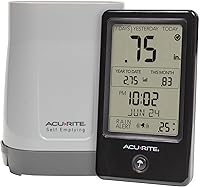
Why Is My AcuRite Rain Gauge Not Working?
An AcuRite rain gauge that stops reporting may have a blocked tipping bucket, a power or wireless issue, or a setup problem. Check the collector for debris, then verify sensor power, placement, and the console connection.
On this page (7 sections)
- Why is my AcuRite rain gauge not recording rainfall?
- How can I tell if the tipping bucket is stuck?
- Could placement cause an inaccurate rain reading?
- What if the sensor has power but the display shows no rain?
- When should I replace batteries or reset the station?
- How do you know whether the gauge is working again?
- What should I check first if my AcuRite rain gauge isn't working?
An AcuRite rain gauge that isn't working may have a blocked collector or tipping bucket, a power problem, poor placement, or a weak wireless connection. Clear debris first, then check the sensor and display before considering replacement.
A rain gauge measures what reaches its collector, so placement and maintenance affect the reading. For a quick overview, see what a rain gauge measures before comparing readings with another station.
Why is my AcuRite rain gauge not recording rainfall?
A blocked collector or tipping bucket can prevent an AcuRite gauge from recording rainfall. Leaves, dirt, insects, and other debris can obstruct the path from the funnel to the bucket.
If you need a different gauge, compare the best rain gauges for home use.
Check the opening and gently remove visible debris. Follow the instructions for your model before taking the sensor apart, and don't push a tool into the mechanism or pour water over the electronics.
A tipping bucket records rain as water fills one side and tips it, then returns to its resting position. See how a tipping bucket rain gauge works to understand why a bucket that can't move may stop the count.
If the collector looks clear, check the display for a low battery symbol or another sensor warning. Confirm that the sensor and console have power, and check the manual for the correct battery type and installation steps.
How can I tell if the tipping bucket is stuck?
A bucket that doesn't rock freely may not register rain. With the sensor safely accessible, follow the manual's guidance to check for debris around the moving part.
Remove only loose material you can reach without forcing the mechanism. If the bucket catches, feels damaged, or won't return to position, stop and consult AcuRite support or the model instructions.
After cleaning, put the sensor back in its normal position and observe it during rainfall. Avoid testing it by adding water unless the manual gives a specific test method.
Could placement cause an inaccurate rain reading?
Yes, a sheltered, tilted, or obstructed sensor can collect less rain than the surrounding area. Place the gauge on a stable, level surface in an open spot, away from roof edges, trees, fences, and sprinklers.
A roof overhang can block rainfall, while nearby branches may shed leaves into the collector. Wind can also affect what reaches a gauge, so follow the placement instructions for your sensor.
If the gauge records rain but the total seems off, check its settings and follow the instructions for how to calibrate an AcuRite rain gauge. Compare readings over the same period, since nearby gauges can differ with placement and local conditions.
What if the sensor has power but the display shows no rain?
A powered sensor can still fail to report if its wireless connection is interrupted. Check the range and placement limits in the manual, and move the display away from likely obstructions if practical.
Make sure the sensor and console are paired as the instructions describe. If the signal doesn't return, use the model-specific AcuRite rain gauge reset instructions, then allow time for the connection to resume.
A wireless thermometer can monitor outdoor temperature in a separate setup, but it doesn't measure rainfall. The AcuRite Digital Thermometer with Indoor provides indoor and outdoor temperature readings from its wireless sensor.
Skip it if your only problem is missing rainfall data. It doesn't replace a rain sensor or troubleshoot the connection between your gauge and console.
For a broader look at sensor faults across brands, compare common weather station rain gauge problems. If you have another brand, see our guides to an Ambient Weather rain gauge problem and a Davis weather station rain gauge problem.
When should I replace batteries or reset the station?
Check the batteries when the sensor stops sending data or the display shows a power warning. Use the battery type and replacement steps in your model's manual, and check for corrosion or loose battery contacts.
After changing batteries, give the sensor time to reconnect. If readings still don't appear, follow the reset sequence for your exact model instead of using instructions for a different AcuRite station.
The AcuRite Iris receives readings for rainfall, temperature, humidity, wind, and pressure. Its color LCD display shows indoor and outdoor conditions.
Choose a replacement or additional station only after checking that its sensor and console fit your needs. A new display alone won't clear a clog or restore a sensor that has lost power.
How do you know whether the gauge is working again?
Check that the collector is clear, the sensor is powered, and the console receives updates. Then compare its rainfall total with a nearby gauge over the same rainfall period.
Don't expect two gauges to match exactly if they sit at different heights or in different exposures. A gradual difference may point to placement or calibration, while a sudden lack of updates suggests a blockage, power issue, or wireless fault.
The Ambient Weather WS-2902 Wi-Fi Smart Weather Station includes a sensor array with a rain cup and an LCD color display. Its array sends readings to the console wirelessly, and the console can connect through Wi-Fi.
Consider it if you want a weather station that measures rainfall, wind, temperature, humidity, UV, and solar radiation. It's a separate system and won't repair or pair with an existing AcuRite sensor.
For severe weather alerts, a weather radio serves a different purpose from a rain gauge. Our guide to programming a Midland NOAA weather radio covers setting one up for alerts.
What should I check first if my AcuRite rain gauge isn't working?
Start with debris, sensor power, placement, and wireless reception, in that order. If the collector is clean and power is present, check the model's pairing and reset steps before considering replacement.
A bucket that moves freely but records a low total may need better placement or calibration. A display that receives no updates may point to a battery or signal issue.
For a general AcuRite weather station rain gauge problem, follow the instructions for your model. For model-specific procedures, use its manual or contact AcuRite support.
Pick cleaning first if the gauge stopped after leaves or dirt collected. Check power and signal if the display stopped updating, and review placement or calibration if it records rain but the totals seem inaccurate.
Frequently asked questions
Why is my AcuRite rain gauge not recording rain?
An AcuRite rain gauge may miss rainfall if debris blocks the collector or tipping bucket, the sensor has lost power, or its wireless signal can't reach the console. Check the collector and funnel, confirm the sensor and display have power, and compare readings during the next rainfall.
How do I unclog an AcuRite rain gauge?
Remove leaves, dirt, and other debris from the collector and funnel, then check that the tipping bucket can move freely. Follow your model's instructions for opening or cleaning the sensor, and don't force the bucket or pour water into its electronics.
Why does my rain gauge show zero after rain?
A zero reading can result from a blocked collector, a missed wireless update, or rainfall that didn't reach the sensor. Check for debris and compare the display with the sensor after the rain ends; also confirm the sensor is level and placed in an open area.
How do I reset an AcuRite rain gauge?
Use the reset steps for your specific AcuRite model, since battery locations and console controls can differ. A typical troubleshooting sequence is to remove power from the sensor and display, wait briefly, then restore power as the manual directs and allow time for them to reconnect.