9 Best Weather Stations with Data Logging (November 2026)
The best weather stations with data logging include the ECOWITT Wittboy Pro Weather Station HP2564 for downloadable website history, the Ambient Weather WS-5000 Ultrasonic Smart Weather Station for a customizable online dashboard, and the AcuRite Iris for history with a local display.
On this page (6 sections)
- How we chose weather stations with data logging
- Which data logging weather station fits your record keeping?
- What should you check in a weather station data logger?
- How much history do you need to keep?
- Are console history, app charts and exported files the same?
- Which weather station with data logging should you choose?
The best weather station with data logging for downloadable history is the ECOWITT Wittboy Pro, which can graph and download records from Ecowitt Weather. For Excel exports, Sainlogic specifies up to two years of app history and exports of up to 30 days at a time; AcuRite Iris is a simpler fit for on-display historical tracking.
A weather station data logger can mean a console that keeps past readings, an app with charts, or a service that lets you download records. Before you choose, decide whether you want to check trends occasionally or save files for your own spreadsheets.
If you also want voice control, our guide to a Google Home weather station covers compatibility questions. For broader display choices, compare these best weather stations with large displays.
Our picks at a glance
-
1
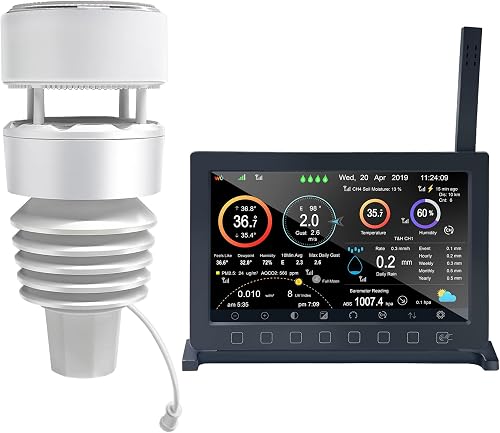 Best for downloadable website history
ECOWITT Wittboy Pro Weather Station HP2564
9.7/10 our score
See it on Amazon -
2
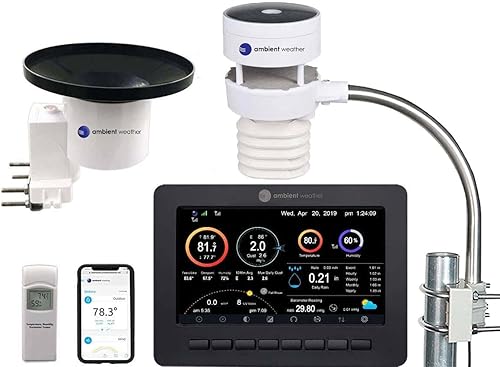 Best for a customizable online dashboard
Ambient Weather WS-5000 Ultrasonic Smart Weather Station
9.7/10 our score
See it on Amazon -
3

- 4
 Check it
Ambient Weather WS-2902 Wi-Fi Smart Weather Station
Best for sharing backyard readings - 5
 Best for viewing a broad set of past readingsCheck it
- 6
 Check it
Sainlogic 5G/2.4G WiFi Weather Station with 24/7
Best for spreadsheet exports - 7
 Check it
VEVOR 7-in-1 Wi-Fi Weather Station with APP
Best for app-based weather history - 8
 Check it
Ambient Weather WS-2000 Smart Weather Station
Best for console-first monitoring - 9
 Check it
AcuRite Iris Weather Station with Rain Gauge
Best for rainfall history on the display
How we chose weather stations with data logging
We compared weather stations with data logging by looking at what they save and how you can access it. We checked historical tracking, website graphs, app storage, downloads, exports and remote access.
A named retention period or export format is more useful for long-term records than a general promise of connected data. Where a product's history or export options aren't specified, we flagged that gap rather than assuming a feature exists.
We also looked at how often readings refresh and where they are shown. A station that updates every few minutes can answer different questions from one that only keeps daily highs and lows.
Our score weighs specs, features and buyer feedback against what you're shopping for. For this roundup, data access and history features carry the most weight.
That weighting means a clear download option can outrank a longer list of measurements. It also means a console only model can still score well if local history is what you asked for.
We checked each product description for exact terms like charts, downloads and exports. Vague wording about connected data was treated as a question to verify, not as confirmed logging.
Set up also mattered, because Wi-Fi pairing and account creation affect whether online records actually start flowing. A station is only useful as a logger once that link is working.
We kept the focus on record keeping rather than forecast accuracy alone. A good forecast display does not automatically mean you can revisit or download past readings later.
Which data logging weather station fits your record keeping?
The ECOWITT Wittboy Pro and Sainlogic make the clearest case for online history, while AcuRite Iris keeps historical readings accessible on its display. The Ambient Weather models focus on connected dashboards, publishing and remote access.
| Product | Best for | Data access | History | Display | Our score |
|---|---|---|---|---|---|
| ECOWITT Wittboy Pro Weather Station HP2564 | downloadable website history | Ecowitt Weather website | Graph and download records | 7-inch TFT console | 9.7 |
| Ambient Weather WS-5000 Ultrasonic Smart Weather Station | a customizable online dashboard | Ambient Weather Network | TFT full-color LCD | 9.7 | |
| AcuRite Iris | history with a local display | Display and Weather Underground | Historical tracking | Color LCD | 9.7 |
| Ambient Weather WS-2902 Wi-Fi Smart Weather Station | sharing backyard readings | Ambient Weather Network | LCD color display | 9.6 | |
| AcuRite Iris | viewing a broad set of past readings | Console display | Historical monitoring | 9.0 | |
| Sainlogic 5G/2.4G WiFi Weather Station with 24/7 | spreadsheet exports | Up to 2 years | 8.9 | ||
| VEVOR 7-in-1 Wi-Fi Weather Station with APP | app-based weather history | Smart Life app | 8.9 | ||
| Ambient Weather WS-2000 Smart Weather Station | console-first monitoring | Console and internet publishing | Full-color TFT LCD | 8.6 | |
| AcuRite Iris Weather Station with Rain Gauge | rainfall history on the display | HD display | Rainfall, weekly, monthly and all-time highs and lows | 8.3 |
ECOWITT Wittboy Pro: best for downloadable website history
ECOWITT Wittboy Pro Weather Station HP2564: Best for downloadable website history
- Ecowitt Weather graphs and history downloads
- Uploads to several weather services
- Email alerts
The Wittboy Pro can upload sensor data to Ecowitt Weather, where you can view graphs and download historical records. It also supports uploads to other named weather services.
Pros
- Website graphs and history downloads
- Supports custom website uploads
- Email alerts
Cons
- Wi-Fi setup is needed for internet uploads
- Rain readings can vary with raindrop size and wind
The Wittboy Pro is the strongest fit here when your goal is to revisit records and download them later. After Wi-Fi setup, the console can upload sensor data to Ecowitt Weather, where you can view graphs and download history.
It can also send readings to Weather Underground, WeatherCloud, WOW or a compatible custom website. The 7-inch console displays readings from the WS90 outdoor sensor, including temperature, humidity, wind, light, UV and rainfall.
The WS90 uses a haptic rainfall sensor. ECOWITT notes that rain readings can vary under some conditions, including changes in raindrop size and wind speed, and recommends pairing a WH40 rain gauge when precise individual rain readings matter.
That trade off matters if rainfall totals are your main log. Small daily differences may add up over a season, so gardeners who track watering closely should read that note carefully.
Pick this station if website graphs and downloadable records are central to your plan. Our guide explains how to download weather station data for later use.
Keep in mind that internet uploads depend on a stable home Wi-Fi connection. If the link drops, check whether the console stores readings locally during the gap.
Ambient Weather WS-5000: best for a customizable online dashboard
Ambient Weather WS-5000 Ultrasonic Smart Weather Station: Best for a customizable online dashboard
- Ambient Weather Network connection
- Remote data access
- Real-time updates every 5 seconds
The WS-5000 combines a console with Ambient Weather Network access for a personal dashboard. Its array sends real-time weather updates every five seconds.
Pros
- Customizable online dashboard
- Remote access and alerts
- Updates every five seconds
Cons
- Historical download details are not specified
- Network access requires Wi-Fi setup
The WS-5000 suits a weather watcher who wants frequent measurements and a dashboard that can be arranged around the readings they follow. Its all-in-one ultrasonic array has no moving parts, and it sends real-time updates every five seconds.
The station connects to Ambient Weather Network, where you can customize dashboard tiles and share local conditions. The included TFT full-color LCD console gives you a separate indoor view of station data.
Ambient Weather describes remote access and alerts, but doesn't specify a history retention period or downloadable file format. If you need an archive for analysis, confirm those options before relying on this as your weather station data logger.
That limit is worth weighing against the fast update rate. Frequent live readings help with alerts and short term trends, but they do not by themselves prove how long past data stays available.
Choose this model for a connected dashboard and quick updates. For a more console-focused option, compare the best weather stations with forecast displays.
AcuRite Iris: best for history with a local display
AcuRite Iris: Best for history with a local display
- Tracks historical data
- Wi-Fi connection to Weather Underground
- More than 25 data points
This AcuRite Iris tracks historical data and connects to Weather Underground for remote monitoring and data sharing. Its display gives you a local view of current conditions.
Pros
- Historical tracking
- Remote monitoring through Weather Underground
- Threshold alarms
Cons
- Export method and history retention are not specified
- Wi-Fi connection is required for remote access
This AcuRite Iris combines historical tracking with a direct connection to Weather Underground for remote monitoring and sharing. It measures indoor and outdoor temperature and humidity, wind speed and direction, barometric pressure, and rainfall.
The color LCD shows current conditions and more than 25 data points, including heat index, dew point, wind chill and rainfall history. Threshold alarms can alert you when readings cross limits you set.
AcuRite doesn't specify a retention period or explain whether readings can be exported to a file. Choose it for a mix of on-screen history and online monitoring, then check the service options if you need a durable archive.
The local display suits a quick check at home without opening an app. Remote viewing adds value when you want to see conditions away from the house.
If forecasts matter as much as the record, see our guide to whether a home weather station can predict weather.
Ambient Weather WS-2902: best for sharing backyard readings
Ambient Weather WS-2902 Wi-Fi Smart Weather Station: Best for sharing backyard readings
- Ambient Weather Network upload
- Customizable personal dashboard
- Remote monitoring and alerts
The WS-2902 sends measurements to Ambient Weather Network, where you can customize and share a personal dashboard. It also supports remote monitoring and alerts.
Pros
- Online dashboard and sharing
- Remote monitoring
- Measures UV and solar radiation
Cons
- Download and retention details are not specified
- Console needs Wi-Fi for network uploads
The WS-2902 is a connected station for monitoring and sharing backyard measurements through Ambient Weather Network. Its wireless sensor array measures wind speed and direction, temperature, humidity, rainfall, UV and solar radiation.
You can customize a personal online dashboard and use remote monitoring and alerts. The color LCD console also provides a local view of measurements, including indoor and outdoor readings.
Ambient Weather doesn't specify how long network records remain available or which file formats can be downloaded. It is a reasonable choice for live sharing, but buyers who need a long-term data logger should verify those history tools first.
Calibration and unit options can help when you compare readings with nearby stations. That matters for shared dashboards, where consistency across locations is easier to judge.
Choose it if you value a shared dashboard and remote access. For setup around connected home tools, read our guide to choosing personal weather station software.
AcuRite Iris: best for viewing a broad set of past readings
AcuRite Iris: Best for viewing a broad set of past readings
- More than 55 data points
- Historical data monitoring
- Color LCD display
This AcuRite Iris model monitors historical data and presents more than 55 data points on its color display. It suits buyers who want a broad set of readings on a local console.
Pros
- Historical data monitoring
- More than 55 data points
- Adjustable display brightness
Cons
- Online upload and export are not specified
- Check which readings matter to your tracking
This AcuRite Iris model monitors historical data and shows more than 55 data points on its color screen. It can suit a home weather watcher who prefers reviewing a broad set of readings at the console.
The station receives indoor and outdoor temperature and humidity, wind speed and direction, barometric pressure, and rainfall. Its display also includes pressure trends and readings such as heat index, dew point and feels-like temperature.
AcuRite doesn't specify internet upload, export format or how long records stay accessible. Treat this as a local display choice unless you confirm that its history meets your archiving needs.
A broad data set is helpful only if the readings you need are easy to find. Spend a few minutes with the display layout before deciding it fits your routine.
Pick it when an at-a-glance console matters more than exporting files. Compare it with the best weather station with forecast options if you want forecast features to guide the choice.
Sainlogic: best for spreadsheet exports
Sainlogic 5G/2.4G WiFi Weather Station with 24/7: Best for spreadsheet exports
- Up to 2 years of history in the inercom App
- Exports up to 30 days at a time to Excel
- Data refreshes every 5 minutes
The inercom App displays up to two years of historical data in charts, and it can export up to 30 days at a time to Excel. That makes this model a direct fit for buyers who want files for later analysis.
Pros
- Clear stated retention period
- Excel export
- App charts
Cons
- Each export covers up to 30 days
- Wi-Fi and app are needed for remote records
Sainlogic is the clearest match for buyers who want to move weather records into a spreadsheet. The inercom App can show up to two years of historical data in charts and export up to 30 days at a time to Excel.
The station refreshes its environmental readings every five minutes. The app organizes rainfall by hourly, daily, monthly and yearly cycles, which can help you review garden or property patterns.
Plan for the export limit when building a longer archive: each file covers no more than 30 days. If you need a continuous record, export on a schedule and keep the files together.
That schedule is a small habit to build early. Exporting monthly is simpler than trying to reconstruct a year from short charts later.
Choose this model for stated app history and Excel exports. The Tempest guide to sending station data to CWOP covers a separate path for sharing observations with a community network.
VEVOR 7-in-1: best for app-based weather history
VEVOR 7-in-1 Wi-Fi Weather Station with APP: Best for app-based weather history
- Smart Life app can store, analyze and share data
- 7-in-1 outdoor sensor
- 7.5-inch display
The Smart Life app can store, analyze and share weather data from this station. The product information doesn't specify how long history remains available or the export format.
Pros
- App storage and analysis
- Large 7.5-inch display
- Solar-powered outdoor sensor
Cons
- Retention period and export format are not specified
- Wi-Fi connection requires the adapter to stay plugged in
VEVOR's 7-in-1 station connects with the Smart Life app, which can store, analyze and share real-time weather data. That app workflow may suit someone who wants to check records away from the console.
Its outdoor sensor tracks temperature, humidity, rainfall, wind speed and direction, and sunlight. The 7.5-inch display provides a local view, and the sensor uses solar power with batteries for nighttime or cloudy conditions.
The product information doesn't give a specific history retention period or export format. Check those points if you need to keep records for several seasons or download them for analysis.
The large display helps with readability across a room. Four brightness levels can also make night time checks less harsh on the eyes.
Choose VEVOR when app-based access is useful and you can confirm its storage limits. If screen readability is a priority, use our large-display weather station guide to compare display-focused options.
Ambient Weather WS-2000: best for console-first monitoring
Ambient Weather WS-2000 Smart Weather Station: Best for console-first monitoring
- Wi-Fi weather publishing
- TFT color display
- Calibration for major parameters
The WS-2000 pairs a full-color console with real-time internet weather publishing. It suits buyers who want to monitor readings locally and share measurements online.
Pros
- Console and online publishing
- Calibration for major parameters
- Audible high and low alerts
Cons
- Download and retention details are not specified
- Optional indoor sensor is sold separately
The WS-2000 pairs a full-color TFT console with real-time internet weather publishing. It measures wind speed and direction, rainfall, temperature, humidity, UV and solar radiation from its wireless sensor array.
The console shows local readings and includes high and low alarm conditions, calibration for major parameters, and imperial or metric units. Internet publishing adds a way to share readings beyond the console.
Ambient Weather doesn't specify historical retention or a download feature. Choose it for a blend of local monitoring and publishing, and verify the archive options if saved records are the main reason you're buying.
An optional indoor sensor is sold separately, so check what is included before you plan indoor logging. That extra sensor can matter if you want barometric pressure from inside the home.
Audible alerts can be useful overnight or in a workshop. Set thresholds that match real concerns, rather than leaving defaults that trigger too often.
AcuRite Iris Weather Station with Rain Gauge: best for rainfall history on the display
AcuRite Iris Weather Station with Rain Gauge: Best for rainfall history on the display
- Weekly, monthly and all-time highs and lows
- Rainfall history
- Customizable weather alarms
The HD display presents rainfall history and weekly, monthly and all-time highs and lows. Choose it when local history and alarms matter more than file export.
Pros
- Rainfall history on the display
- Customizable alarms
- Displays more than 25 data points
Cons
- Remote upload and file export are not specified
- History is focused on the readings shown on the display
This AcuRite Iris shows rainfall history along with weekly, monthly and all-time highs and lows. Its HD display also presents more than 25 data points and supports customizable alarms for conditions such as temperature, humidity, wind and rainfall.
The wireless sensor measures indoor and outdoor temperature and humidity, wind speed and direction, barometric pressure, and rainfall. The display includes a storm alarm that activates when barometric pressure drops.
Remote upload and file export aren't specified for this model. Choose it when local rainfall history and alarms meet your needs, then confirm the display's history windows if you need specific dates or longer archives.
Weekly and monthly summaries are handy for garden watering decisions. They give a quick picture without sorting through a long list of daily entries.
Check which history windows the display can scroll through before you buy. That detail decides whether you can compare this month with the same period last year.
What should you check in a weather station data logger?
Check the storage location, retention period, export options and update rate before you choose. Those details determine whether the station can answer questions about yesterday's rain or support a spreadsheet you maintain over several years.
A console may show recent highs and lows without saving a full series of readings. An app may offer charts but limit file exports, so look for a stated format and time span if analysis is important.
Also check whether the station sends data to a service you can access from your phone or computer. If you need to download records, follow the steps for your model in our weather station data download guide.
Placement affects the quality of the log as much as the software does. A sensor in direct sun or near a wall can create a record that does not reflect open yard conditions.
Power and connectivity are worth a quick check too. Solar powered sensors and plug in consoles each have limits, and a weak Wi-Fi signal can interrupt uploads.
Ask how the station handles a missed day or a sensor fault. A useful logger should make gaps visible rather than filling them with misleading values.
How much history do you need to keep?
Choose a history period that matches the comparisons you plan to make. Seasonal gardening may call for monthly rainfall and temperature records, while year-over-year comparisons need at least a full year of accessible data.
Sainlogic specifies up to two years of app history, with Excel exports of up to 30 days at a time. ECOWITT offers graphs and downloads from its weather website, while other models here describe historical tracking without specifying exact retention.
For a useful archive, make a regular export schedule and store copies somewhere outside the station app. That way, a service change or account issue is less likely to erase the only record you have.
Think about what you will actually do with old readings. A few charts may be enough for a casual check, while a spreadsheet supports averages, totals and side by side comparisons.
Different measurements also need different time spans. Wind gusts matter over minutes, rainfall totals matter over weeks, and heating or cooling patterns may need a full season.
Name your files in a simple way that includes the station and date range. That habit makes it easier to find the right file months later.
Test the export process soon after set up rather than waiting a year. Early files show whether the format, units and time range match what you expected.
Keep a short note about sensor changes, moves or cleaning dates. Future readings are easier to interpret when you know what changed in the setup.
Are console history, app charts and exported files the same?
No, they provide different levels of access. A console is convenient for checking stored readings at home, charts make trends easier to scan, and exports let you analyze or back up the data elsewhere.
A history display may only show selected highs, lows or rainfall totals. App charts can add time ranges, but a downloadable file is more flexible when you want to calculate averages or compare stations.
Before buying, check the exact record types and time ranges available. Don't assume that Wi-Fi access alone includes permanent storage or file downloads.
Charts are often the fastest way to spot a pattern. A quick look at a month of temperatures can reveal a heat spell that a list of numbers would hide.
Exports add control because you can sort, filter and combine files. That control matters when you keep records for a garden, a small farm or a school project.
Console history is still useful for daily decisions. It can show whether last night reached a frost risk level without opening a phone.
The best choice depends on how you like to review weather. Some people prefer a glance at the display, while others want files they can keep for years.
Which weather station with data logging should you choose?
Choose the ECOWITT Wittboy Pro if website graphs and downloadable history are your priority, or Sainlogic if you want a stated Excel export workflow and up to two years of app history. Pick AcuRite Iris for display-based historical tracking, and Ambient Weather for a customizable network dashboard.
Before you commit, verify retention and export limits for the exact service you plan to use. The right data logging weather station is the one that keeps the measurements you need in a format you can revisit.
Match the station to your habit first. If you check a console daily, local history may be enough, and if you work in spreadsheets, a clear export format should lead your choice.
Also confirm set up steps for Wi-Fi, apps and accounts before you order. A strong record keeping plan falls apart if pairing the station takes longer than expected.
Finally, plan how you will store exports outside the app. Regular backups give your weather log a better chance of lasting beyond a service change.
Our top 3 picks at a glance
-
1
Best for downloadable website history
ECOWITT Wittboy Pro Weather Station HP2564
9.7/10 our score
See it on Amazon -
2
Best for a customizable online dashboard
Ambient Weather WS-5000 Ultrasonic Smart Weather Station
9.7/10 our score
See it on Amazon -
3
Frequently asked questions
What does data logging mean on a weather station?
Data logging means saving measurements over time so you can review past conditions. Depending on the station, records may appear on its console, in an app, on a website, or in downloadable files.
Check which measurements are saved, how long they remain available, and whether you can export them.
Can I export weather station data to Excel?
Some stations offer spreadsheet export. Sainlogic says its inercom App can export up to 30 days of data at a time to Excel, while ECOWITT offers history downloads from its website.
Confirm the file format and time range before choosing a station for regular analysis.
How much history should a home weather station keep?
Choose a retention period that covers the comparisons you want to make, such as seasonal rainfall or temperature changes between years. Sainlogic specifies up to two years in its app.
For other stations, check the app or website settings for retention limits before relying on them as an archive.
Can a weather station log data without Wi-Fi?
Some consoles show past readings locally, but online history and downloads generally depend on a network connection. AcuRite Iris models in this roundup describe historical tracking on the display, while several other picks send readings to online services.
Check the specific station's offline history behavior if your connection is unreliable.
What should I check before buying a data logger weather station?
Check the history length, which measurements are stored, where records are viewed, and whether export is supported. Also confirm the app or website works with your preferred devices and internet services.
If you plan to compare seasons, make sure the retention period covers the full interval.