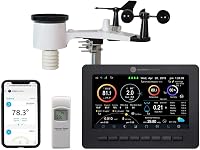
AcuRite Iris 5-in-1 Weather Sensor Guide
The AcuRite Iris 5-in-1 weather sensor 06004M works with compatible AcuRite 5-in-1 displays. Check both model numbers before ordering, since “Iris” or “5-in-1” alone does not confirm a match.
On this page (9 sections)
- How do you match an AcuRite Iris 5-in-1 weather sensor?
- What should you check about AcuRite Iris sensor power?
- Is the Iris 06014 Pro+ the same as other Iris sensors?
- Does an AcuRite Iris 5-in-1 weather sensor need to match the display?
- Which AcuRite sensor type should you choose?
- What if the replacement looks almost identical?
- How do you set up an AcuRite Iris 5-in-1 weather sensor?
- How can you care for and use the Iris sensor?
- How do you choose an AcuRite Iris replacement sensor?
The AcuRite Iris 5-in-1 weather sensor 06004M works with compatible AcuRite 5-in-1 displays. Check the model number on your current sensor and your display’s compatibility before ordering; “Iris” or “5-in-1” alone may not identify a match.
This sensor measures temperature, humidity, wind speed, wind direction and rain. The separate AcuRite Wireless Indoor Outdoor Temperature and Humidity sensor is a different type.
This guide explains how to compare model numbers, choose between sensor types and prepare for installation. For other compatible parts, see our AcuRite 5-in-1 weather station parts guide.
How do you match an AcuRite Iris 5-in-1 weather sensor?
Start with your current sensor’s model number and your display’s compatibility information. Treat the product family name as a clue, then confirm the exact sensor type before buying.
Use this quick check:
- Find the model number printed on the outdoor sensor.
- Find the model number on the display or in its manual.
- Compare both numbers with the replacement sensor’s compatibility information.
- Check the replacement’s power requirements.
- Ask AcuRite support if a number is missing or the match is uncertain.
The AcuRite Iris sensor model 06004M is compatible with AcuRite 5-in-1 weather station displays. Its compatibility information names a range of display models, but does not identify 06014 as a sensor model.
If you’re searching for an AcuRite Iris 5-in-1 model 06014 or an AcuRite Iris model 06014 replacement, confirm what the number refers to. Don’t rely on a general Iris label to establish a match.
How should you check an AcuRite Iris 5-in-1 model number?
A model number helps identify a device, but it does not prove that a replacement will pair with your display. Check the exact number on your sensor and compare it with the display’s compatibility information.
The 06004M sensor’s compatibility information names display models. It does not confirm that a sensor marked 06014 is interchangeable with 06004M or that every Iris display accepts every 5-in-1 sensor.
If you see “06014” in notes or packaging, compare it with your sensor label. If the numbers differ, ask AcuRite to confirm compatibility before ordering.
What should you check about AcuRite Iris sensor power?
Check the battery requirements before choosing a replacement. A solar panel configuration does not show which displays support the sensor.
The 06004M has a single solar panel and requires 4 AA alkaline or lithium batteries, which are not included. Make sure those requirements suit your setup.
The solar panel does not change the five measurements this sensor provides. Similar-looking sensors can have different model numbers or compatibility, so compare the label and supported pairing.
Does an AcuRite Iris 5-in-1 weather sensor’s solar panel affect pairing?
No, the solar configuration does not replace a compatibility check. Confirm that the display supports the sensor type even when the replacement looks like the model you have now.
The 06004M transmits readings every 36 seconds over a 433 MHz wireless signal, with a range of up to 330 ft. These are the sensor’s stated specifications, not a guarantee that another Iris version will pair with your display.
Is the Iris 06014 Pro+ the same as other Iris sensors?
The “Pro+” wording does not replace a model-number check. Confirm the sensor model and supported display pairing before treating an Iris 06014 Pro+ as a match for another 5-in-1 sensor.
Product names can combine family terms, model references and configuration labels. Match the number printed on your sensor with the replacement’s compatibility information, then check your display model.
If the names differ or the compatibility information does not mention your station, ask AcuRite support. That can help you avoid buying a sensor that measures the right conditions but cannot connect to your display.
Does an AcuRite Iris 5-in-1 weather sensor need to match the display?
Yes. The display must support the replacement sensor’s type.
A sensor can measure the right conditions and still be the wrong replacement for your station.
The 06004M is compatible with AcuRite 5-in-1 weather station displays. Compare your display’s model number with the compatible models before ordering.
If you can’t identify your display or the model isn’t clear, ask AcuRite to confirm compatibility. Our AcuRite Iris 5-in-1 color display compatibility guide covers display fit, and the AcuRite weather station display guide helps you check display compatibility more broadly.
Which AcuRite Iris 5-in-1 weather sensor buyer should skip it?
Skip the 06004M if your display does not support an AcuRite 5-in-1 sensor or you cannot confirm the model match. Also skip it if you only need temperature and humidity and your station supports a compatible sensor made for those readings.
The 06004M fits a station that needs all five outdoor measurements and has a compatible display. Its battery requirements and outdoor mounting also need to suit your setup.
If you want a new display and sensor together, a complete weather station may be more suitable than buying a replacement sensor alone. If you’re comparing another brand, see Sainlogic weather stations.
Confirm your display and sensor needs before choosing a bundle.
Which AcuRite sensor type should you choose?
Choose a 5-in-1 sensor when you need wind and rain readings as well as temperature and humidity. Choose a separate temperature and humidity sensor only if your station supports it and those are the readings you need.
The 06004M is a replacement option when its model and your display’s compatibility match. It uses a 433 MHz signal, requires 4 AA alkaline or lithium batteries, and includes mounting hardware.
This sensor measures temperature and humidity, not wind speed, wind direction or rain. Its replacement compatibility information names models 00592TX, 00592TXR, 06002M, 06002RM and 11126-592TXR, so check your current sensor label carefully.
The 01535M weather station includes a weather sensor and HD display. It may suit you if you need both parts together; its product data does not confirm that its sensor pairs with a display you already own.
Which AcuRite Iris 5-in-1 weather sensor option fits your situation?
Pick the AcuRite Iris when you need to replace a confirmed-compatible 5-in-1 sensor. Pick the AcuRite Wireless Indoor Outdoor Temperature and Humidity sensor when that is all you need and your station supports its listed sensor models.
Choose the AcuRite Iris Weather Station with Rain Gauge if you need both a sensor and display. For a different complete station option, read the Ambient Weather WS-2000 review.
If you already own a display, confirm its compatibility before buying a replacement or a complete station.
A 5-in-1 replacement is the wrong choice for a station that expects only a temperature and humidity sensor. Likewise, the separate temperature and humidity sensor is not a substitute when you rely on wind and rainfall readings.
What if the replacement looks almost identical?
Don’t choose by appearance alone. Compare model numbers and supported station pairing, because AcuRite warns that similar-looking temperature and humidity sensors can have different compatibility.
The AcuRite Wireless Indoor Outdoor Temperature and Humidity sensor has an A-B-C switch and specific replacement model numbers. It differs from the AcuRite Iris, which also measures wind and rain.
If your old sensor is damaged or its label has faded, note the display model and any remaining numbers on the sensor. Ask AcuRite support to confirm the replacement before you order.
How do you set up an AcuRite Iris 5-in-1 weather sensor?
Confirm compatibility first, then install the batteries, mount the sensor and follow the display’s pairing steps. Keep both model numbers nearby in case you need help completing setup.
Before installation, verify:
- The replacement sensor model matches the confirmed compatibility.
- You have 4 AA alkaline or lithium batteries for the 06004M; batteries are not included.
- You can use the included mounting hardware outdoors.
- You have the instructions for pairing the sensor with your display.
Mounting location affects how useful outdoor readings are. Choose a position exposed to outdoor conditions, secure the sensor with its hardware, and keep it within the stated wireless range of the indoor display.
The 06004M sends data every 36 seconds and has a wireless range of up to 330 ft. Walls and other obstacles can affect wireless communication.
After setup, check that the display receives readings for each condition the sensor measures. If readings are missing, recheck the model pairing, batteries and setup steps before changing the mounting location.
How can you care for and use the Iris sensor?
Keep the sensor powered, securely mounted and clear enough to measure outdoor conditions. Use its readings alongside your own observations when local conditions vary across your yard.
Check the sensor periodically for loose mounting hardware, visible dirt or leaves that could interfere with rain collection or moving parts. Follow AcuRite’s instructions for cleaning or maintenance; avoid forcing components that seem stuck.
Replace batteries when the sensor stops reporting or the display indicates a power issue. Use the specified AA alkaline or lithium type, and close the battery compartment as directed before returning the sensor outdoors.
For rain readings, keep the rain collection area unobstructed. For wind readings, place the sensor where nearby structures do not block airflow more than necessary, and make sure it remains firmly mounted.
What common AcuRite Iris 5-in-1 weather sensor mistakes should you avoid?
The most common buying mistake is assuming that shared branding or appearance guarantees compatibility. Check the sensor model and display model as a pair before ordering.
Other avoidable mistakes include:
- Buying a sensor because “Iris” appears in its name without confirming the exact model.
- Treating 06014 as interchangeable with 06004M without confirmation.
- Choosing a temperature and humidity sensor when the station needs wind and rain.
- Forgetting that the 06004M requires 4 AA batteries that are not included.
- Expecting the wireless range to remain unchanged through walls or other obstacles.
- Mounting the sensor before checking that the display can receive its signal.
If the display shows no readings after setup, check compatibility and power before assuming the sensor is faulty. When the numbers still do not match, ask AcuRite support with both model numbers in hand.
How do you choose an AcuRite Iris replacement sensor?
Choose by confirmed model compatibility first, then match the sensor type and battery requirements to your needs. If you can’t verify that your display supports the replacement, ask AcuRite before buying.
Pick the AcuRite Iris when your station needs temperature, humidity, wind and rain data. Choose the AcuRite Wireless Indoor Outdoor Temperature and Humidity sensor only when it suits your station, and confirm the exact model-number match.
For an AcuRite Iris 5-in-1 weather sensor, compare the sensor label, display model and replacement compatibility information. Choose the AcuRite Iris if all three align; choose another sensor type or a complete station when your needs differ.
Frequently asked questions
How do I know which AcuRite Iris replacement sensor fits?
Check the model number on the back of your current outdoor sensor and confirm that your display supports that sensor type. The 06004M is compatible with AcuRite 5-in-1 weather station displays.
If a number is missing or unclear, ask AcuRite support to confirm the match.
Is AcuRite model 06014 the same as 06004M?
The information here does not confirm that 06014 is interchangeable with 06004M. Compare the number printed on your sensor with your display’s compatibility information.
If those exact numbers are not clearly matched, ask AcuRite support before buying.
Does a solar panel change Iris sensor compatibility?
No. A solar panel describes the 06004M’s configuration, but it does not prove that the sensor pairs with your display.
Confirm the model number and supported sensor type, then check whether its battery requirements suit your needs.
Can I replace an Iris sensor with a temperature and humidity sensor?
Only if your station supports that specific sensor and you need temperature and humidity alone. The 06004M measures temperature, humidity, wind speed, wind direction and rain.
The separate AcuRite temperature and humidity sensor is a different sensor type.
What should I check before ordering an AcuRite sensor?
Write down your display model and outdoor sensor model, then compare both with the replacement’s compatibility information. Check the battery type and the sensor’s configuration, too.
Contact AcuRite support if the model numbers do not clearly match.