Ambient Weather WS-2000 vs WS-2902: Which Is Better? (October 2026)
Choose the WS-2000 for its high-definition TFT console and calibration options; choose the WS-2902 for a simpler color LCD console with Wi-Fi monitoring. Both measure outdoor weather with a wireless sensor array and can share data through the Ambient Weather Network.
On this page (5 sections)
Choose the WS-2000 for its high-definition TFT console and calibration options; choose the WS-2902 for a color LCD console with Wi-Fi monitoring. Both stations measure outdoor conditions with a wireless sensor array, and both can send data online.
The main difference is the console. The WS-2000 offers a high-definition TFT display, imperial and metric units, calibration and high and low alarms; the WS-2902 is described with an easy-to-read LCD color display and remote monitoring features.
We compared their stated features for console readability, sensor expansion and connectivity. If you want a closer look at each model, see our Ambient Weather WS-2000 review and Ambient Weather WS-2902 review.
 Best for keeping birds off the funnel
Mysora Bird Spikes Compatible with Ambient Weather
 Best for straightforward Wi-Fi monitoring
Ambient Weather WS-2902 Wi-Fi Smart Weather Station
Ambient Weather WS-2000 vs WS-2902: which console is easier to read?
The WS-2000 has the more detailed stated display, while the WS-2902 offers a color LCD described as easy to read. Choose based on the screen you want to check and where you plan to place it.
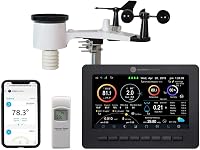
The WS-2000 uses a high-definition, full-color TFT LCD console. Its display includes a light and dark background, and the station presents measured readings alongside calculated data such as feels-like temperature, dew point, sunrise and sunset.
The WS-2902 comes with a brilliant LCD color display. Its console provides indoor and outdoor readings, including temperature and humidity, plus wind, rainfall, UV and solar radiation data from the outdoor array.
Neither display description tells you how large text will look from across your room. Think about viewing distance and lighting, then check the console’s physical dimensions before choosing a shelf or wall location.
Does the WS-2000 console offer more controls?
The WS-2000 lists more built-in console controls, including calibration, two unit systems and high and low alarms. These can help if you want to adjust displayed readings or set alerts at the console.
It supports imperial and metric units and allows calibration of major parameters. Its console also includes audible high and low alarm conditions, along with internet time synchronization.
The WS-2902 supports customizable alerts and remote monitoring. Its stated features emphasize Wi-Fi access and sharing rather than console calibration.
If you’re deciding whether the WS-2000’s interface suits your routine, our Ambient Weather WS-2000 console guide covers the console and compatibility topic in more detail.
Which model gives you more sensor expansion options?
The WS-2000 description specifically mentions an optional indoor sensor; the available WS-2902 details don’t establish a matching expansion option. If you plan to add an indoor sensor, verify the exact model and compatibility before buying.
The WS-2000’s outdoor array measures wind speed and direction, rainfall, temperature, humidity, UV and solar radiation. The console can also receive barometric pressure, humidity and temperature from an optional indoor sensor sold separately.
The WS-2902 package includes an Osprey Sensor Array with rain cup and a color console. Its wireless array measures wind speed and direction, temperature, humidity, rainfall, UV and solar radiation; the product description also covers barometric pressure and indoor conditions.
Those measurement lists don’t mean the stations have interchangeable add-on sensors. Check the model number and compatibility details for any extra sensor you’re considering.
What should you check before adding an indoor sensor?
Confirm compatibility with the exact WS-2000 or WS-2902 model before ordering an extra sensor. A shared brand or similar readings aren’t enough to establish that a sensor works with both consoles.
Also consider where you’d place the sensor and which readings you need indoors. The WS-2000 description names optional indoor temperature, humidity and barometric pressure readings; compare that with your intended setup.
How do the WS-2000 and WS-2902 connect?
Both models use Wi-Fi for online data sharing, while their outdoor arrays connect to their consoles wirelessly by RF. These are separate links in the station setup.
The WS-2000 uses a 915 MHz RF connection from sensor array to console. Its Wi-Fi option can publish station data online, and the console can use an internet time server.
The WS-2902 also sends readings from the array to the console by RF and can connect by Wi-Fi. Its features include remote monitoring, alerts and sharing through the Ambient Weather Network; smart home integration is also described for services such as Google Home and Alexa.
A Wi-Fi connection depends on your home network and the setup you choose.
Check the station’s instructions for the required network and account steps. If you’ve chosen the WS-2902, our WS-2902 setup guide explains the setup topic.
Can you use either station with smart home tools?
The WS-2902 description specifically names IFTTT, Google Home and Alexa; the WS-2000 details focus on Wi-Fi publishing and console functions. Check the current service requirements and compatibility for any automation you plan to use.
The WS-2902 can send data to the Ambient Weather Network for remote access, alerts and dashboard sharing. That can suit you if you want to check conditions away from home.
The WS-2000 also supports online weather publishing through Wi-Fi. Choose the station around the services you plan to use, and confirm their current setup requirements before relying on an alert or automation.
Which station is easier to install and maintain?
Both use an outdoor wireless array, so plan a suitable mounting location and a clear connection path to the console. The WS-2902 package includes its sensor array and console, while the WS-2000 description covers an array and console with separate power requirements.
The WS-2000 array uses a solar panel as its primary power source and has optional battery backup. Its console uses an included 5V DC adapter, while the outdoor array requires 3 AAA batteries.
The WS-2902 array also uses solar power. Its console package includes an AC adapter, and the model’s specs call for 3 AAA batteries.
For either station, consider how you’ll reach the rain gauge and other outdoor sensors for care. The WS-2902 replacement parts guide may help if you need to identify parts later, while the WS-2902 troubleshooting guide is a useful next step if readings or connectivity stop working.
Which Ambient Weather station should you choose?
Choose the WS-2000 for a high-definition TFT console and stated calibration controls; choose the WS-2902 for an LCD color console with described remote monitoring and smart home options. Your preferred screen and network features should guide the decision.
The WS-2000 is the better fit if you want calibration, imperial and metric units, console alarms and an explicitly described optional indoor sensor. Its high-definition TFT display is also the clearest stated choice for a buyer who prioritizes console detail.
The WS-2902 is the better fit if Wi-Fi remote access, alerts, dashboard sharing or named smart home services are central to your setup. Its LCD color console is described as easy to read, and the package includes an Osprey array with a rain cup.
If you’re considering a step up in Ambient Weather’s range, compare the WS-5000 vs WS-4000 and read our WS-4000 review. Choose the WS-2000 for console controls and the named indoor-sensor option; choose the WS-2902 for its stated Wi-Fi and remote features.
Frequently asked questions
Is the WS-2000 or WS-2902 easier to read?
The WS-2000 has a high-definition TFT color display, while the WS-2902 has an LCD color display described as easy to read. If display detail is your priority, the WS-2000 has the clearer stated advantage; check the console dimensions and placement before choosing either.
Can the WS-2000 and WS-2902 connect to Wi-Fi?
Yes. Both models support Wi-Fi data publishing, and the WS-2902 also supports remote monitoring and alerts.
Wi-Fi is a console connection, separate from the wireless RF connection between the outdoor sensor array and console.
Can you add sensors to either weather station?
The WS-2000 description says it can receive readings from an optional indoor sensor sold separately. The details here don't guarantee a matching expansion option for the WS-2902, so check the model's current compatibility information if adding sensors is important.
Do the WS-2000 and WS-2902 use the same outdoor sensor array?
Both descriptions pair the console with a wireless outdoor sensor array, and both use 915 MHz RF to connect the array to the console. The WS-2902 package includes an Osprey Sensor Array with rain cup; confirm exact replacement compatibility before buying separate parts.
Which should I choose, the WS-2000 or WS-2902?
Choose the WS-2000 if its high-definition TFT display, calibration and console alarms fit your priorities.
Choose the WS-2902 if you want a color LCD display with Wi-Fi remote monitoring and alerts. Compare the exact package and console details before deciding.