9 Best PM2.5 Air Quality Monitors (November 2026)
The best PM2.5 air quality monitors include the GoveeLife Smart Air Quality Monitor with PM2.5 for connected homes, the BREATHE Airmonitor Plus Gen 2 Indoor Air for broader air checks, and the Amazon Smart Air Quality Monitor for Alexa routines.
On this page (7 sections)
- Which PM2.5 air monitor fits your home?
- The best PM2.5 air monitors
- How do you choose a PM2.5 air monitor?
- How should you set up and use a PM2.5 monitor?
- What common PM2.5 monitor mistakes should you avoid?
- How can PM2.5 readings help you think about smoke and dust?
- Which best PM2.5 air monitor should you choose?
The best PM2.5 air monitor for most homes is the GoveeLife Smart Air Quality Monitor with PM2.5, which refreshes data every two seconds and supports remote viewing. For broader readings, the BREATHE Airmonitor Plus Gen 2 tracks several particle sizes, gases, temperature and humidity.
A PM2.5 air monitor helps you see how fine particle readings change in a room. Some picks focus on particles, while others add app history, alerts or measurements such as VOCs and carbon monoxide.
If you're new to particle readings, start with what PM2.5 means on an air quality monitor. Our air quality monitor guide explains the other sensors you may want to compare.
Our picks at a glance
-
1
 Best for connected homes
GoveeLife Smart Air Quality Monitor with PM2.5
9.7/10 our score
See it on Amazon -
2
 Best for broader air checks
BREATHE Airmonitor Plus Gen 2 Indoor Air
9.5/10 our score
See it on Amazon -
3

- 4
 Best for room-to-room checksCheck it
- 5
 Check it
YNAK 16 in 1 Air Quality Monitor
Best for large displays - 6
 Check it
Temtop S1 PM2.5 Air Quality Monitor
Best for long battery life - 7
 Check it
AirKnight Premium Indoor Air Quality Monitor Indoor
Best for app-free monitoring - 8
 Check it
AprilAire ZAWTHCPV Smart Indoor 5-in-1 Wi-Fi Air
Best for AprilAire homes - 9
 Check it
LifeBasis Air Quality Monitor Indoor
Best for sound alerts
Which PM2.5 air monitor fits your home?
The GoveeLife is the strongest match for connected PM2.5 tracking, while BREATHE and Amazon suit shoppers who want more than particle readings. Your best choice depends on whether you prefer a simple screen, room-to-room portability or app-based history.
We compared the stated measurements, power options, display details and connected features for each pick. The product cards below explain who should choose each monitor and who should skip it.
| Product | Best for | Measures | Connection | Power | Our score |
|---|---|---|---|---|---|
| GoveeLife Smart Air Quality Monitor with PM2.5 | connected homes | PM2.5, temperature and humidity | 2.4 GHz Wi-Fi and Bluetooth | Type-C cable; no built-in battery | 9.7 |
| BREATHE Airmonitor Plus Gen 2 Indoor Air | broader air checks | CO₂, PM1, PM2.5, PM10, TVOC, HCHO, temperature and humidity | 9.5 | ||
| Amazon Smart Air Quality Monitor | Alexa routines | PM2.5, VOCs, carbon monoxide, humidity and temperature | 9.4 | ||
| Temtop P600 PM2.5 Monitor | room-to-room checks | PM2.5 and PM10 | 9.3 | ||
| YNAK 16 in 1 Air Quality Monitor | large displays | CO₂, PM1, PM2.5, PM10, HCHO, TVOC, temperature, humidity and AQI | 9.2 | ||
| Temtop S1 PM2.5 Air Quality Monitor | long battery life | PM2.5, AQI, temperature and humidity | 9.0 | ||
| AirKnight Premium Indoor Air Quality Monitor Indoor | app-free monitoring | CO₂, PM2.5, PM10, TVOC, HCHO and more | 8.8 | ||
| AprilAire ZAWTHCPV Smart Indoor 5-in-1 Wi-Fi Air | AprilAire homes | PM2.5, VOCs, CO₂, temperature and humidity | Corded electric | 8.2 | |
| LifeBasis Air Quality Monitor Indoor | sound alerts | AQI, CO₂, PM1, PM2.5, PM10, HCHO, TVOC, temperature and humidity | 8.0 |
The best PM2.5 air monitors
These PM2.5 air monitors cover different needs, from quick app refreshes to portable particle checks. Match the sensor list and power style to the question you want the device to answer.
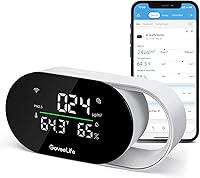
GoveeLife Smart Air Quality Monitor with PM2.5: Best for connected homes
- PM2.5, temperature and humidity
- Two-second data refresh
- Wi-Fi and Bluetooth monitoring
- 13-day graphs and two-year data export
Quick updates and remote data access suit a room where you want to follow PM2.5 changes over time. It also measures temperature and humidity, but needs a power source.
Pros
- Two-second refresh
- Remote monitoring and data export
- Can connect with compatible GoveeHome appliances
Cons
- Requires continuous power
- Wi-Fi time display requires 2.4 GHz
The GoveeLife suits a room where you want to see PM2.5 changes without checking the device every few minutes. Its data refreshes every two seconds, and the LED indicator uses four levels to show ambient air quality.
It also measures temperature and humidity, so one plugged-in device can track those readings alongside particles. The display can show a clock and PM2.5, and you can switch between bright and night modes.
Bluetooth or Wi-Fi supports remote monitoring, with online graphs for 13 days and data export covering the past two years. The time display needs 2.4 GHz Wi-Fi, and the monitor itself has no built-in battery.
Choose it if you want connected tracking and already use compatible GoveeHome appliances. Skip it if you need a battery-powered monitor or want readings for particles beyond PM2.5, such as PM10.
BREATHE Airmonitor Plus Gen 2 Indoor Air: Best for broader air checks
- PM1, PM2.5 and PM10
- CO₂, TVOC and formaldehyde
- 90-day app history and export
- Up to six hours of portable use
Track particles alongside gases, temperature and humidity on the display or in the app. Its 90-day history and export help you review patterns.
Pros
- Measures multiple particle sizes
- App alerts and data export
- Can run on battery or USB-C power
Cons
- Portable runtime is up to six hours
- App connection requires 2.4 GHz Wi-Fi
BREATHE is a fit if you want PM2.5 readings alongside several other measures of indoor air. It tracks PM1, PM2.5 and PM10, as well as CO₂, TVOC, formaldehyde, temperature and humidity.
Its app supports remote readings, configurable CO₂ and PM2.5 alerts, graphs and up to 90 days of stored data. You can export readings, which helps when you want to compare patterns across days.
The Gen 2 design offers up to six hours of portable use and can run while connected to USB-C power. That gives you placement flexibility for shorter checks, though it is a poor match for all-day cordless use.
Choose this monitor if you want a broad picture and app history. Skip it if you only need particle readings on a simple screen or don't want to pair a monitor with an app and 2.4 GHz Wi-Fi.
For another way to compare fine particles and dust, see our best air quality monitor for dust guide.
Amazon Smart Air Quality Monitor: Best for Alexa routines
- PM2.5, VOCs and carbon monoxide
- Temperature and humidity
- Color-coded LED
- Alexa notifications and routines
This monitor pairs PM2.5 readings with VOCs, carbon monoxide, temperature and humidity. Alexa notifications and routines suit homes already using Alexa devices.
Pros
- Five indoor air measures
- Color-coded status light
- Can trigger Alexa routines
Cons
- Smart features are centered on Alexa
Amazon's Smart Air Quality Monitor brings PM2.5 into an Alexa-centered setup. Along with particles, it tracks VOCs, carbon monoxide, humidity and temperature.
A color-coded LED gives a quick status indication, while the Alexa app shows an air quality score. If Alexa detects poor air quality, you can receive phone notifications or announcements on Echo devices.
You can also set Alexa routines to switch compatible air purifiers, dehumidifiers and fans on or off as indoor air conditions change. That makes this a practical option if you already use Alexa for home controls.
Choose it if you want Alexa notifications and routines alongside several air readings. Skip it if Alexa isn't part of your home setup or if you need a specified app history for reviewing PM2.5 readings over time.
Temtop P600 PM2.5 Monitor: Best for room-to-room checks
- Measures PM2.5 and PM10
- Handheld design with back stand
- 12-hour data histogram
- Indoor and outdoor use
A portable format and histogram suit checking particle readings in different spots. It focuses on PM2.5 and PM10 rather than gases or comfort readings.
Pros
- Portable handheld design
- Displays recent data as a histogram
- Measures PM2.5 and PM10
Cons
- Does not measure VOCs or carbon monoxide
The Temtop P600 is a straightforward choice for checking particle levels in different locations. It measures PM2.5 and PM10, with a histogram showing air data from the past 12 hours.
Its handheld design includes a back stand, so you can carry it between rooms or set it on a surface. It is described for indoor and outdoor use, which can help when comparing readings across more than one setting.
The focus stays on particles rather than gases or comfort readings. If you need temperature, humidity or VOC measurements in the same device, choose one of the broader monitors above.
Choose the P600 when portability and a recent particle trend matter most. Skip it if you want app notifications or gas readings on the same unit.
For smoke-related questions, compare our guides to the best air quality monitor for cigarette smoke and the best air quality monitor for smoke.
YNAK 16 in 1 Air Quality Monitor: Best for large displays
- Seven-inch display
- PM1, PM2.5 and PM10
- CO₂, HCHO and TVOC
- Up to eight hours of runtime
Its large screen presents several readings at once, while audible alerts can signal changes. The “16 in 1” name refers to nine parameters and seven alert types.
Pros
- Large seven-inch display
- Multiple particle and gas readings
- Alerts can be muted
Cons
- Large display may take more room than compact monitors
YNAK's seven-inch display makes multiple readings easy to see at once. It measures PM1.0, PM2.5 and PM10 alongside CO₂, HCHO, TVOC, temperature, humidity and AQI.
Its name refers to nine detectable parameters and seven types of AQI alert buzzers. You can adjust the screen brightness across three settings and mute the alert sounds when you want a quieter room.
The monitor offers up to eight hours of runtime and charges over USB-C. That can help if you want to move it between rooms, though the large display takes more space than a compact monitor.
Choose YNAK if you want a broad set of readings visible without opening an app and want audible alerts available. Skip it if you need a small device for a crowded shelf or plan to leave it unplugged for longer than its stated runtime.
Avoid exposing its sensors to perfumes or strong odors, which can affect accuracy.
Temtop S1 PM2.5 Air Quality Monitor: Best for long battery life
- PM2.5 and AQI
- Temperature and humidity
- Compact portable design
- Up to 60 days of battery life
A compact screen combines PM2.5 and AQI with temperature and humidity. Its stated battery life supports moving it between rooms without keeping it plugged in.
Pros
- Includes comfort readings
- Portable and compact
- Long stated battery life
Cons
- Does not measure PM10 or gases
The Temtop S1 keeps its readings focused: PM2.5, AQI, temperature and humidity. The compact display shows these measures at a glance, making it easy to move the unit between a nursery, office or bedroom.
Temtop says the battery can last up to 60 days on a charge. A settings button can refresh the latest PM2.5 and AQI readings when you want a current update.
This is a more focused option than monitors that include PM10, carbon monoxide or VOC measurements. Its combination of particle and comfort readings may be enough if those are the values you want to follow.
Choose the S1 when a small portable device and longer stated battery life matter more than app graphs. Skip it if you need gas readings, PM10 or a monitor with a detailed connected history.
AirKnight Premium Indoor Air Quality Monitor Indoor: Best for app-free monitoring
- PM2.5 and PM10
- CO₂, TVOC and HCHO
- Large LCD screen
- Rechargeable lithium-polymer battery
AirKnight combines particle readings with several gas measurements on a large screen. Its rechargeable design makes it portable around a home, office or vehicle.
Pros
- Measures multiple particle and gas types
- Portable rechargeable design
- No app or Wi-Fi required
Cons
- Does not provide app-based history
AirKnight combines PM2.5 and PM10 with CO₂, TVOC and formaldehyde readings on a large LCD screen. Its rechargeable design makes it portable around a home, office or vehicle.
The monitor does not require Wi-Fi or an app, so the readings stay on the device. That can suit you if you want a direct display and prefer not to set up another connected home tool.
AirKnight describes the AT1000 as a 10-in-1 monitor, while the named readings include particles and several gases. Check that those measures match what you want to follow before choosing it.
Choose it for a portable screen with a wider set of readings than a particle-only meter. Skip it if reviewing historical trends in an app is a priority.
For smoke-focused comparisons, see the best air quality monitor for smoke and our cigarette smoke monitor guide.
AprilAire ZAWTHCPV Smart Indoor 5-in-1 Wi-Fi Air: Best for AprilAire homes
- PM2.5, VOCs and CO₂
- Temperature and humidity
- Healthy Air app alerts
- Can integrate with select AprilAire equipment
This connected monitor tracks PM2.5 alongside VOCs, CO₂, temperature and humidity. It is a natural fit if you already use compatible AprilAire equipment.
Pros
- App provides alerts and trend information
- Color status scheme
- Can integrate with select AprilAire systems
Cons
- Requires the Healthy Air app
- Corded design limits placement
The AprilAire ZAWTHCPV tracks PM2.5 alongside VOCs, CO₂, humidity and temperature. Its Healthy Air app provides measurements, trends, alerts and explanations of readings.
The app is required for the monitor to function, so this pick makes the most sense if you're comfortable with connected monitoring. It uses corded power and offers three light options, including always on and always off.
AprilAire says the monitor can integrate with select AprilAire filtration or ventilation equipment when paired with a compatible Wi-Fi thermostat. Those accessories are sold separately.
Choose this monitor if you already use the AprilAire system or want app guidance with your readings. Skip it if you want a screen that works without the app or need battery-powered placement.
Read our best Bluetooth air quality monitor guide for another view of connected monitoring options.
LifeBasis Air Quality Monitor Indoor: Best for sound alerts
- PM1, PM2.5 and PM10
- CO₂, HCHO and TVOC
- Visual and audible alerts
- Up to 11–12 hours of use
LifeBasis displays several readings with color cues and audible alerts. Its rechargeable battery gives you flexibility to move it around during a day of monitoring.
Pros
- Broad range of readings
- Visual and audible alerts
- Portable rechargeable design
Cons
- Audible alerts may not suit quiet rooms
LifeBasis combines PM2.5 with PM1, PM10, CO₂, HCHO, TVOC, temperature and humidity. Its screen uses color cues, and the device can also sound an alert when a reading exceeds its normal range.
The rechargeable battery provides up to 11–12 hours of continuous use. You can adjust screen brightness, which helps when the monitor sits in a bedroom or another room where a bright display may be distracting.
The broad sensor set makes it useful for checking more than fine particles. Its audible alert is the main tradeoff if you prefer a quiet device or plan to place it near a sleeping area.
Choose LifeBasis when you want several readings, visible cues and a portable design. Skip it if you want a quiet monitor with only particle readings; the Temtop P600 is a more focused alternative.
How do you choose a PM2.5 air monitor?
Choose a PM2.5 air monitor by deciding which pollutants matter, where you'll place it, and whether you need a screen, history, alerts or remote access. A long sensor list is useful only if it answers the questions you actually have about your room.
Which readings should your PM2.5 monitor include?
A focused PM2.5 monitor suits you if fine particle changes are your main concern. Temtop P600 adds PM10, while broader devices can also track gases such as VOCs, carbon monoxide or formaldehyde.
Think about the source you want to observe before paying for more sensors. If your main goal is to follow particle changes during cooking or nearby smoke, PM2.5 may be the central reading; if you also want to see ventilation-related or gas measurements, compare broader models.
Do you want app history or a screen-only air monitor?
An app can help you review trends or check readings when you're away from the room. GoveeLife offers remote monitoring and long-term export, while BREATHE provides app alerts, graphs and 90-day history.
A screen-only approach can be simpler if you just want a current reading nearby. Temtop P600 shows a 12-hour histogram, while Temtop S1 displays its measures on the device.
Before buying a connected model, check the required app and Wi-Fi band. GoveeLife needs 2.4 GHz Wi-Fi for its time display, and BREATHE connects through 2.4 GHz Wi-Fi.
Should the monitor stay plugged in or move with you?
A battery-powered monitor can move between rooms without needing an outlet at each stop. Compare the stated runtime with how long you want to monitor in a new location: BREATHE offers up to six hours, YNAK up to eight, and LifeBasis up to 11–12 hours.
The Temtop S1 is the choice here with a stated battery life of up to 60 days, while GoveeLife needs a continuous power connection. AprilAire is corded too, so plan where its cable can reach before setting it up.
If you want continuous tracking in one room, a corded model may be a straightforward fit. For repeated short checks around a home, pick a rechargeable unit and charge it before you need to move it.
Is a large display or an alert more useful?
A large display helps when you want to read several values from across a room. YNAK has a seven-inch screen with three brightness settings, while AirKnight has a large LCD and LifeBasis combines display color cues with sound alerts.
Alerts are useful when you can't watch a screen, but consider where the monitor will sit. LifeBasis can sound an alert when readings exceed its normal range, and YNAK offers alert buzzers with a mute control.
For a bedroom or quiet workspace, a mute option or adjustable brightness may matter more than extra alert types. If you already use Alexa, Amazon's monitor can send notifications and trigger routines for compatible devices.
How should you set up and use a PM2.5 monitor?
Set up a PM2.5 monitor in the room you want to understand, with its sensor openings clear and power or Wi-Fi ready for the features you plan to use. Follow the model's instructions, then keep placement consistent when comparing readings over time.
Where should an indoor PM2.5 monitor sit?
Place the monitor on a stable surface in the area where you spend time, with air able to reach the sensor. Avoid direct airflow from a vent, an open window, or the immediate plume from cooking if you want a general room reading.
A monitor placed beside a stove may show a short-lived change from cooking rather than the room's usual level. That can be useful when you intentionally want to observe a source, but move it back to a representative spot afterward.
Keep the sensor openings clear of hair, dust and other obstructions. GoveeLife's instructions specifically call for keeping its sensor clear, and its troubleshooting guidance says to remove obstructions and restart the device if readings appear abnormal.
How can you compare readings between rooms?
Use the same monitor in each room and give it time to report changes after moving it. Keep notes about the room and what was happening, such as cooking, cleaning, open windows or people entering, so a shift has useful context.
Don't compare a reading taken beside a running appliance with one from a quiet room as if the rooms had identical conditions. A PM2.5 monitor shows particle changes, but it does not identify their source on its own.
If you want to track trends, use a model with a histogram or stored graphs. GoveeLife, BREATHE and the Temtop P600 offer different ways to review earlier readings.
How should you care for the sensor?
Keep openings unobstructed and follow the instructions for your specific device. Don't touch or expose the YNAK sensors to perfumes or strong odors, which its guidance says can affect accuracy.
If a reading looks unusual, first check the placement and sensor opening. For GoveeLife, remove any foreign material blocking the sensor and restart the monitor; also confirm the device is connected to power.
What common PM2.5 monitor mistakes should you avoid?
The most common mistakes are choosing a model for features you won't use, placing it where a local event dominates the reading, and treating one number as a diagnosis of the air. A monitor is most useful when you understand what it measures and keep the setup consistent.
Don't assume every air quality monitor measures the same pollutants. A PM2.5-focused device may not measure PM10, VOCs or carbon monoxide, so verify the sensor list against your purpose.
Don't assume an app is optional on every smart model. AprilAire requires its Healthy Air app to function, and other connected features may need a compatible network or account setup.
Don't confuse a short-term spike with a stable room pattern. Cooking, cleaning, dust and ventilation can all change conditions, so note what was happening and look for repeated patterns before drawing conclusions.
Don't place a monitor in a cramped spot with blocked openings. A blocked sensor can interfere with detection, while a location next to a window or vent may reflect incoming air rather than the room overall.
How can PM2.5 readings help you think about smoke and dust?
A PM2.5 reading can show particle changes that may occur with smoke or dust, but the monitor does not tell you which source caused them. Use the reading alongside what is happening in the room and choose a device with sensors that fit your concern.
For smoke-specific buying help, compare our best air quality monitor for smoke guide with the best air quality monitor for cigarette smoke. If dust is your main concern, see our guide to air quality monitors for dust.
If you want to check a specific concern with a kit rather than a continuous monitor, read our home air quality test kit for cigarette smoke guide. For general sensor basics, the complete air quality monitor guide explains how the different readings fit together.
Which best PM2.5 air monitor should you choose?
Choose GoveeLife if you want fast connected readings and data export, BREATHE if you want more sensors and app history, or Temtop P600 if you prefer portable particle-focused checks. Pick Amazon for Alexa routines, YNAK for a large display, Temtop S1 for long stated battery life, AirKnight for app-free multi-reading use, AprilAire for its connected system, or LifeBasis for audible alerts.
The best PM2.5 air monitor is the one whose sensors, power style and history features fit how you plan to use it. For a specific cigarette smoke concern, start with our home air quality test kit guide and compare it with the best air quality monitor for smoke.
Our top 3 picks at a glance
-
1
Best for connected homes
GoveeLife Smart Air Quality Monitor with PM2.5
9.7/10 our score
See it on Amazon -
2
Best for broader air checks
BREATHE Airmonitor Plus Gen 2 Indoor Air
9.5/10 our score
See it on Amazon -
3
Frequently asked questions
What does a PM2.5 air monitor measure?
A PM2.5 air monitor measures fine airborne particles with a diameter of 2.5 micrometers or less. Some monitors also measure larger PM10 particles, gases, temperature or humidity.
Choose a model based on which readings you need, since a PM2.5 device does not automatically measure every indoor pollutant.
Is a PM2.5 monitor enough to check indoor air quality?
A PM2.5 monitor can show changes in fine particle levels, but it gives only one part of the indoor air picture. For other concerns, consider a monitor that also measures VOCs, carbon monoxide, CO₂, temperature or humidity.
Match the sensors to the question you want the device to answer.
Where should I place an indoor PM2.5 monitor?
Place the monitor in the room you want to understand, on a stable surface with its sensor openings unobstructed. Keep it away from direct airflow, open windows and the immediate plume from cooking if you want a general room reading.
Follow the device instructions for placement and sensor care.
Can an air quality monitor detect smoke?
A monitor with a PM2.5 sensor can show particle changes that may occur with smoke, but it does not identify the source on its own. Readings can change for other reasons, including cooking or dust.
Our best air quality monitor for smoke guide covers smoke-focused choices, while the best air quality monitor for cigarette smoke addresses that specific concern.
Do PM2.5 monitors need Wi-Fi?
No. A standalone monitor can show readings on its own screen without Wi-Fi.
Connected models add features such as remote viewing, alerts or stored trends, but they may require a compatible app and a specific Wi-Fi band.
Choose based on whether you need readings away from home.