How to Calibrate a Hygrometer
To learn how to calibrate a hygrometer, compare it with a known humidity reference and adjust it only if its instructions allow calibration. A salt test or calibration kit can show the difference.
On this page (10 sections)
- How do you calibrate a hygrometer?
- What do you need before starting?
- How do you use a salt test for hygrometer accuracy?
- How do you calibrate a digital hygrometer?
- What should you do if the reading is off?
- How should you choose a hygrometer for calibration?
- How can you set up and care for a hygrometer?
- What common calibration mistakes should you avoid?
- When should you check or replace a hygrometer?
- How to calibrate a hygrometer: which method should you choose?
To learn how to calibrate a hygrometer, compare its reading with a known humidity reference, then adjust it only if the device instructions allow calibration. A salt test or calibration kit can show how far the reading differs from the reference.
Calibration does not always mean changing a device. For many digital hygrometers, the useful result is a measured offset that helps you interpret future readings.
For app-connected monitoring, compare digital Bluetooth hygrometers.
How do you calibrate a hygrometer?
Compare the hygrometer with a stable reference, let the reading settle, and adjust it only if the device supports an adjustment. Keep the sensor away from drafts, sunlight, and heat while you follow the reference method's instructions.
A calibration kit provides a test method and a reference target. A salt test is another common check, though it needs careful setup and time for the air inside the container to stabilize.
Write down the reference value, the hygrometer reading, and the difference. For example, if the reference is 75% relative humidity and the device reads 70%, the device is 5 percentage points low under those conditions.
What do you need before starting?
Use the exact hygrometer manual, a reference method, and a steady indoor location. The manual tells you whether the model can be calibrated and how to use any adjustment control.
Gather your hygrometer and instructions, a calibration kit or salt-test materials, a sealed container if the method requires one, and a note or log for the readings.
Keep the setup at a steady room temperature. Avoid sunny windows, heaters, air conditioners, and exterior doors, where temperature changes can affect the check.
If you need to buy a kit, compare the method, directions, and reference value before choosing. Our guide to choosing a hygrometer calibration kit can help you match a kit to your device and preferred method.
How do you use a salt test for hygrometer accuracy?
A salt test checks a hygrometer against humidity created by a sealed salt-and-water setup. Keep the salt and water away from the sensor, and follow a reliable procedure.
Add water to salt until it is damp but not dissolved. Put the salt in a larger sealed container with the hygrometer, keeping them separate, and leave the setup undisturbed for the time your instructions specify.
When the reading settles, compare it with the method's reference value. The result is useful only if the container stayed sealed and the sensor remained at a steady temperature.
For step-by-step help, read our guide to the salt test for a hygrometer. If you want to judge repeatability as well, see how to test a hygrometer for accuracy.
How do you calibrate a digital hygrometer?
Check whether the digital hygrometer's manual provides an adjustment or offset feature before changing its reading. Compare it with a reference first, then follow the model-specific steps.
Some devices let you change an offset through buttons or a menu. Others show measurements but offer no way to change them, so don't guess at button combinations or use a procedure meant for another model.
If no adjustment is available, write down how far the reading differs from the reference. Use that difference as a guide when reading the device, and repeat the comparison later if you need to see whether the gap has changed.
A hygrometer with a calibration certificate may suit a reader who needs documented calibration information. A certificate describes a calibration record; it does not mean the device will stay accurate forever.
What should you do if the reading is off?
Confirm the setup before changing anything if the reading differs from the reference. Check that the container stayed sealed, the sensor did not touch salt or water, and the temperature remained steady.
Repeat the test if the result seems unusual. One check may reflect a setup problem, while repeated comparisons can show whether the difference is consistent.
If the device supports adjustment, apply the correction as its manual describes. If not, keep the measured offset with the device or in a note near its display.
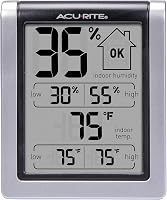
The AcuRite Wireless Digital Indoor Thermometer and Hygrometer displays current indoor temperature and humidity, plus daily highs and lows. Use a separate reference test to assess its humidity reading; those display features do not replace calibration instructions.
How should you choose a hygrometer for calibration?
Choose a hygrometer based on where you'll use it, whether you need remote readings, and whether its manual explains calibration. A room monitor, a replacement sensor, and a temperature-only display solve different needs.
For simple room monitoring, the AcuRite Wireless Digital Indoor Thermometer and Hygrometer shows indoor temperature and humidity at a glance, with daily highs and lows. It suits someone who wants to keep an eye on room conditions alongside a humidifier or dehumidifier.
Skip it if you need a confirmed adjustment feature; check its manual before assuming it can be calibrated.
For a compatible AcuRite system, the AcuRite Wireless Indoor Outdoor Temperature and Humidity is a replacement sensor. Verify the model number on the sensor you are replacing, since several similar-looking models have different compatibility.
It suits someone replacing a matching sensor, but skip it if you need a standalone display or have not confirmed compatibility.
The AcuRite Digital Thermometer with Indoor provides indoor and outdoor temperature readings, daily temperature highs and lows, and trend arrows. It suits someone focused on temperature tracking.
Skip it if your main goal is humidity calibration, since it is not a substitute for a humidity reference test.
How can you set up and care for a hygrometer?
Place the hygrometer where it can read the conditions you care about, and keep it away from direct heat and sunlight. Use the manual's placement and care instructions for the specific device.
If you need to place the sensor apart from its display, compare digital hygrometers with probes.
For a calibration check, keep the hygrometer in the test environment for the full time the method requires. Avoid opening the container during the test, moving it between warm and cool areas, or letting water contact the sensor.
Afterward, return the device to its normal location and allow the reading to settle. Keep a simple record of the date, reference value, and device reading so you can recognize a steady offset or a change over time.
What common calibration mistakes should you avoid?
The most common mistakes are changing a device before checking the setup and applying instructions meant for another model. Both can leave you with a less useful reading.
Keep the salt and water separate from the sensor, and don't open the container before the reading settles. A leaking container or changing temperature can make the comparison unreliable.
Don't assume every hygrometer can be adjusted. If the manual provides no calibration steps, record the difference instead of trying undocumented controls.
When should you check or replace a hygrometer?
Check a hygrometer when accuracy matters, after a long period of use, or when its readings seem inconsistent. Follow the manufacturer's guidance if it gives a check interval.
A simple room monitor may still be useful with a known offset. For humidity-sensitive storage or another task where the reading must be dependable, compare it with a suitable reference more regularly and decide whether that offset is acceptable.
Consider a different hygrometer if readings remain unstable, it cannot be adjusted when you need adjustment, or it stays far from a suitable reference. Repeat the check with a sound setup before making that decision.
For a kit-based method, follow our guide to using a Boveda hygrometer calibration kit. Choose the method that fits your device and the level of confidence you need.
How to calibrate a hygrometer: which method should you choose?
Choose a calibration kit for a clearly guided method, or a salt test if you can keep the setup sealed and steady. Either way, compare the reading with the reference and adjust the device only if its manual explains how.
Choose the AcuRite indoor monitor if you want a simple display of room humidity and daily records. Choose the AcuRite replacement sensor only after confirming it matches your system.
Choose the AcuRite thermometer if temperature tracking is your priority.
If the hygrometer cannot be adjusted, keep a note of its offset and decide whether that difference works for your use. That is the practical answer to how to calibrate a hygrometer: compare carefully, follow the model's instructions, and choose a device whose readings and features fit the job.
Frequently asked questions
Can you calibrate a digital hygrometer?
Some digital hygrometers have a calibration control or offset setting, while others cannot be adjusted. Check your exact model's manual, compare its reading with a reference, and apply an offset only if the instructions explain how.
Otherwise, record the difference and use it when interpreting readings.
How long should a hygrometer sit in a calibration test?
Follow the kit or device instructions for the test duration, since timing depends on the method and hygrometer. Keep the test container closed at a steady room temperature, and wait for the reading to settle before comparing it with the reference.
What humidity should a salt test show?
A properly prepared saturated salt test is commonly used as a reference near 75% relative humidity at room temperature. Setup can affect the result, so follow a reliable method and use it as a comparison point rather than assuming every reading will be identical.
Should I adjust a hygrometer if it is off?
Adjust it only when the manufacturer provides a calibration procedure for your model. If it has no adjustment, note the difference from the reference and account for it when reading the device.
A large or changing gap may make it unsuitable for your purpose.