How to Use a Boveda Hygrometer Calibration Kit
To use a Boveda hygrometer calibration kit, follow the kit and hygrometer instructions for setup, wait time, and target humidity. Compare the reading with the kit’s stated target after the full wait.
On this page (6 sections)
- How do you prepare a Boveda hygrometer calibration kit?
- How long should the hygrometer stay with the kit?
- How do you compare the reading with the kit’s target?
- What can affect the calibration check?
- Which AcuRite devices can help you monitor indoor conditions?
- How should you use the result after testing?
To use a Boveda hygrometer calibration kit, follow the kit and hygrometer instructions for setup, wait time, and target humidity. Compare the reading with the kit’s stated target after the full wait.
A calibration check shows how a hygrometer reads under the test conditions. It does not tell you how the device performs at every humidity level or in every room.
How do you prepare a Boveda hygrometer calibration kit?
Start with the kit and hygrometer instructions, then follow their setup steps. Check the target humidity, wait time, and whether the hygrometer belongs inside a container or pouch.
Keep the calibration pouch sealed unless its instructions say otherwise. Opening or damaging it can change the test conditions.
Use a clean, dry container if the instructions call for one. Leave enough room for the hygrometer and pouch to sit without pressing against or puncturing the pouch.
Don’t add water or another humidity source unless the instructions require it. Extra moisture can change the conditions being checked.
How long should the hygrometer stay with the kit?
Leave the hygrometer in the required setup for the full wait time in the kit instructions. Checking too soon may give you a reading before the test is complete.
Keep the setup in a stable indoor location, away from sunlight, heaters, vents, and drafts. Avoid moving it or opening the container during the check.
When the wait is over, read the display and record the value. If the hygrometer manual specifies when to adjust it, follow those steps.
How do you compare the reading with the kit’s target?
Compare the hygrometer reading with the target stated in the Boveda kit instructions. Record the difference in percentage points and whether the device reads higher or lower.
For example, if the kit target is 75% relative humidity and the display reads 72%, the hygrometer is 3 percentage points below the target in this check. Use the target for your kit rather than assuming every kit has the same one.
A single-point check only compares the hygrometer at that humidity level. For more on readings and sensors, see what a hygrometer measures and how a hygrometer measures humidity.
What if your Boveda hygrometer calibration kit check shows an offset?
Check the hygrometer manual to see whether the device can be adjusted. Some devices have a calibration setting, while others only display measurements.
If the manual allows adjustment, follow its steps and recheck the reading as directed. If adjustment is unavailable, note the difference so you can account for it when interpreting readings.
For device adjustment steps, use our guide on how to calibrate a hygrometer. For another accuracy check, see how to test a hygrometer for accuracy.
What can affect the calibration check?
A sealed setup, correct timing, and stable conditions help make the check easier to interpret. An open or damaged pouch, a draft, or an early reading can affect the result.
Keep the hygrometer away from wet surfaces and direct contact with the pouch unless the instructions specify otherwise. Handle the device gently, and don’t force an adjustment control.
Temperature can affect how you interpret humidity readings. See dew point vs humidity for how the measures differ.
Keep the test setup at stable indoor conditions and avoid moving the hygrometer from a hot or cold location just before the check.
A calibration kit checks a reading at its target humidity. If you need documentation, learn how to choose a hygrometer with a calibration certificate.
Which AcuRite devices can help you monitor indoor conditions?
AcuRite offers devices for displaying indoor temperature and humidity or reporting conditions from a separate sensor. Choose a monitor based on where you need readings and whether you need temperature, humidity, or both.
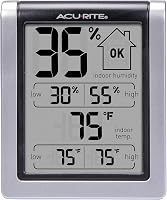
The AcuRite Wireless Digital Indoor Thermometer and Hygrometer, score 9.7, displays indoor temperature and humidity, with daily high and low readings. Its dimensions are 3 in H x 2.5 in W x 1.3 in D.
Use it to monitor room conditions, and follow its instructions for setup and placement. A separate calibration check requires following the kit’s instructions.
The AcuRite Wireless Indoor Outdoor Temperature and Humidity, score 9.6, is a sensor for compatible AcuRite displays or AcuRite Access, sold separately. Check the model number on your existing sensor and confirm compatibility before choosing a replacement.
For indoor and outdoor temperature monitoring, the AcuRite Digital Thermometer with Indoor, score 9.5, shows current readings and daily high and low temperatures. Its remote sensor sends outdoor readings to the indoor display from up to 165 ft away.
To compare kit types, see how to choose a hygrometer calibration kit. For temperature tracking with a connected setup, our guide to Wi-Fi temperature sensors explains another option.
How should you use the result after testing?
Treat the result as a reference for the tested humidity point and note any difference. If the hygrometer is adjustable, follow its manual and recheck it; if not, account for the difference when reading it.
Choose a calibration kit for a check at its stated target humidity. Choose a hygrometer with a calibration certificate if you need documentation tied to a specific instrument and calibration process.
For a Boveda hygrometer calibration kit, follow the setup instructions, wait the full period, and compare the reading with the stated target. Use the difference to guide adjustment or interpretation, then place the hygrometer where it can measure the air you want to monitor.
Frequently asked questions
How long does a Boveda hygrometer calibration kit take?
Follow the wait time in the kit instructions, since it may vary by kit. Keep the hygrometer in the required setup for that full period.
Compare the reading after the stated wait.
Can I calibrate any hygrometer with a Boveda kit?
A humidity calibration kit can check many hygrometers, but setup and adjustment depend on the device and kit. Read both sets of instructions first, especially if your hygrometer requires a particular placement or adjustment method.
A reading check does not mean every hygrometer can be adjusted.
What should I do if my hygrometer reads differently?
Record how far the reading is from the kit’s target, then check the hygrometer manual for adjustment instructions. If the device cannot be adjusted, keep the difference in mind when interpreting its readings or compare it with another suitable instrument.
Does a calibration kit prove a hygrometer is accurate everywhere?
No. A kit checks a hygrometer under a specific humidity condition and setup.
It does not show how the device performs at every humidity level, temperature, or location.
Follow the manufacturer’s advice for repeat checks and place the hygrometer where it can measure the air you care about.