How to Read a Galileo Thermometer
To learn how to read a Galileo thermometer, find the lowest bulb floating above the sunk bulbs and read its attached temperature tag. If all bulbs float or all sink, use the end tag as a limit for the thermometer's range.
On this page (8 sections)
- How do you read a Galileo thermometer?
- What if all the bulbs float or sink?
- Why do Galileo thermometer bulbs move?
- Does a larger Galileo thermometer work differently?
- How should you set up and care for one?
- What should you compare before choosing a thermometer?
- What common reading mistakes should you avoid?
- How to read a Galileo thermometer: which one should you choose?
To learn how to read a Galileo thermometer, find the lowest bulb floating above the sunk bulbs and read its attached temperature tag. If every bulb floats or every bulb sinks, the room is outside the instrument's displayed range, so use the end tag as a limit.
Set the glass tube upright on a steady surface and give the bulbs time to settle before reading. The tags can be small, and bulbs may overlap, so look carefully instead of judging the temperature by bulb height alone.
How do you read a Galileo thermometer?
Read the tag attached to the lowest bulb that is floating above the lower group. The bulbs above it are floating too, while the lower group has sunk.
Follow the connector or string from that bulb to its tag. Tags can hang below the bulbs, which makes it easy to read the wrong one if you rely on their vertical position.
View the thermometer straight on, near eye level. If the glass or bulbs are hard to see, shine a light behind the tube and look for the point where the floating and sunk groups meet.
How can you read a Galileo glass thermometer when bulbs are crowded?
A crowded Galileo glass thermometer is easier to read with steady light behind it and your eyes level with the tube. Wait for movement to stop, identify the lowest bulb that is clearly floating, then trace it to its label.
If two bulbs seem to touch, change your viewing angle slightly and check again from the front. Don't tilt, shake, or rotate the tube to separate them, since that can move the bulbs and make the reading less clear.
What if all the bulbs float or sink?
When every bulb is on the same side, use the end bulb's tag as a range limit. All bulbs floating means the room is colder than the thermometer's displayed range; all bulbs sunk means it is warmer.
If all bulbs float, read the tag on the lowest bulb. If all bulbs sink, read the tag on the highest one.
Neither case gives an exact temperature beyond the range marked on the thermometer. If the room may be outside that range, use a digital thermometer that covers the temperature you need to check.
Why do Galileo thermometer bulbs move?
The bulbs move because temperature changes affect their buoyancy in the surrounding liquid. Their tags show the temperatures associated with their positions.
The reading comes from the bulb positions and the labeled temperature intervals, not from measuring a liquid column like a conventional glass thermometer. For a closer explanation, read how a Galileo thermometer works.
Use the tags instead of estimating from the height of a bulb. The number and spacing of bulbs and the marked range can differ among models.
Does a larger Galileo thermometer work differently?
No, the reading method stays the same at any size: find the lowest floating bulb and read its tag. A larger tube may be easier to see across a room, but the tag still determines the reading.
Check that the thermometer's height and shape fit the place where you intend to display it. For options and size considerations, see our guide to large Galileo thermometers.
How should you set up and care for one?
Place the thermometer upright on a level, stable surface where you can see its tags. Choose an indoor spot away from direct sunlight, heaters, air conditioners, and other sources of sudden temperature changes.
Let it settle after moving it before taking a reading. Keep it where it is less likely to be bumped, and handle the glass carefully when you dust or reposition it.
Don't use the thermometer to check pool water or make a safety decision. It is a decorative room thermometer with a finite marked range, so use an instrument designed for the conditions you need to measure.
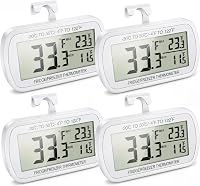
For freezer monitoring, compare freezer thermometers with alarms.
What should you compare before choosing a thermometer?
Choose a Galileo thermometer for a decorative, approximate room reading; choose a digital model when you want a direct number or extra measurements. Think about where it will sit, how quickly you need to read it, and whether temperature alone answers your question.
A Galileo thermometer suits someone who likes a visible, non-digital display and can keep it upright in a stable indoor place. It is a poor fit if you need a precise reading, need to check changing conditions quickly, or want a measurement outside its printed range.
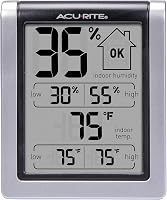
A digital indoor thermometer and hygrometer adds humidity readings and daily high and low records. To understand how humidity relates to temperature, see the dew point vs humidity chart.
The AcuRite 00613 has a display for current temperature and humidity and can show daily high and low readings.
For indoor and outdoor temperatures, the AcuRite 00424CA shows current readings, trend arrows, and daily highs and lows. Its remote sensor sends outdoor readings to the display from up to 165 ft away.
The AcuRite 06002M / 592TXR is a replacement indoor and outdoor temperature and humidity sensor for specific compatible AcuRite models. Choose it only after matching the model number on the sensor you are replacing; it is not a stand-alone display.
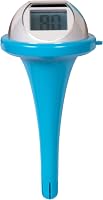
If you want to measure pool water, choose a thermometer designed for that job. Our guide to the best digital floating pool thermometers covers that category.
What common reading mistakes should you avoid?
The most common mistake is reading the lowest bulb overall instead of the lowest floating bulb. Separate the floating group from the sunk group first, then follow the correct bulb to its tag.
Other easy mistakes include reading a tag on a higher floating bulb, taking a reading before the bulbs settle, and treating an end tag as an exact value when all bulbs are at the top or bottom. Light behind the tube and a steady viewing angle can help when the bulbs overlap.
Don't assume every Galileo thermometer uses the same temperature intervals or has the same range. Check the tags on your model, and use a digital thermometer when the display is hard to read or the temperature is outside those limits.
How to read a Galileo thermometer: which one should you choose?
Choose a Galileo thermometer when you want an attractive indoor display and an approximate temperature cue. Choose a digital indoor model when you need a clear number, humidity information, daily records, or indoor and outdoor readings.
For a second indoor reference with humidity and high-low records, consider the AcuRite 00613 digital indoor thermometer and hygrometer. If you need an outdoor reading too, the AcuRite 00424CA indoor and outdoor thermometer has a remote sensor and daily temperature records.
The useful rule for how to read a Galileo thermometer is simple: locate the lowest floating bulb, trace it to its temperature tag, and treat an all-floating or all-sunk group as a range limit. For alerts that need an official source, see how to set up and program a Midland NOAA weather radio.
Frequently asked questions
Which bulb do you read on a Galileo thermometer?
Read the temperature tag on the lowest bulb floating above the group of sunk bulbs. If the bulbs overlap, view the tube at eye level and shine light behind it.
This can help you see which bulb is floating, so trace it to its tag rather than judging by height.
What if all the bulbs in a Galileo thermometer are floating?
When every bulb floats near the top, read the tag on the lowest bulb. The room is below the thermometer's displayed range, so treat that tag as a limit rather than an exact reading.
A separate digital thermometer can give you a numeric reading.
What if all the bulbs in a Galileo thermometer sink?
When every bulb sinks, read the highest temperature tag among them. The room is warmer than the thermometer's displayed range, so the tag marks a limit rather than an exact temperature.
Use a separate thermometer if you need a numeric reading in that warmer range.
How accurate is a Galileo thermometer?
A Galileo thermometer gives an approximate room temperature based on the positions and tags of its floating bulbs. The marked intervals and temperature range vary by model, so check the instructions for yours.
Use it for a general indication, not a precise reading or a safety decision.