What Is a Data Logger and How Do You Use One?
To use a data logger, choose one that measures the conditions you need, set its recording interval, place the sensor, and retrieve the saved readings. Check that it stores a history you can access; a wireless thermometer may only show current readings and daily highs or lows.
On this page (9 sections)
- What is a data logger, and what does it record?
- How do you use data loggers step by step?
- How do you choose a logging interval?
- Where should you place a data logger?
- How do you retrieve and review data logger readings?
- What should you check before logging high temperatures?
- What common mistakes make logger readings unreliable?
- How do you choose the right data logger?
- Which data logger should you choose?
To use data loggers, match the device to the conditions you need to measure, set how often it records, place it carefully, and retrieve the stored readings. A logger can show changes between checks, but a thermometer that only displays current conditions may not keep a history you can review.
Start by deciding what question the record should answer. You might need to follow temperature in a room or compare humidity through the day.
You may also monitor a process that changes quickly. The sensor, recording interval, storage, and download method all need to suit that job.
What is a data logger, and what does it record?
A data logger measures and stores readings over time. Depending on its sensors, it may record temperature, humidity, or other conditions.
A basic model may save readings in internal memory for later download. A wireless model may send readings to a receiver or connected service, but wireless transmission by itself does not mean the system saves a history.
Records typically pair a measurement with a time. Some devices also show readings on a display or report alarms, but those features vary by model.
Is a data logger different from a thermometer?
A data logger measures like a thermometer and also saves readings at set intervals. A thermometer that only shows the current reading may not keep a record for later review.
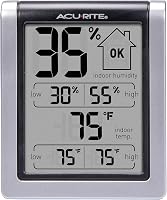
Check for a logging or history feature before choosing a device for documentation. If you only need a room's current temperature and humidity, the AcuRite Wireless Digital Indoor Thermometer and Hygrometer shows both at a glance and records daily highs and lows.
How do you use data loggers step by step?
The basic process is to choose the measurement, set the interval, position the sensor, start recording, and retrieve the data. Follow the device's instructions for setup, calibration, power, and downloads.
- Choose a logger with sensors for the conditions you need to measure.
- Set the date, time, units, and recording interval if those options are available.
- Set alarm limits if the device supports them and they fit your purpose.
- Put the sensor at the point you want to monitor.
- Start recording and confirm that readings are being saved.
- Retrieve the data with the logger's supported connection or software.
- Review the record and save a copy if you need to keep it.
Write down where you placed the sensor and when recording began. Those details help you compare records later and explain gaps or unusual readings.
How do you choose a logging interval?
Choose an interval that captures the changes you need to understand without filling storage too quickly. Fast-changing conditions need more frequent readings, while steadier conditions may need less detail.
A short process change could go unnoticed if the logger records only occasionally. Very frequent readings create a larger file and may use memory or battery faster, so check the device's capacity against the length of the recording period.
For remote temperature records, compare options in our guide to the best wireless temperature data loggers. Check that a candidate saves the history and lets you retrieve it in a useful form.
Where should you place a data logger?
Place the sensor where it can measure the condition you care about, away from influences that could skew the result. Choose the spot based on the question you want the record to answer, such as the temperature near stored items or in the center of a room.
Avoid putting a temperature sensor beside a heater, window, or vent, or in direct sunlight, unless that is the exact location you need to measure. Keep it clear of water and physical damage, and follow the device's instructions for indoor or outdoor use.
In industrial settings, placement and wireless range can affect whether readings represent the area you intend to monitor. Our guide to choosing wireless temperature sensors for industrial use explains what to consider.
How do you retrieve and review data logger readings?
Use the retrieval method the logger supports, such as a cable, memory card, app, or compatible receiver. Confirm that the data downloaded successfully before stopping or resetting the device.
When reviewing the record, check the date and time, units, gaps, and any alarm events. A graph can make trends easier to spot, but check unusual readings against the sensor's placement and instructions before drawing conclusions.
Some wireless temperature sensors work with compatible displays or connected systems. The AcuRite Wireless Indoor Outdoor Temperature and Humidity sensor pairs with compatible displays or AcuRite Access for remote monitoring.
What should you check before logging high temperatures?
Check the device's stated operating range and sensor guidance before measuring high temperatures. The logger and sensor must suit the conditions where you place them throughout the recording period.
Don't assume a general-purpose temperature device is suitable for an oven, kiln, or hot process. The AcuRite Digital Thermometer with Indoor provides indoor and outdoor readings, plus daily highs and lows.
For specialized heat measurements, compare the best high temperature data loggers and confirm each unit's working range and sensor limits. Use a logger designed for the conditions instead of placing a device beyond its stated range.
What common mistakes make logger readings unreliable?
Poor placement, an incorrect clock, low power, or an early stop can make a record misleading. Check the sensor location, time settings, power, and saved data before using the readings to make a decision.
A logger can only record what its sensor detects. A temperature-only sensor will not provide humidity readings, and a device that displays measurements may not save a history.
Another common mistake is resetting the logger before confirming that its data was retrieved. If you need a record for a particular process, confirm in advance that you can download it in a format you can review, and note any changes to the sensor's position or settings.
How do you choose the right data logger?
Choose a logger by measurement type, recording interval, retrieval method, operating range, storage, and power. Consider who needs to read the record and whether you need to check it in person or remotely.
For occasional room checks, a display that shows current temperature and humidity may be enough. The AcuRite Wireless Digital Indoor Thermometer and Hygrometer suits at-a-glance checks and daily high and low comparisons, but it does not replace a dedicated logger when you need a downloadable interval history.
For remote readings, the AcuRite Wireless Indoor Outdoor Temperature and Humidity sensor may suit you if you have a compatible display or AcuRite Access. It is a replacement sensor for specific model numbers, so check the model on the sensor you're replacing before ordering.
Skip it if you need a stand-alone logger with a confirmed downloadable record.
For a simple indoor and outdoor temperature display with daily highs and lows, the AcuRite Digital Thermometer with Indoor is a fit. Skip it if your task requires a saved measurement history or specialized high-temperature limits.
A dedicated logger is the right choice when you need stored readings at intervals and a reliable way to retrieve them. Before buying, confirm the sensor type, supported range, storage period, power needs, and download method.
For high heat, start with high-temperature logger options; for remote sensor placement, review industrial wireless sensor choices.
Which data logger should you choose?
Pick a room monitor for quick checks, a compatible wireless sensor for remote readings, and a dedicated logger for a retrievable measurement history. To use data loggers well, match the interval and sensor to the conditions you need to understand, then verify the saved record before relying on it.
Frequently asked questions
What is a data logger?
A data logger measures and stores readings over time, often at intervals you choose. Depending on its sensors, it can record conditions such as temperature or humidity.
You can retrieve the record later to review changes, compare periods, or find readings that need attention.
How do you use a data logger?
Choose a logger with sensors for the conditions you need, set its interval and any available limits, then place it at the measurement point. Start recording and retrieve readings with the supported method, such as a cable, memory card, app, or compatible display.
How often should a data logger record?
Choose an interval that captures changes relevant to your decision. Shorter intervals give more detail and can use storage faster, while longer intervals save fewer readings.
Consider how quickly conditions may shift, how long recording will run, and the logger's storage capacity.
Can a wireless thermometer work as a data logger?
A wireless thermometer can send readings to a compatible display or connected system, but that does not guarantee it saves a downloadable history. Before relying on it for logging, confirm that the specific system records readings, how it saves them, and how you can retrieve them.