How to Choose a Zigbee Soil Moisture Sensor
Choose a Zigbee soil moisture sensor only after confirming it works with your hub and suits its location. Then compare the probe, reading display, alerts and how you plan to use its data.
On this page (10 sections)
- How do you choose a soil moisture sensor Zigbee users can rely on?
- Will the sensor work with your Zigbee hub?
- Is a Zigbee soil sensor suitable for outdoor use?
- Which probe and readings fit your plants?
- Do you need alerts, history or only a local reading?
- Can a Zigbee sensor control watering?
- How should you set up and care for a soil moisture sensor?
- What common mistakes make readings less useful?
- What should you check before buying?
- Which soil moisture sensor should you choose?
A soil moisture sensor Zigbee setup can bring plant readings into a connected home system, but only if the sensor works with your hub and suits its location. Compare compatibility, probe placement, data access and watering needs before you buy.
Zigbee describes how compatible devices communicate. It doesn't guarantee that every sensor will connect to every hub or support alerts.
It also doesn't guarantee outdoor suitability. Start with the job you need the sensor to do: check a few pots, monitor a garden bed remotely, or use readings in an irrigation routine.
For larger growing operations, compare soil moisture sensors for agriculture.
A connected sensor may be a good fit when you already have a compatible hub and want to see readings without walking to each plant. If you only need an occasional spot check, a manual meter is simpler and doesn't need a network.
Our best wireless soil moisture sensor options cover other ways to monitor plants, and our guide to choosing a soil moisture sensor for IoT explains how sensor data fits a wider connected system.
How do you choose a soil moisture sensor Zigbee users can rely on?
Choose a soil moisture sensor for Zigbee by checking hub support, placement, measurement method and access to readings. A sensor adds little value if your system can't receive its data where you want to use it.
| Check | What to confirm |
|---|---|
| Hub and app | The specific sensor pairs with your hub and its readings appear in your app or dashboard |
| Placement | The sensor suits the pot, garden bed, greenhouse or other intended location |
| Measurement | You understand what the device measures and how its probe should contact soil |
| Alerts and history | The system offers the notifications or past readings you want |
| Watering link | The sensor, hub and irrigation controller support the connection you plan to use |
| Power and upkeep | You know how the sensor is powered and what care its instructions require |
Make a short list of requirements before comparing models. For example, a patio gardener might need outdoor guidance and phone access, while someone with indoor plants may care more about pairing and a clear reading history.
Check the entire path from probe to screen. Confirm the sensor can detect the condition you care about, the hub can receive its signal, and the app shows the result in a useful form.
Will the sensor work with your Zigbee hub?
A Zigbee soil moisture sensor works with your setup only if your hub supports that specific device. Confirm pairing, reading display and any automation features before buying.
Look up compatibility by the exact sensor and hub model or platform. Check whether you need a separate gateway and which app receives the data.
Also check whether the sensor requires a particular hub. A product that uses Zigbee may still lack support in the system you already own.
Pairing is only one part of the decision. If you want an alert when a pot becomes dry, confirm that the sensor's readings can trigger a notification in your app.
If you plan to automate watering, verify the full connection between the sensor, hub and controller.
For automatic watering, compatibility across every device matters. Our guide to using a soil moisture sensor with Orbit B-hyve explains why checking the complete setup is a useful step before you rely on an irrigation routine.
What does Zigbee compatibility mean for soil sensors?
Zigbee compatibility means a device and hub can communicate through a supported connection. It doesn't confirm that every feature, such as history, alerts or watering routines, will work.
Check support for the sensor's readings and the controls you expect to use. Your hub might recognize a device while the app omits a feature you planned to rely on.
If you're building a broader connected system, compare this with our guide to soil moisture sensors for IoT. It helps you think through the hub, app and data path together.
Is a Zigbee soil sensor suitable for outdoor use?
Use a Zigbee soil sensor outdoors only when its instructions support the weather and placement conditions there. A wireless connection does not show whether the sensor can handle rain, sun or changing temperatures.
Look for clear outdoor guidance and limits on where the probe and electronics may sit. A sensor could be intended for a sheltered area rather than direct exposure, so follow the placement instructions for a garden bed, covered patio or greenhouse.
Plan the hub location as well. The sensor might be suitable for outdoor soil while the hub needs to stay indoors or sit near a reliable connection point.
Think about access before installation. A sensor buried behind dense plants or placed where it is hard to reach may be inconvenient to inspect.
It may also be difficult to reposition or clean. Leave room to check it, especially if the instructions call for periodic care.
Which probe and readings fit your plants?
Choose a probe based on how deep you need to check and what growing medium you use. A surface check may not describe moisture near the bottom of a large pot.
Compare probe length and insertion guidance. Check the kind of result the device displays, too.
Follow instructions about soil contact, hard ground and loose growing media, since poor contact can make a reading less useful. Think about plant roots, too: place a probe where it can reach the intended area without forcing it through a dense root mass.
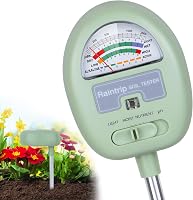
A connected sensor can provide remote readings, while a manual meter can answer a local question without a hub. For background on what moisture readings mean, see what a soil moisture sensor can tell you.
When does a longer probe help?
A longer probe can reach deeper soil in a large pot. Match the probe length to the depth you want to check, and make sure you can insert it without damaging roots or hitting the bottom of the container.
The XLUX Long Probe Plant Soil Moisture Meter has a probe 5.5 in longer than regular styles. Its dial gives an immediate dry, moist or wet reading, but it is a manual meter rather than a Zigbee sensor.
XLUX designed this meter for standard potting soil. Loose, airy mixes may not make enough contact with the probe, so press the growing medium firmly around it; wipe the probe after use and don't leave it in soil for more than 5 minutes.
The XLUX suits someone who wants a quick local check in a deeper pot and doesn't need phone alerts. Skip it if you require readings in a smart home app, or if your main growing medium is very loose and airy.
Do you need alerts, history or only a local reading?
Choose alerts and history when you need to check plants remotely or spot changes between visits. For occasional checks beside a pot, a simple meter may be enough.
Before choosing a connected system, decide what you will do with the data. A dashboard can help you check a plant from another room, while history can help you compare readings over time.
Alerts may be useful if you can't check plants often, but they only help when the app, sensor and notification settings work together.
For a local check, the XLUX meter gives an immediate result on its dial and doesn't depend on a hub. Its longer probe can be useful for deeper pots, though it won't send a reading to your phone.
The General Tools Digital Moisture Meter MMD7NP serves a different job. It is pinless and measures moisture in wood, with relative readings for wallboard, drywall and masonry.
This General Tools meter suits DIYers checking a suspicious damp mark without putting pins into a wall or wood surface. It is not a soil moisture meter, so skip it if your goal is to decide when to water plants.
The Govee WiFi Thermometer Hygrometer H5179 monitors indoor temperature and humidity through WiFi and Bluetooth with the Govee Home app. It measures room air, not soil moisture.
The Govee H5179 suits someone who wants to follow indoor air conditions and receive app alerts for preset temperature or humidity ranges. Skip it if you need a soil reading or a Zigbee connection.
It uses WiFi and Bluetooth, not Zigbee. Its WiFi does not support 5G.
Temperature and soil moisture answer different questions. Compare dedicated choices in our best soil moisture and temperature sensors guide.
Can a Zigbee sensor control watering?
A Zigbee soil moisture sensor can support automatic watering only when the sensor, hub and irrigation controller work together. Verify the connection and automation behavior before relying on a system to water plants.
Check how the controller receives sensor data and what happens if the hub loses its connection. Confirm whether the system lets you set a moisture threshold, review a reading and pause watering when needed.
A sensor's wireless protocol alone doesn't guarantee an irrigation feature. Support can differ by sensor, app and controller, so check the complete setup against your planned use.
Don't assume automation removes the need to observe the plants. A reading reflects conditions near the probe, so placement matters.
Keep a way to inspect the plant and soil directly, particularly after moving a sensor or changing the watering schedule.
How should you set up and care for a soil moisture sensor?
Set up a soil moisture sensor by choosing a representative spot, following its placement instructions and confirming the reading reaches your app or display. A good connection cannot make up for a probe placed in an unhelpful location.
Before inserting a probe, identify the area you want to monitor. In a pot, consider whether you need a reading near the center or deeper toward the bottom.
In a garden bed, avoid placing the sensor where runoff, a drip outlet or a roof edge could make that spot wetter than the rest of the bed.
Follow the sensor's instructions for insertion depth and soil contact. Don't force a probe into hard soil or through thick roots.
If your growing medium is loose or airy, check whether the sensor requires firmer contact to produce a useful reading.
After pairing, confirm that the hub receives a reading and that the app shows it for the correct sensor. If you rely on alerts, set a range that fits your intended use and confirm notifications are enabled on both the app and phone.
For care, follow the device's own cleaning and storage guidance. Remove a manual probe after checking if its instructions say not to leave it in soil.
Wipe it clean when required. For a connected sensor, inspect its placement and power as recommended rather than leaving it buried or exposed without checking.
What common mistakes make readings less useful?
The most common mistakes are assuming Zigbee guarantees hub support, placing the probe poorly, and treating one reading as a full picture of a bed or pot. Each can lead to a watering choice that doesn't fit the plant's actual conditions.
- Buying by protocol name alone: Confirm the exact hub and app support before ordering.
- Skipping outdoor guidance: Wireless doesn't mean weatherproof; check placement limits.
- Reading only the surface: Match probe reach to the soil depth you want to understand.
- Ignoring the growing medium: Loose or airy material may not make enough contact with some probes.
- Automating before checking behavior: Confirm thresholds, notifications and what happens if the connection drops.
- Expecting every sensor to measure soil: A temperature and humidity monitor measures air conditions, while a pinless building meter checks materials such as wood or drywall.
A sensor is a guide to conditions at its placement point. If a reading seems surprising, check its location and soil contact before changing a watering routine.
What should you check before buying?
Before buying, confirm the hub, location, probe and data features against your setup. This checklist can rule out a sensor that connects but doesn't solve your watering problem.
- Identify your exact hub and app.
- Confirm the specific sensor is supported.
- Check that it suits the planned location and growing medium.
- Compare probe reach and placement instructions.
- Decide whether you need alerts, history or irrigation control.
- Verify power and maintenance requirements.
If you only need to check a plant now and then, a manual soil meter may be simpler. If you want readings in a connected system, choose a Zigbee sensor with clear compatibility and placement guidance.
Which soil moisture sensor should you choose?
Choose a Zigbee model when its hub support and location guidance match your setup and you want connected readings or alerts. Choose a manual probe for occasional checks, or an indoor air monitor when you need temperature and humidity rather than soil data.
Start by checking the hub, then confirm the sensor's intended location and probe design. If automatic watering is the goal, verify every connection from sensor to controller before relying on it.
For related options, compare our best wireless soil moisture sensors and best soil moisture and temperature sensors. If you're still choosing between a connected device and a simpler check, our guide to using a soil moisture meter explains the manual approach.
Frequently asked questions
Will any Zigbee soil sensor work with my hub?
No. Confirm that the sensor supports your specific hub or smart home platform before buying.
Zigbee devices may require a matching hub or supported system.
Also check that readings appear in the app or dashboard you plan to use.
Can I leave a Zigbee soil sensor outside?
Only if the sensor is suitable for the weather and placement where you plan to use it. Check its outdoor guidance, temperature limits and placement instructions.
A wireless connection alone does not make a sensor weatherproof.
Do Zigbee soil moisture sensors work with irrigation controllers?
Some setups may connect sensor readings to irrigation controls, but compatibility depends on the sensor, hub, controller and supported integrations. Check the complete setup before relying on readings to start or stop watering, and confirm how it behaves if the connection drops.
What should I compare besides Zigbee compatibility?
Compare what the device measures, how its probe is placed, and whether it provides alerts or history. Also check power needs, location limits and whether the sensor suits your soil or potting mix.