Why Has Your Weather Thermometer Stopped Working?
If your weather thermometer died, check the batteries and identify which reading disappeared before buying anything. A blank screen, missing outdoor value, and odd but changing reading point to different problems.
On this page (9 sections)
- What does it mean when a weather thermometer died?
- How can you tell whether the display or sensor has failed?
- How do you check thermometer batteries?
- Why did the outdoor temperature reading disappear?
- How do you tell a dead battery from a sensor fault?
- Could the thermometer be reading wrong instead of being dead?
- When should you replace a weather thermometer?
- What should you check before buying a replacement?
- Which replacement should you choose if your weather thermometer died?
If your weather thermometer died, check its batteries and identify which reading disappeared before replacing it. A blank screen points first to display power, while a missing outdoor reading points to the remote sensor or its connection.
Start with fresh batteries of the type specified in the manual. Check polarity, the battery cover, and any low-battery icon, then inspect the display and sensor separately because one can lose power while the other still works.
Follow the thermometer's manual before cleaning contacts or resetting it. Note whether the screen is blank, shows dashes, holds an old reading, or displays a value that keeps changing.
What does it mean when a weather thermometer died?
A thermometer that stopped working may have lost power, lost its sensor signal, or started giving questionable readings. Those symptoms suggest different checks, so notice what the display is doing before changing settings.
A blank display suggests checking its batteries and contacts. If the indoor temperature appears but the outdoor value is blank or frozen, focus on the remote sensor and its connection.
A reading that changes but seems unusual may not mean the unit has failed. Sunlight, drafts, a nearby heat source, or sensor drift can affect measurements.
Our guide to what sensor drift is explains why a thermometer can keep working while its readings slowly become less reliable.
How can you tell whether the display or sensor has failed?
If the display still shows indoor information, check the outdoor sensor link first. A blank screen calls for a separate display power check, while dashes or an old outdoor value suggest the sensor is not sending usable data.
Write down the symptom and the model numbers from both units. That gives you a useful starting point when following the manual or contacting support.
If you have an AcuRite 00592TXR, follow the model-specific sensor troubleshooting guide. Sensor compatibility depends on model numbers, even when two units look alike.
How do you check thermometer batteries?
Check the batteries in the display and remote sensor separately, following the manual for type and orientation. A working display does not prove the outdoor sensor still has power.
Avoid mixing old and new batteries or combining types unless the manual allows it. Look for moisture, residue, or damaged contacts, and stop if you see corrosion you cannot clean safely.
For an AcuRite unit, use the steps in how to replace AcuRite thermometer batteries. Once fresh batteries are in place, allow time for the units to reconnect according to their instructions.
What if fresh batteries do not restore the display?
If the screen remains blank with correctly installed batteries, inspect the battery contacts and follow the manual's reset steps. Do not assume the sensor is dead before checking the display's own power.
If the contacts look damaged or the unit has been exposed to water, contact AcuRite for model-specific advice. A replacement sensor will not fix a failed display.
Why did the outdoor temperature reading disappear?
A missing outdoor reading often means the display is not receiving a sensor transmission. Check the sensor's batteries, model compatibility, channel or switch settings if present, and distance from the display.
Move the sensor near the display for a temporary signal check, away from large metal objects and likely sources of interference. If the reading returns, move it gradually toward its intended location and check that updates continue.
The AcuRite Wireless Indoor Outdoor Temperature and Humidity sensor is a replacement option for specific compatible models. Its compatible models include 00592TX, 00592TXR, 06002M, 06002RM, and 11126-592TXR, so check the label on your current sensor before choosing it.
This sensor needs 2 AA alkaline or lithium batteries, sold separately. Skip it if your display is not listed as compatible, or if the display itself is blank or damaged.
Can distance or placement block a sensor signal?
Testing the sensor close to the display helps separate a signal problem from a sensor problem. If the reading returns nearby, the original location or an obstacle may be interfering.
Keep the outdoor sensor away from direct sunlight, vents, and surfaces that can distort its temperature reading. Check the connection again after moving it to its permanent spot.
How do you tell a dead battery from a sensor fault?
Try fresh sensor batteries and a nearby placement before replacing the sensor. If the display works and the outdoor reading returns, low power or a weak signal was likely the problem.
If the sensor still will not connect nearby, confirm that its model is compatible with the display. Check any channel switch or pairing steps in both manuals because instructions vary by model.
Do not substitute a similar-looking sensor unless its model number is approved for your display. If compatibility is unclear, AcuRite support can help confirm the match.
Could the thermometer be reading wrong instead of being dead?
A changing but unusual reading may be an accuracy or placement issue, not a dead thermometer. Compare it with another thermometer nearby, away from sunlight, vents, and warm appliances.
Let both devices settle under the same conditions before comparing them. A steady difference may point to placement or sensor drift, rather than a blank display or broken connection.
Use this practical guide to checking weather station accuracy to make a more consistent comparison. If you are checking humidity as well as temperature, see how to calibrate a hygrometer.
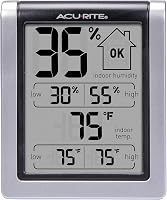
The AcuRite Wireless Digital Indoor Thermometer and Hygrometer displays room temperature and humidity, plus daily highs and lows for both. If its humidity reading seems off, see how to use a Boveda hygrometer calibration kit.
It suits someone who wants an indoor reference while troubleshooting an outdoor sensor.
Choose this monitor for a room where humidity matters, such as near a humidifier or dehumidifier. If you want to compare indoor and outdoor humidity readings, see indoor outdoor thermometers with humidity.
Skip it if you need an outdoor reading or a replacement remote sensor.
When should you replace a weather thermometer?
Replace only the part that has failed, once power, compatibility, and placement checks are complete. If the display works but a compatible sensor will not reconnect, a sensor replacement may be enough; if both parts are faulty or mismatched, a complete set may be simpler.
The AcuRite Digital Thermometer with Indoor provides current indoor and outdoor temperatures, trend arrows, and daily high and low records. Its outdoor sensor sends readings from up to 165 ft (50 m) away, and the display receives updated data every 30 seconds.
Choose this set if you want a fresh matched display and sensor together. Skip it if your current display works and you have confirmed that only the sensor needs replacement.
The display and sensor each require 2 AA batteries, sold separately.
For food storage rather than room weather monitoring, compare fridge and freezer thermometers or freezer thermometers with alarms. A Galileo thermometer reading guide covers liquid-filled glass models.
What should you check before buying a replacement?
Match the replacement to the part that failed and verify its model compatibility. Read the model label on your existing sensor and check it against the display manual or AcuRite's compatibility guidance.
Choose a replacement sensor when the display works and the failed sensor is confirmed compatible. Pick the indoor monitor if you only need room temperature and humidity, or a complete set if you want a replacement display and outdoor sensor together.
Common buying mistakes include choosing a sensor because it looks similar, replacing the sensor when the display has failed, and forgetting to check battery type. Before ordering, write down both model numbers and the symptom that remains after fresh batteries and a nearby signal check.
Which replacement should you choose if your weather thermometer died?
If your weather thermometer died, choose based on what still works: get the compatible remote sensor when only outdoor readings are gone, the indoor monitor when you need room temperature and humidity, or the complete set when you need both display and sensor.
If fresh batteries, suitable placement, and the correct pairing steps do not restore a reading, contact AcuRite with the model numbers and symptoms. For other compatible replacement options, see AcuRite weather station sensor guides.
Frequently asked questions
Why did my weather thermometer suddenly stop working?
A weather thermometer can stop showing readings because of weak or depleted batteries, a display problem, or a lost connection between a remote sensor and its display. Check the power first, then confirm the sensor and display are compatible and within range.
Use the manual for model-specific reset steps.
Why is my outdoor thermometer showing dashes?
Dashes can mean the display is not receiving data from its remote sensor. Check the sensor batteries, confirm model compatibility and channel settings if your units have them, then move the sensor closer temporarily.
Re-pair the units using the instructions for your model, since button sequences vary.
Can cold weather make a thermometer stop working?
Cold can affect battery performance, but operating limits depend on the specific thermometer and sensor. Check the manual for temperature limits and battery guidance.
If the screen works indoors but the outdoor sensor does not, inspect its power and placement.
How do I know if my thermometer is broken?
A thermometer may be broken if fresh, correctly installed batteries and the model's reset or pairing steps do not restore a display or sensor reading. Compare it with a reliable thermometer placed nearby and allow both time to settle.
A consistent difference may come from drift or placement, so check accuracy before replacing hardware.