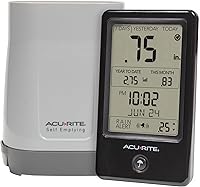
How to Reset an AcuRite Rain Gauge
AcuRite rain gauge reset instructions depend on the sensor model. Find the model number, follow its manual, and check for updated readings afterward; clear rain totals only if you mean to erase them.
On this page (8 sections)
- Where do you find AcuRite rain gauge reset instructions?
- How do you reset an AcuRite rain gauge safely?
- Should you restart the sensor or clear rain totals?
- What should you check after resetting the gauge?
- When do you need calibration instead of a reset?
- Which weather products help you check readings?
- What mistakes can stop a reset from helping?
- Which next step fits your rain gauge problem?
To reset an AcuRite rain gauge, follow the instructions for your exact sensor model, then confirm the display receives updated data. Restarting a sensor and clearing a stored rainfall total are not always the same operation.
Before touching a control, decide what you want to fix. If readings have stopped, check power, signal, and debris.
If the gauge is reporting again but the accumulated value needs a fresh start, look for the display’s rain-total control.
Where do you find AcuRite rain gauge reset instructions?
Use the model number on your sensor or display to find the matching AcuRite rain gauge reset instructions. Button positions and reset sequences vary, so a procedure for one model may not apply to another.
Look for the model label on the outdoor unit or display. Check the manual for a reset, restart, or clear-total control, and note whether the steps refer to the sensor or the console.
A reset control may be under a cover or inside a battery compartment if the manual shows it there. Don’t pry open a sealed housing or press an unlabeled button to guess.
How do you reset an AcuRite rain gauge safely?
Follow the manual’s sequence for your model, then give the sensor and display time to reconnect. Don’t borrow button combinations or battery steps from a different AcuRite gauge.
Use this preparation checklist:
- Write down any rainfall totals you want to keep.
- Record the sensor and display model numbers.
- Find the matching manual and identify whether you need a restart or a total clear.
- Follow the manual’s power, battery, and button steps in order.
- Put the sensor back in its normal position and allow the display to update.
- Check for a reading after rainfall, or use a test method only if the manual provides one.
A reset may briefly interrupt readings. If the display offers a separate rain-total clear function, leave it alone unless you intend to erase that value.
For mounting and placement help before returning the sensor to service, follow how to set up an AcuRite rain gauge.
Should you restart the sensor or clear rain totals?
Restart the sensor to troubleshoot operation; clear a total only when you want to start a new accumulation period. The exact control and its effect depend on the display model.
A sensor restart does not necessarily erase stored rainfall totals. Clearing a total does not necessarily restore a sensor connection, so check the manual’s description before choosing a control.
Ambient Weather consoles use their own controls. If you’re working with one of those stations, see how to reset rain totals on an Ambient Weather station for that separate procedure.
What should you check after resetting the gauge?
Check the data connection and the collection mechanism before trying another reset. A reset cannot remove a blockage or correct poor sensor placement.
Inspect the gauge opening for leaves, dirt, or other debris. If the design uses a tipping mechanism, follow the manual’s cleaning instructions and don’t force the parts to move.
Confirm that the sensor has power and sits within the range recommended for its display. Use the manual to check battery requirements, pairing steps, and any indicator lights.
No new rainfall reading does not always mean the reset failed. Wait for a rainfall event or use a manufacturer-approved test method, if one is described for your model.
If readings remain missing, work through why an AcuRite rain gauge may not be working before repeating the reset.
When do you need calibration instead of a reset?
Use calibration when readings arrive but seem consistently too high or low; use a reset when you’re trying to restore operation. Calibration settings won’t fix a missing signal or a blocked mechanism.
Check the model’s calibration steps before changing any setting. The guide to calibrating an AcuRite rain gauge covers that separate adjustment.
A tipping-bucket gauge records rain as collected water tips a small bucket. For Davis options using this mechanism, see Davis tipping bucket rain gauges.
Understanding how a tipping-bucket rain gauge works can help explain why a clear opening and freely moving mechanism matter.
Which weather products help you check readings?
Choose a weather station if you want rainfall alongside other outdoor conditions; choose a thermometer only if temperature is the extra reading you need. Neither replaces the model-specific reset instructions for an AcuRite rain sensor.
The Ambient Weather WS-2902 suits someone who wants rainfall readings together with several other backyard measurements and a color console. Its Wi-Fi features support remote access and weather alerts; skip it if you only need to restart an existing AcuRite rain sensor.
The AcuRite Iris fits readers who want rainfall and other outdoor conditions on an AcuRite display. It is a weather station rather than a standalone reset aid, so check the exact model’s manual for its reset and rain-total controls.
The AcuRite Digital Thermometer with Indoor suits someone who only needs current indoor and outdoor temperatures plus daily high and low records. It does not measure rainfall, so skip it if you need rain totals or a rain sensor.
For a basic explanation of what the instrument measures, read what a rain gauge is and how it’s used. If you’re setting up a separate alert device, how to set up and program a Midland weather radio covers that different task.
What mistakes can stop a reset from helping?
The most common mistake is treating every problem as a reset problem. A reset won’t correct a clogged collector, a dead battery, an out-of-range sensor, or a calibration issue.
Avoid these missteps:
- Clearing the wrong value: Record totals first, then confirm whether the control clears a daily, monthly, or longer accumulation.
- Using another model’s steps: Button sequences and access points can differ. Match instructions to the model number.
- Repeating resets without checking basics: Inspect power, signal, placement, and debris before trying again.
- Forcing the mechanism: Follow the manual for cleaning and movement checks; don’t bend or push parts to make them tip.
- Expecting an instant rain reading: A gauge may need rainfall or a model-approved test before the display can show a new amount.
If the sensor still does not report after these checks and a rainfall event, use AcuRite’s support resources for that model. Keep the model number and a short note of the steps you already followed.
Which next step fits your rain gauge problem?
Choose the action that matches the symptom: restart for an unresponsive sensor, clear totals for a new record period, and calibrate for readings that arrive but seem off. If the display has no signal, check power, placement, and pairing before doing any of those.
Identify the model first and keep the manual beside you. If a reset does not restore readings, troubleshoot the sensor and connection instead of clearing totals or repeating the same sequence.
Frequently asked questions
Where is the reset button on an AcuRite rain gauge?
The reset button location depends on the rain gauge model. Check the outdoor sensor and its manual for a labeled reset control, which may be inside a battery compartment or beneath a cover.
Don't press an unlabeled control or open a sealed area.
Use the model number to find the correct instructions.
Does resetting an AcuRite rain gauge erase rainfall totals?
It can, depending on what you reset and which model you have. A sensor reset may interrupt readings, while clearing rain totals on a display can erase accumulated data.
Record any totals you want to keep and check the manual before using a reset or clear control.
What should I do if my AcuRite rain gauge still does not work after a reset?
Check for debris or a blocked tipping mechanism, confirm the sensor has power, and make sure the display is paired and within range according to the manual. Wait for a new rainfall event to confirm measurement.
If readings remain absent, follow model-specific troubleshooting or contact AcuRite support.
How do I reset rain totals on another weather station?
Rain-total controls differ across brands and display models. For an Ambient Weather station, use its console or app instructions for clearing the desired total, and confirm whether the action affects a daily, monthly, or yearly value before proceeding.