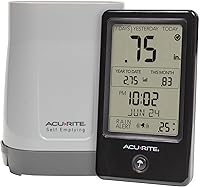
How to Calibrate an AcuRite Rain Gauge
To learn how to calibrate an AcuRite rain gauge, compare its reading with a measured amount of water delivered evenly into the collector. Check the instructions for your exact model before changing a setting.
On this page (8 sections)
- How do you test an AcuRite rain gauge with measured water?
- What should you check before adjusting calibration?
- How do you calculate the expected rainfall?
- How do you adjust an AcuRite rain measurement?
- Which products can help you monitor rain and weather?
- When should you reset the rain total?
- What if the gauge still underreports rainfall?
- How do you keep rain measurements reliable after calibration?
To learn how to calibrate an AcuRite rain gauge, compare its reading with a measured amount of water delivered evenly into the collector. Check the instructions for your exact model before changing a setting.
A controlled test can help separate a calibration mismatch from a setup or recording problem. Make one change at a time, then repeat the same test to see whether the reading moved closer to the expected amount.
How do you test an AcuRite rain gauge with measured water?
A controlled test uses a measured amount of water, a level gauge, and a slow, steady pour. The expected reading depends on the collector opening, so use the instructions for your specific AcuRite model to find the test amount and target.
- Check the model number and find its rain gauge calibration instructions.
- Clear the collector and confirm the gauge is mounted level.
- Note or clear the current test-period total as the manual directs.
- Add the prescribed amount of water slowly and evenly into the collector.
- Wait for the display to settle, then compare its reading with the expected amount.
- Record the difference before making any adjustment allowed by the manual.
A fast pour may miss the normal collection path. Use a steady stream and keep water away from the console and other sensors.
What should you check before adjusting calibration?
Check that the gauge is clean, level, and moving freely before changing calibration. Debris or poor setup can cause incorrect readings that an adjustment won't fix.
Remove leaves, grit, and other debris from the collector. If the gauge has a moving mechanism, inspect it gently and follow the manual for cleaning.
Don't force or bend its parts.
The sensor needs an open location where roofs, trees, or walls won't block rainfall. The guide to setting up an AcuRite rain gauge explains placement and installation.
Compare measurements over the same time window. A station's daily total may reset on a schedule, while a manual container measurement may cover a different period.
If the station misses rainfall or shows intermittent totals, review common causes of an AcuRite rain gauge not working. For related symptoms across brands, see why a weather station rain gauge may not be working.
How can you tell calibration error from a setup problem?
A repeatable difference in a controlled test may point to a calibration issue. If the reading changes from test to test, inspect placement, debris, the mechanism, and the test method before adjusting anything.
Check the console's connection and reception if the sensor appears to collect rain but the display doesn't update. If the gauge is new or has been moved, verify setup first.
How do you calculate the expected rainfall?
The expected rainfall is the volume of water divided by the collector opening area, expressed as a depth. Because collectors differ by model, use an AcuRite-approved test amount or the calculation instructions in your manual.
Don't assume the same cup of water should produce the same reading on every gauge. A larger opening spreads water over a wider area, changing the equivalent rainfall depth.
If the manual gives a test amount and target reading, follow those values. Keep the container and pour speed consistent when repeating the procedure.
How do you adjust an AcuRite rain measurement?
Adjust the reading only through the method described for your exact model. AcuRite stations can use different controls or procedures, so instructions for another model may make the error worse.
Some systems may provide a calibration setting through the display or connected software, while others rely on correct mechanical setup. Don't open the sensor, alter internal parts, or apply general instructions unless the manual directs you to do so.
After an approved adjustment, repeat the measured-water test with the same amount and pour rate. If the result still differs, follow the manual's troubleshooting steps instead of making repeated guesses.
What mistakes can distort an AcuRite rain gauge calibration test?
Common test errors include pouring too fast, using an unmeasured amount, and comparing different time periods. These can make a working gauge look inaccurate.
A gauge that isn't level may also collect or register water differently than expected. Check the mount before pouring, and don't change its position midway through a test.
Avoid using a distant weather station as the only reference. Rainfall can vary over short distances, so a nearby manual gauge or the model's controlled test method gives a more useful comparison.
Which products can help you monitor rain and weather?
A weather station can provide rain readings alongside other backyard conditions, while a separate thermometer adds temperature readings. Confirm the model's rain collection and calibration instructions before relying on it for a comparison test.
The Ambient Weather WS-2902 Wi-Fi Smart Weather Station measures rainfall, wind, temperature, humidity, UV intensity, and solar radiation. It suits readers who want rain readings alongside other weather data and Wi-Fi access, but skip it if you only need a simple standalone rain gauge.
The AcuRite Iris receives readings for rainfall, wind, temperature, humidity, and barometric pressure on its color display. It suits households wanting an AcuRite display for several weather readings, but skip it if you only need a basic rain measurement.
The AcuRite Digital Thermometer with Indoor provides current indoor and outdoor temperature, plus daily high and low records. It suits people who want temperature readings alongside a separate rain gauge, but skip it if rainfall measurement is your main need.
For a closer look at standalone options, compare the best AcuRite rain gauges for the yard. A weather station with several sensors is useful when you want more than rainfall totals.
When should you reset the rain total?
Reset a rain total only when you intend to start a new measurement period or the manual requires it for testing. A reset clears accumulated data and doesn't correct a sensor that reads too high or too low.
Write down any total you need to keep before resetting. Follow the model's instructions for clearing the display or starting a test period.
For model-specific steps, see AcuRite rain gauge reset instructions. If the gauge still records nothing after setup and a controlled test, troubleshoot the sensor and signal before resetting again.
What if the gauge still underreports rainfall?
If a controlled test still reads low, check for a blocked collector, an uneven mount, restricted movement, or a mismatch in the measurement period. Repeat the test after inspecting those points and confirming the correct method for your model.
Rainfall can vary across short distances, so comparing a backyard sensor with a distant station may not reveal a calibration error. Compare the gauge with a measured test or a nearby manual gauge in the same conditions.
If you're comparing another brand, the guide to an Ambient Weather WS-2902 underreporting rain covers checks for that model. A Davis weather station rain gauge that isn't working may need a different troubleshooting process.
How do you keep rain measurements reliable after calibration?
Keep the collector clear, mount it level, and follow the model's instructions for any test or adjustment. Record the test amount and result so you can compare readings after cleaning or calibration.
Choose a controlled test when the gauge repeatedly differs from a known amount. Troubleshoot first when readings are missing, inconsistent, or changed after a move or connection issue.
For a repeatable result, use the exact procedure in the gauge manual and change only settings it identifies. If your test points to a persistent problem, use the AcuRite rain gauge troubleshooting guide before deciding whether to replace the gauge.
Frequently asked questions
How do you calibrate an AcuRite rain gauge?
Use a controlled test: place the gauge level, add a measured amount of water slowly and evenly, and compare the display with the expected rainfall. Check the exact model manual before adjusting anything, since steps can differ.
Repeat the same test after any permitted adjustment.
How much water should I use to test a rain gauge?
Use the amount specified in your model's manual, and deliver it slowly so the gauge can register each increment. The expected rainfall depends on the collector's opening area and the amount of water.
Follow the manual's test method and target reading.
Should I reset the rain total before a calibration test?
Reset or clear the current test period only if your model's manual explains how. Record the existing reading first if you need to preserve it.
A reset can clear accumulated rainfall, so don't use one casually to correct a measurement mismatch.
Why is my AcuRite rain gauge reading incorrectly?
Debris, an uneven mount, blocked movement, signal interruptions, or a recording-period mismatch can look like a calibration problem. Inspect the collector and moving parts, confirm the gauge is level, and compare a controlled test with the manual before adjusting calibration.