How to Choose Ambient Weather WS-2902 Replacement Parts
Choose Ambient Weather WS-2902 replacement parts by matching the station revision to the failed assembly. Check the outdoor array, console, power source, or mount before ordering, and confirm compatibility for the exact model.
On this page (8 sections)
- How do you identify the right Ambient Weather WS-2902 replacement part?
- Should you replace the full outdoor sensor array?
- How do you choose a replacement console?
- Are batteries or mounting hardware the part you need?
- What should you verify before ordering WS-2902 parts?
- How should you set up and care for replacement parts?
- What common mistakes lead to the wrong replacement?
- How do you decide which WS-2902 part to replace?
Ambient Weather WS-2902 replacement parts should match your station revision and the assembly that has failed. Start by identifying whether the issue involves the outdoor sensor array, console, batteries, or mounting hardware, then confirm compatibility with the exact model before ordering.
The WS-2902 name covers multiple versions, so a part that fits one revision may not fit another. Check the labels on both the console and outdoor sensor, note what has stopped working, and compare the full model numbers with Ambient Weather’s compatibility information.
If the console still receives data, check which readings are missing or unreliable before replacing the outdoor array. Use the Ambient Weather WS-2902 troubleshooting guide to narrow down the fault, and the WS-2902 setup guide for Wi-Fi and pairing if the problem may involve configuration.
How do you identify the right Ambient Weather WS-2902 replacement part?
Identify the failed assembly first, then match its part number to the revision printed on your station. The WS-2902 name alone does not prove that a replacement will fit.
Write down the full model designation from both the display console and outdoor sensor. If a label is hard to reach, take a clear photo so you can compare it with Ambient Weather’s compatibility information or share it with support.
Use the symptom as a starting point:
| Symptom | First area to inspect |
|---|---|
| No outdoor readings | Sensor power, signal path, and outdoor array |
| One outdoor reading missing | The matching sensor function and its connections |
| Console does not turn on | Console power source, cable, or adapter |
| Readings return after a reset, then disappear | Setup, communication, or power |
| Array is physically damaged | Housing, mounting, and affected sensor assembly |
A symptom points to an area to inspect, not a guaranteed diagnosis. Check batteries and setup before ordering a replacement assembly, and don’t take apart a sealed sensor unless Ambient Weather provides instructions for your revision.
Which WS-2902 part numbers and revisions should you compare?
Compare the exact model and part number for the assembly you plan to replace. Don’t assume WS-2902, WS-2902A, WS-2902B, WS-2902C, and WS-2902D parts are interchangeable unless Ambient Weather confirms they are.
For a console replacement, match the console revision and confirm that it works with your outdoor sensor array. The Ambient Weather WS-2902D replacement console guide focuses on that version.
If you are considering a different Ambient Weather station family, check the WS-2000 and WS-5000 console compatibility guide before buying. For a broader look at model-specific options, see Ambient Weather station replacement parts.
Should you replace the full outdoor sensor array?
Replace the full array when its housing or several sensor functions have failed and Ambient Weather confirms a compatible replacement is available. If just one reading is missing, check power, placement, and communication before replacing the whole unit.
The outdoor assembly brings several measurements together, so damage to one unit can affect multiple readings. A data gap can also come from depleted batteries, a loose or blocked connection, or a console that needs setup.
Inspect the array from the ground when possible. Look for cracks, loose mounting, obstructed moving parts, corrosion around accessible battery contacts, or an antenna that has shifted.
Don’t climb onto a roof or tower without safe access and suitable equipment. Check whether the affected reading is temperature, humidity, wind, or rain, and note when it stopped and whether other measurements still appear.
Those details help you describe the problem clearly when you contact support. They also make it easier to distinguish a single sensor issue from a power or connection problem.
When is sensor repair better than replacement?
Repair can make sense if Ambient Weather offers a specific replacement sensor or repair step for your revision. Use documented instructions and don’t improvise repairs to sealed or weather-exposed components.
If the station may be under warranty, contact Ambient Weather before opening the array. Have the model and serial details ready, along with purchase information if available.
If the array looks intact and just one measurement is missing, rule out setup and placement first. Wind sensors need room to move freely, while debris or an uneven mount can interfere with rain collection.
How do you choose a replacement console?
Choose a console only after confirming it works with your exact outdoor sensor array. A similar screen or a shared part of the model name does not guarantee a compatible revision or communication setup.
Read the full console model number and compare it with the replacement’s compatibility details. Check whether a power adapter or cable is included, since those accessories may be sold separately from the console.
If the current console still turns on, note its readings, network setup, and pairing information before disconnecting it. You may need to reconnect the replacement to Wi-Fi and pair it with the outdoor array.
Don’t order based only on the words “WS-2902 compatible.” If the compatibility details don’t identify your revision, ask Ambient Weather to confirm the specific console and sensor combination.
Are batteries or mounting hardware the part you need?
Batteries and mounting hardware can address power or installation problems, but neither replaces a failed sensor assembly. Check the battery type in your manual and the mount dimensions before buying supplies.
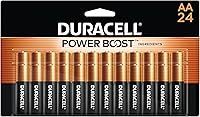
Use the battery size specified for the exact device. Duracell Coppertop AA batteries are alkaline cells for devices that require AA batteries, while Amazon Basics AAA batteries are alkaline cells for devices that call for AAA batteries.
Check the WS-2902 manual for the required battery size and quantity. Don’t substitute one size for the other based on appearance or convenience.
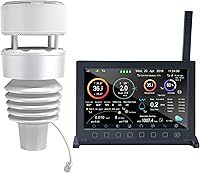
A replacement mount can help if the array has moved or its original hardware is damaged. The Ambient Weather EZ2-35W2MC Weather Station Pole Mounting kit includes six mast sections that assemble to a fully assembled height of 66 in, two clamps, and four lag screws for mounting to a vertical surface; the anemometer shown in the product image is not included.
Before changing the mount, check that it fits both the sensor’s attachment point and the surface where you plan to install it. Follow the station manual’s placement guidance so nearby structures and heat sources don’t interfere with readings.
What should you verify before ordering WS-2902 parts?
Verify the full station revision, part number, connector, and included hardware before you order. This check helps prevent buying a part that fits the WS-2902 family but not your particular unit.
- Read the model label on the console and outdoor array.
- Identify which reading or component has failed.
- Check Ambient Weather’s compatibility information for that revision.
- Compare connectors, mounting points, and included accessories.
- Check whether the replacement needs pairing, setup, or a separate power supply.
- Ask Ambient Weather support to confirm a match if any detail is unclear.
Keep photos of the labels and connectors with your notes. If you’re replacing a console, record both console and sensor models so support can check that the two will work together.
A third-party item title that says “WS-2902 parts” is not enough to confirm compatibility. Wait for a clear part number or written confirmation when you can’t verify the match.
How should you set up and care for replacement parts?
Set up a replacement part using the instructions for its exact component and station revision. Pair the console and array, restore the network connection if needed, and check that the readings return before treating the repair as complete.
For a battery change, use the specified size and quantity, observe the polarity marks, and close the battery compartment fully. Keep batteries dry and store spare cells in their original packaging until you need them.
For a console replacement, record the old console’s settings before disconnecting it. After installing the new one, follow its pairing steps and check that outdoor readings appear; reconnect Wi-Fi using the setup instructions for that model.
For an outdoor array or mount, install it where the station manual calls for clear exposure. Keep moving parts clear of branches and other obstructions, and secure the mount to a suitable surface with the correct hardware.
Recheck the array after severe weather or any work near the mounting point. If a reading changes after relocation, compare the new exposure with the previous location before assuming a sensor has failed.
What common mistakes lead to the wrong replacement?
The most common buying mistake is ordering by product family name without checking the revision. Confirm both ends of the system, especially when replacing a console or outdoor array.
Other errors can be avoided with a few checks:
- Replacing the full array before checking batteries, setup, and signal.
- Choosing a console because its screen looks like the old one.
- Assuming an AA battery can replace an AAA cell, or the reverse.
- Buying a mount without checking its attachment point and installation surface.
- Opening a sealed sensor before checking for revision-specific instructions.
- Treating one missing reading as proof that the entire array has failed.
If you are changing brands, compatibility needs the same care. Our guides to AcuRite 5-in-1 replacement parts, replacement sensors for La Crosse stations, and Davis weather station replacement parts cover other model-specific systems.
How do you decide which WS-2902 part to replace?
Choose the part that matches the symptom, failed assembly, and exact station revision. Correct setup or replace batteries when those explain the issue; replace the array or console only when the diagnosis and compatibility information point to that component.
If readings are missing or inconsistent, start with the WS-2902 troubleshooting guide and check the setup and Wi-Fi steps before buying hardware. For physical damage, match the part number and mounting details; for a console swap, confirm that the console and outdoor array are compatible as a pair.
When choosing Ambient Weather WS-2902 replacement parts, buy batteries only in the specified size, use a mount that fits your installation, and seek confirmation for revision-specific electronics. That decision rule can spare you from replacing a working component or ordering a part that won’t connect.