Ecowitt Wittboy Pro Weather Station Review: Worth It? (October 2026)
The ECOWITT Wittboy Pro Weather Station HP2564 suits buyers who want a dedicated console and a 7-in-1 outdoor sensor with online weather uploads. Its WS90 haptic rain sensor can show larger deviations under some conditions, so consider adding a WH40 rain gauge if precise rain data matters.
On this page (9 sections)
- What does the Ecowitt Wittboy Pro HP2564 include?
- How does the WS90 sensor measure weather?
- What are the HP2564 console and app useful for?
- Can you expand the Wittboy Pro with more sensors?
- What should you know about setup and placement?
- How does the HP2564 compare with other stations?
- Is the Ecowitt Wittboy Pro HP2564 worth choosing?
- How we scored the Ecowitt Wittboy Pro
- Should you choose the Ecowitt Wittboy Pro HP2564?
The ECOWITT Wittboy Pro Weather Station HP2564 suits buyers who want a dedicated console with a 7-in-1 outdoor sensor and online data access. Its WS90 sensor measures wind, temperature, humidity, light, UV and rainfall, though rain readings can vary with raindrop size and wind.
Choose it if you want a visible indoor display and options to add compatible Ecowitt sensors over time. If precise rain data matters, consider adding a separate WH40 rain gauge.
What does the Ecowitt Wittboy Pro HP2564 include?
The HP2564 package combines the HP2560 TFT console with the WS90 outdoor sensor array. The console has a 7-inch display, while the outdoor array gathers weather readings and sends them to the console.
ECOWITT Wittboy Pro Weather Station HP2564: Best for a dedicated console
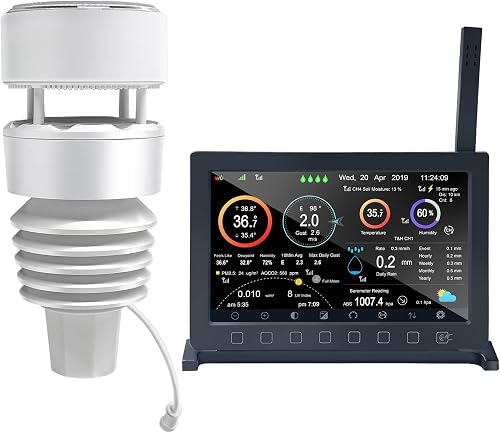
- 7-inch HP2560 TFT console
- WS90 7-in-1 outdoor sensor
- Wi-Fi weather uploads
- Pairs with Ecowitt sensors
A console-based package for buyers who want indoor readings and an outdoor sensor array, with Wi-Fi uploads and room to pair compatible Ecowitt sensors.
Pros
- Dedicated TFT display console
- Measures temperature, humidity, wind, light, UV and rainfall
- Uploads data to supported weather services
- Pairs with a range of Ecowitt sensors
Cons
- WS90 rainfall readings can vary with raindrop size and wind
- Console needs corded power
- Outdoor sensor batteries are not included
The console needs corded power, and the WS90 has a built-in solar panel and backup batteries. Outdoor sensor batteries are not included.
The outdoor sensor and console communicate by radio frequency at 915 MHz.
For a quick primer on the indoor unit's role, read what a weather station console does. The console is where you see local readings and configure Wi-Fi uploads.
How does the WS90 sensor measure weather?
The WS90 combines several outdoor measurements in one sensor array, including temperature, humidity, wind speed and direction, light, UV and rainfall. Its wind speed and direction readings use ultrasonic sensor technology, while rainfall uses a haptic piezoelectric sensor.
The haptic rain sensor detects rain and interprets when rain stops. It has no traditional collection cup, which keeps the array compact, but its measurements can vary under certain conditions.
Ecowitt notes that raindrop size and wind speed can affect the WS90's reported rainfall. If detailed rain data is central to your setup, pair it with a WH40 rain gauge.
You can also compare home weather stations with rain gauges.
Buyers comparing sensor formats can also review ultrasonic weather stations to see how those systems differ from stations with moving wind cups. For a broader look at an all-in-one sensor package, see the best weather station 7 in 1 options.
What are the HP2564 console and app useful for?
The HP2560 gives you a dedicated indoor display for the weather data collected around your home. After Wi-Fi setup, you can also view live data through the Ecowitt app or WS View Plus.
The console includes built-in indoor temperature and humidity sensors, plus a barometric pressure sensor. That gives the indoor unit a role beyond showing outdoor readings.
The system can upload sensor data to Ecowitt Weather, Weather Underground, WeatherCloud, WOW or a compatible custom website. Ecowitt Weather supports graphs and history downloads, and email alerts are available for Wittboy weather sensor data.
Wi-Fi configuration has three available methods. If you prefer a station centered on local readings rather than online services, compare the best digital weather stations with wind sensors.
Can you expand the Wittboy Pro with more sensors?
The HP2560 can pair with a range of Ecowitt sensors, so the HP2564 can serve as the center of a broader home monitoring setup. Supported additions include soil moisture sensors, thermo-hygrometers, pool and other thermometers, air quality sensors, a water leak detector, a separate rain gauge and an anemometer.
The supported number varies by sensor type. For example, the console supports up to 8 WH51 soil moisture sensors, up to 4 WH41 or WH43 air quality sensors, and one WH40 rain gauge.
This flexibility helps if you expect to add garden, pool or indoor monitoring later. Check compatibility and the supported quantity for each sensor before building a larger system.
What should you know about setup and placement?
Mount the WS90 on the mounting tube and base in a stable position suited to the sensor readings you want. ECOWITT specifies a transmission range up to 300 m in open space and up to 150 m when obstacles are present.
Those are stated maximum distances, so walls, structures and the specific installation can affect the connection. Check that the console receives consistent data from the sensor before settling on a permanent location.
The outdoor sensor meets IPX5 waterproof standards and uses thermal insulation materials. Its built-in solar panel and backup batteries support outdoor operation, while the console needs corded power.
Wi-Fi configuration is part of setup if you want app access or internet uploads. Keep the console within practical reach of power and your home network.
How does the HP2564 compare with other stations?
The ECOWITT Wittboy Pro stands out for its dedicated 7-inch console and sensor expansion options. The Ambient Weather WS-2902 is another Wi-Fi station with a color LCD and smart home integrations, while the AcuRite Iris focuses on a local color display and common backyard measurements.
| Station | Console and access | Sensor focus | Useful distinction |
|---|---|---|---|
| ECOWITT Wittboy Pro Weather Station HP2564 | 7-inch TFT; app and Wi-Fi uploads | WS90 7-in-1 array | Pairs with Ecowitt add-on sensors |
| Ambient Weather WS-2902 Wi-Fi Smart Weather Station | Color LCD; remote access and alerts | Wind, temperature, humidity, rain, UV and solar radiation | Smart home links include Alexa, Google Home and IFTTT |
| AcuRite Iris | Color LCD | Indoor/outdoor temperature, humidity, wind, pressure and rain | Local display includes a 12-hour personalized forecast |
Pick the HP2564 if the console, Ecowitt sensor expansion and online weather uploads match your plans. The best 5 in 1 weather station options can help if you want to compare a more compact sensor setup.
Is the Ecowitt Wittboy Pro HP2564 worth choosing?
The HP2564 is a good match when you want a console-based station with broad outdoor readings, Wi-Fi uploads and room to add sensors. The main trade-off is its WS90 rainfall measurement, which can vary with wind and raindrop size.
Choose it if a dedicated screen matters and you may add Ecowitt sensors for soil, pool or air quality readings. If precise rain data is a priority, consider a compatible WH40 gauge; if you only need general rainfall tracking, the WS90 may be enough.
For more options aimed at serious home monitoring, compare the best professional home weather stations. If you need a station that can run from batteries at the display, see battery operated weather stations for home.
How we scored the Ecowitt Wittboy Pro
Our score weighs specs, features and buyer feedback against what you're shopping for. We gave the HP2564 a 9.7 because it pairs a dedicated console with a multi-sensor array, Wi-Fi uploads and a wide range of compatible Ecowitt add-ons.
Its score reflects the breadth of the setup, while the rainfall caveat remains important for buyers who need precise totals. A separate WH40 can address that specific need.
Should you choose the Ecowitt Wittboy Pro HP2564?
Choose the ECOWITT Wittboy Pro Weather Station HP2564 if you want a dedicated console, multi-sensor outdoor readings and an expandable Ecowitt system. Choose another station if you want a different app ecosystem or a simpler local display, and add a WH40 if precise rain measurement is a priority.
Frequently asked questions
Does the Ecowitt Wittboy Pro HP2564 need a console?
Yes. The package includes the HP2560 indoor TFT display console and the WS90 outdoor sensor array.
The console displays sensor data and can connect to Wi-Fi for uploads to supported weather services.
It also has built-in temperature, humidity and barometric pressure sensors.
How accurate is the Wittboy Pro rain sensor?
The WS90 uses a haptic piezoelectric rain sensor, but rainfall readings can vary with raindrop size and wind speed. Ecowitt recommends pairing a WH40 rain gauge if you need more precise rain measurements.
The WS90 can suit general observation.
Can the HP2564 connect to other Ecowitt sensors?
Yes. The HP2560 console can pair with a range of Ecowitt sensors, including soil moisture, thermo-hygrometer, pool and other thermometers, air quality sensors, a water leak detector, a separate rain gauge and an anemometer.
Supported quantities vary by sensor type, so check the limits for the devices you plan to add.
Which weather services can the HP2564 upload to?
After Wi-Fi setup, the HP2560 can upload sensor data to Ecowitt Weather, Weather Underground, WeatherCloud, WOW and compatible custom websites. You can also view data through the Ecowitt app or WS View Plus after configuration.


