5 Best Newentor Weather Stations (November 2026)
The best Newentor weather stations include the Newentor Weather Station Wireless Indoor Outdoor Thermometer for color display fans, the Newentor Weather Station with 3-Sensor for multiroom monitoring, and the Newentor Projection Alarm Clock for ceiling time checks.
On this page (7 sections)
- How we chose these Newentor weather stations
- Which Newentor weather station fits your home setup?
- How many sensors should your Newentor weather station have?
- Which display and power setup suits your room?
- How should you install a Newentor wireless weather station?
- What common Newentor weather station mistakes should you avoid?
- Which Newentor weather station should you choose?
The Newentor Weather Station Wireless Indoor Outdoor Thermometer is a strong fit for a central room, while the best Newentor weather station for several areas may be a model with three sensors in the box. Choose a projection clock if seeing time and temperature on a bedroom wall or ceiling matters more than a large console display.
The right choice comes down to where you will put the console, how many places you want to monitor and whether you want a projection. Compare power options too.
Some displays stay lit on an adapter, while battery use can dim the screen or change how it behaves.
Think about your daily routine before you compare models. If you check the weather while passing through a kitchen or living room, a large console display may feel more natural.
If you usually check readings from bed, a projection can place the information where your eyes already go.
Sensor count matters in the same practical way. One included remote sensor suits a home that mainly needs one outdoor reading beside the indoor conditions.
Three included sensors suit a home that wants a backyard, a shaded side wall and another room compared at the same time.
Do not treat supported sensors and included sensors as the same thing. A station can support up to three sensors while shipping with only one, so you would need to buy extras and plan where each one will sit.
Power needs a close look as well. A plugged in display can stay on for a quick glance at any hour, while a battery only screen may dim to save energy.
That trade off matters most where you expect to read the screen often.
Forecast and clock features are useful extras rather than the main reason to buy. Sensor placement and display visibility will shape how much you trust the readings.
Use this guide to match each model to a clear job. Start with the room, the locations you want to watch and the light you prefer at night, then let the feature list narrow the choice.
Our picks at a glance
-
1
 Best for color display fans
Newentor Weather Station Wireless Indoor Outdoor Thermometer
9.7/10 our score
See it on Amazon -
2
 Best for multiroom monitoring
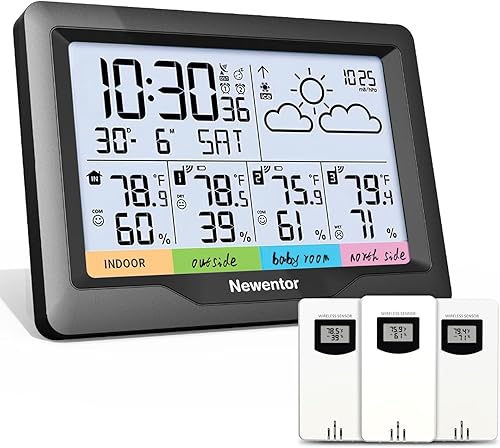
Newentor Weather Station with 3-Sensor
8.8/10 our score
See it on Amazon -
3

- 4
 Check it
Newentor Projection Alarm Clock
Best for blue light projection - 5
 Check it
Newentor Weather Stations Wireless Indoor Outdoor
Best for wide-angle viewing
How we chose these Newentor weather stations
We compared each station's display, included sensors, supported sensor count, power choices and clock or forecast features against common home setups. The scores reflect how well those features match the needs behind this search.
A weather station console is the indoor screen that receives readings from remote sensors and presents them with clock or forecast information. Our guide to what a weather station console does explains how the parts work together.
We treated a home setup as more than a list of specifications. A console in a bright living room needs different visibility than a clock beside a bed, and a sensor for a garden needs a different position than a sensor for a nursery.
Included sensors received close attention because they change what you can use on the first day. A station that supports three sensors but ships with one still asks you to buy and set up the extras before you get readings from several rooms.
Power was weighed in the same way. A battery powered console can sit where an outlet is awkward, while an adapter powered display can stay lit for a glance.
Neither option is better for every room, so we noted how each model behaves in daily use.
Display type also shaped the comparison. A color screen can group temperature, humidity, pressure and forecast details in one view, while a projection places time and temperature on a wall or ceiling.
A wide viewing angle helps when several people read the same console from different seats.
Clock and forecast features were treated as secondary, since they support the main readings rather than replace them. Atomic time can keep the clock and date settled, and pressure based forecasts can add context, but neither fixes poor sensor placement.
We kept the trade offs plain in each write up. If a model includes only one sensor, we said so.
If battery use dims the screen, we said so. That approach makes it easier to match a station to your rooms instead of buying for features you may not use.
The final scores should be read as a guide to fit, not as a claim that one station suits every home. The best choice is the one whose sensors, display and power match the places you actually check each day.
| Product | Best for | Display | Sensors | Power | Our score |
|---|---|---|---|---|---|
| Newentor Weather Station Wireless Indoor Outdoor Thermometer | color display fans | Color LCD with adjustable backlight | 1 included; supports up to 3 | DC adapter or battery backup | 9.7 |
| Newentor Weather Station with 3-Sensor | multiroom monitoring | LCD | 3 included | Battery powered | 8.8 |
| Newentor Projection Alarm Clock | ceiling time checks | Projection and screen | 1 included; supports up to 3 | Power adapter and battery | 7.6 |
| Newentor Projection Alarm Clock | blue light projection | Digital screen and projection | 1 included; supports 3 | DC power adapter | 7.5 |
| Newentor Weather Stations Wireless Indoor Outdoor | wide-angle viewing | 7.5 in VA color display | 3 included | DC adapter or batteries | 7.4 |
Which Newentor weather station fits your home setup?
The best Newentor weather station for a shared living space depends on whether you value a color screen, several sensors or a wide viewing angle. A projection model suits a different job: showing time and temperature from bed.
Newentor Weather Station Wireless Indoor Outdoor Thermometer: Best for color display fans
- Color LCD screen
- One remote sensor included
- Supports up to 3 sensors
- Indoor and outdoor temperature and humidity
A color screen brings temperature, humidity, forecast, pressure and clock details together. Plug in the console for an always-on display.
Pros
- Shows indoor and outdoor temperature and humidity
- Records daily highs and lows
- Offers customizable alerts
Cons
- Only 1 remote sensor is included
- Battery-only screen dims after a 15-second glance
The Newentor Weather Station Wireless Indoor Outdoor Thermometer brings indoor and outdoor temperature and humidity together with daily highs and lows, customizable alerts, time and date, forecast, moon phase and barometric pressure. Its color LCD and adjustable backlight make it a natural choice for a central room where you want to glance at more than a single temperature reading.
One remote sensor comes with it, and the console supports up to three sensors. That leaves room to add monitoring points for a basement, nursery or another area, though you'll need to buy those additional sensors separately.
The console uses its included DC adapter for an always-on display. On battery power, the screen lights for a quick 15-second glance before dimming, so this mode works better for occasional checks than a continuously visible clock.
Choose it for a color display and useful daily records. It also leaves room to expand.
Skip it if you need three remote sensors included or want a screen that stays lit without an outlet.
For installation, follow our guide to setting up a Newentor weather station, then use the Newentor weather station set time steps if the clock needs adjustment.
Newentor Weather Station with 3-Sensor: Best for multiroom monitoring
- Three remote sensors included
- Temperature and humidity monitoring
- Atomic clock
- Battery powered
Three included sensors let you monitor multiple locations from one console. Its battery-powered design can suit a room without a nearby outlet.
Pros
- Three remote sensors included
- Battery powered console
- Shows temperature and humidity
Cons
- The screen is not described as a color display
- One feature describes four-zone monitoring, while the main functions mention 3 channels
The Newentor Weather Station with 3-Sensor is the straightforward choice when you want to start with several monitoring locations. It includes three remote sensors and shows temperature and humidity information on an LCD console.
Its battery-powered design can suit a room where an outlet is inconvenient. The console is described as having a high-contrast display that remains readable without backlighting, which may be useful in a hallway, utility room or other spot where you want a quick glance.
There is a difference in how the monitoring zones are described: one feature mentions four-zone monitoring, while the main functions refer to three wireless channels. If you need a specific number of simultaneous readings, confirm that the console view meets your needs before relying on a fourth zone.
Choose it for three sensors and flexible console placement. Skip it if a color screen is a must.
The feature descriptions also differ on whether it has three or four monitoring zones.
Mount each sensor vertically in shade, and use the included label sticks to keep track of which location each channel represents.
Newentor Projection Alarm Clock: Best for ceiling time checks
- Projects time onto a wall or ceiling
- Two projection brightness levels
- Four screen brightness settings
- Supports up to 3 sensors
The projection makes time and temperature visible from bed, with separate brightness controls for the projection and screen. It also monitors indoor and outdoor temperature and humidity.
Pros
- Projection can be flipped 180 degrees
- Two alarms with adjustable snooze
- Supports up to 3 sensors
Cons
- One remote sensor is included
- Atomic time sync may need to be disabled where signal or time-zone support is unsuitable
The Newentor Projection Alarm Clock is aimed at bedside use, where a projected time and temperature can be easier to see than a console across the room. It projects onto a wall or ceiling and has separate controls for projection brightness and screen brightness.
You can flip the projection 180 degrees and invert its readings. This can help suit the way the clock sits.
One remote sensor is included, and the system supports up to three. Two alarms and adjustable snooze make it useful as a clock as well as a basic indoor and outdoor monitor.
The forecast uses barometric pressure changes to estimate conditions for the next 12 hours. Atomic time sync supports seven US time zones, but you can turn it off and set the time manually if the signal is weak or your location is unsupported.
Choose it for a bedroom projection with flexible alarm settings. Skip it if you want a large, always-visible weather display for a shared room.
It's also a poor fit if you need several sensors included.
If you need to correct a clock setting, use the Newentor weather station set time guide.
Newentor Projection Alarm Clock: Best for blue light projection
- Blue projection
- Two projection brightness settings
- Four screen modes including off
- Supports three sensors
This projection clock switches between time and temperature views and rotates to align the projection. It suits a bedroom where projection and screen brightness controls are priorities.
Pros
- Projection rotates 180 degrees
- Four screen brightness options
- Supports three sensors
Cons
- One remote sensor is included
- Power source is a DC adapter
This Newentor Projection Alarm Clock switches between time and temperature projection, with blue projection light and two brightness settings. Its screen offers four modes, including a full off setting, so you can choose how much light remains in the room.
The projection rotates 180 degrees to help align it with a wall or ceiling view. One remote sensor is included, and the system supports up to three sensors for additional monitoring locations.
The main appeal is the combination of projection controls and the ability to turn the screen off.
Choose it when blue projection and a screen-off option matter most. Skip it if you need three sensors in the box or want the flexibility to power the console from batteries.
Place the remote sensor in shade and protect it from direct rain.
Check the room layout before you set it up. A projection works best when the wall or ceiling sits in your natural line of sight from bed, and a darker room will show the glow more clearly.
Care is simple but steady. Keep the sensor shaded so sun does not warm it, and keep the console where the projection stays sharp rather than stretched across a corner.
Newentor Weather Stations Wireless Indoor Outdoor: Best for wide-angle viewing
- 7.5 in VA color display
- Three remote sensors included
- 170-degree viewing angle
- AC power with battery backup
The wide-view VA screen and three included sensors suit a household tracking several areas. The console can use an adapter or 3 AA batteries, while each sensor requires 2 AA batteries.
Pros
- Three remote sensors included
- 170-degree viewing angle
- Atomic clock synchronization
Cons
- Sensor batteries are not included
- Battery operation has screen behavior that may differ from adapter power
The Newentor Weather Stations Wireless Indoor Outdoor model combines a wide-view color screen with three remote sensors. Its 7.5 in VA display has a stated viewing angle of 170 degrees, making it a strong match for a shared space where people may check the console from different seats.
The console can use its DC adapter or three AA batteries. Each remote sensor takes two AA batteries, which aren't included, so plan for those before placing sensors around the home.
The model has atomic clock synchronization and a forecast. It also shows temperature, humidity and barometric pressure.
With the adapter, the display has high, low and off brightness settings. While the station searches for atomic time signals, the screen may go black for about seven minutes.
Choose it for a broad viewing angle and three sensors included. Skip it if you need a simple battery-only console with no screen behavior to learn.
If readings stop appearing, check our Newentor weather station troubleshooting guide before repositioning the console or sensors.
How many sensors should your Newentor weather station have?
Choose the sensor count based on how many places you want to compare from the console. One remote sensor gives you an outdoor reading alongside the indoor conditions; three sensors make it easier to watch separate outdoor or indoor areas at once.
The Newentor Weather Station Wireless Indoor Outdoor Thermometer includes one sensor and supports up to three. The two three-sensor stations include three remote sensors, while both projection clocks include one and support additional sensors.
Think through your locations before buying. A backyard sensor, a basement sensor and a nursery sensor each serve a different purpose.
For a station focused on outdoor garden conditions, compare weather stations for gardens.
The most useful arrangement depends on which readings you'll check regularly. Keep a short note of each sensor's location so you can interpret readings when cycling through channels.
Before adding a sensor, check which channels the console can display and whether the extra sensor is compatible. For help matching a replacement, use the guide to finding a compatible Newentor outdoor sensor.
Which display and power setup suits your room?
A station that looks good on paper can be awkward in daily use if its screen is hard to see from where you sit or it needs an outlet you don't have. Consider where the console will live before deciding which display and power arrangement to buy.
The first model is best if you want a color display that stays on when plugged into its adapter. Battery-only operation saves the need for a nearby outlet, but the screen dims after a 15-second glance.
The three-sensor station is battery powered, while the wide-view model offers an adapter or battery option.
Projection clocks are made for checking the time and temperature from bed. Picture where the clock will sit and whether its projected display will be visible from your pillow.
A projection feature won't be useful if the wall or ceiling isn't in your line of sight, or if its glow bothers you at night.
If the console seems blank or readings look wrong, review Newentor weather station troubleshooting steps.
How should you install a Newentor wireless weather station?
Install the console where you can read it easily, then place each remote sensor where its readings will be meaningful. Avoid putting an outdoor sensor in direct sunlight, since sun can warm the sensor and make the temperature read high.
For the three-sensor model, Newentor recommends mounting sensors vertically on a north-facing wall or in a shaded spot, about 6 inches below eaves. A shaded position under a deck rail is another option.
Keep the sensor protected from rain while allowing air to move around it.
Give each sensor a clear location label, especially if you have several. That simple step helps you connect a reading with the right room or outdoor spot instead of guessing which channel you're viewing.
Set the time zone and daylight saving time correctly on models with atomic time. Give the console time to receive the signal.
For pressure-based forecasts, allow 7 to 10 days for calibration where the model calls for it. A forecast display should be treated as a personal guide based on pressure readings, not a promise of exact local conditions.
If a sensor stops reporting, check its placement, batteries and channel before resetting the whole station. Our guides cover a Newentor weather station reset, sensor not working checks and setting up a Newentor remote sensor.
What common Newentor weather station mistakes should you avoid?
The most common placement mistake is putting an outdoor sensor in direct sunlight. That can warm the sensor and give you a reading that reflects its sunny position rather than the shaded outdoor air around it.
Another mistake is expecting battery power to behave like adapter power. On the color-display model, battery-only use dims the screen after a short glance.
On the wide-view model, the screen may go dark for about seven minutes while the station searches for an atomic time signal.
Don't assume that every model includes the same number of sensors just because each supports multiple sensors. Check what comes with the station and what its console supports separately.
Projection clocks also have one sensor included even though they can support more.
For forecast features, allow time for calibration where specified. Place the console where it can receive a time signal.
If atomic sync doesn't work in your area, the projection clock supports manual time setting. A forecast based on pressure is useful context for planning, but it cannot tell you exactly what conditions will be at every nearby location.
Which Newentor weather station should you choose?
Pick the Wireless Indoor Outdoor Thermometer if a color display, daily high and low records, alerts and expandable sensor support suit your central room. Choose the Newentor Weather Station with 3-Sensor if you want three sensors in the box and battery-powered console placement.
Choose the wide-view model if you'll read the console from different parts of a shared room and want three sensors included. For a bedside clock, pick the red projection model for adjustable projection and screen brightness or the blue projection model if you value its screen-off option.
The best Newentor weather station is the one whose included sensors, display and power fit your rooms. For a single outdoor reading, start with the color-screen model; for several locations, choose a three-sensor station; for a bedroom, choose projection.
For more brand options, compare these picks with our guide to the best AcuRite weather stations.
Our top 3 picks at a glance
-
1
Best for color display fans
Newentor Weather Station Wireless Indoor Outdoor Thermometer
9.7/10 our score
See it on Amazon -
2
Best for multiroom monitoring
Newentor Weather Station with 3-Sensor
8.8/10 our score
See it on Amazon -
3
Frequently asked questions
Which Newentor weather station is best for most homes?
The Newentor Weather Station Wireless Indoor Outdoor Thermometer suits a central room because its color LCD combines indoor and outdoor temperature and humidity with clock, forecast and pressure information. It includes one remote sensor and supports up to 3.
Choose a model with more included sensors if you want readings from several rooms right away.
What should I compare when choosing a Newentor weather station?
Compare how many sensors come in the box, how many the console supports, how the display is powered and which readings it shows. The first model keeps its display lit with the adapter, while battery-only operation dims the display after 15 seconds.
For a bedroom, projection brightness and screen-off options may matter too.
Do Newentor wireless weather stations include multiple sensors?
Some do. The Newentor Weather Station with 3-Sensor and the Newentor Weather Stations Wireless Indoor Outdoor model each include 3 remote sensors, while the other picks here include one.
Compare both the included sensor count and the console's supported sensor count.
Where should I place a Newentor outdoor sensor?
Place the sensor vertically in a shaded location, away from direct sunlight and rain. Newentor's guidance for the three-sensor model recommends a north-facing wall or a shaded spot about 6 inches below eaves, since direct sun can make temperature readings high.
See how to set up a Newentor weather station remote sensor for setup details.
Can a Newentor weather station predict local weather?
Newentor stations use pressure changes or barometric readings for a personal forecast, which is a guide rather than a guarantee. Some models need time for calibration, and the projection clock forecasts conditions for the next 12 hours.
Read whether a home weather station can predict weather to understand what these forecasts can tell you.