Davis Vantage Vue Console Compatibility Guide
Choose a Davis Vantage Vue console that Davis confirms matches your sensor suite. Check both model numbers and the console version, then decide whether you need a local display, WeatherLink access, or both.
On this page (10 sections)
- How do you check Davis Vantage Vue console compatibility?
- Are you replacing a console or adding one to a Vue system?
- Which console features should you compare?
- What if you only need a replacement part?
- Do batteries or mounting accessories affect compatibility?
- How should you set up a compatible console?
- What setup mistakes can cause problems?
- Can you use WeatherLink with a Vantage Vue console?
- What should you verify before ordering?
- Which Davis Vantage Vue console should you choose?
A compatible Davis Vantage Vue console must match the sensor suite’s model and wireless setup. Before buying a replacement or adding a separate console, record both model numbers and confirm the pairing.
The best choice depends on your setup. A console for a sensor suite you already own calls for a confirmed match, while a first-time buyer may prefer a complete station bundle with its parts identified together.
How do you check Davis Vantage Vue console compatibility?
Check the console and sensor suite model numbers together. Similar product names or a similar looking screen do not prove that two units can communicate.
Find each label on the back or underside of the equipment. Record the full model number and revision details, if shown, and note whether the console came with the station or was bought separately.
| Check | Why it matters |
|---|---|
| Console model and revision | Helps Davis confirm the intended station pairing |
| Sensor suite model | Identifies the unit sending outdoor readings |
| Wireless setup | Determines whether the components can communicate |
| WeatherLink plans | Helps identify the right console version and connection path |
| Included equipment | Shows whether you need a console alone or a complete station |
If a seller cannot identify the exact console model, ask before ordering. For a plain explanation of what a console does, read what a weather station console does.
Davis Vantage Vue console model checks
A model check is more useful than choosing by the word “Vue” alone. Send Davis or an authorized dealer a clear photo of both labels if you cannot read or interpret the numbers.
Ask for confirmation that the specific console works with your sensor suite. Also ask what cables, adapters, power supplies or other parts are included, since a console-only purchase may not provide everything your setup needs.
Are you replacing a console or adding one to a Vue system?
A replacement console must match the sensor suite already installed. If you are adding a console to an existing system, verify the model and wireless details before you buy.
For a replacement, record the old console number and note what still works. A blank screen may point to a power issue, while missing outdoor readings could involve the wireless connection, sensor suite or setup.
For a new pairing, first decide between a complete station bundle and a separate console. A bundle makes it easier to identify which parts are intended to work together, while a separate console can suit someone who already has a confirmed compatible sensor suite.
First-time buyers should confirm exactly what the bundle includes before ordering. Then follow the Davis WeatherLink console setup guide for the matching system.
Which console features should you compare?
Choose a console based on how you want to read and use weather data. A local display and WeatherLink access are distinct needs, so check which functions the specific model supports.
Some households mainly want a screen they can check at home. Other buyers want to save records on a computer or access data through WeatherLink, which may require compatible connection hardware or software.
Compare the model against these questions:
- Local readings: Does the display show the conditions you want to check?
- Data access: Does it support the connection path you intend to use?
- Power: What power source does it require, and which replacement cells or adapter fit?
- Expansion: Which sensors and accessories does the console support?
- Placement: Do you have a suitable surface, stand or nearby power outlet?
For data tools, see Davis Vantage Vue software options. If you are considering the other Davis station family, compare the Vantage Pro2 console compatibility guide.
What should Davis Vantage Vue console buyers skip?
Skip a console when the model number is missing, the seller cannot confirm compatibility, or the only evidence is that it looks like your old unit. A screen that appears similar does not mean its radio setup supports your sensor suite.
Also skip paying for features you will not use. If local readings are all you need, identify a compatible display and power arrangement first; if you want WeatherLink, confirm the extra connection requirements before choosing a version.
What if you only need a replacement part?
Buy by full model number, not by the words “Davis” or “Vantage” alone. Confirm compatibility with your Vue sensor suite and check which parts come with the console.
Avoid assuming that another Davis console works because the screen or menu looks familiar. If the number is unclear, contact Davis support or an authorized dealer and provide both equipment labels.
If the existing console belongs to your system but stopped responding, check its power and use the right reset steps before replacing it. The Davis WeatherLink console reset guide can help you decide what to check.
Do batteries or mounting accessories affect compatibility?
Batteries and mounts cannot make an incompatible console communicate with a sensor suite. They are useful only when their size, purpose and installation match your equipment.
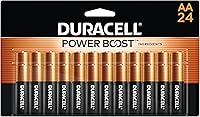
Check the console compartment or manual before buying batteries. The Duracell Coppertop pack contains 24 single-use AA alkaline batteries, while the Amazon Basics pack contains 36 single-use AAA alkaline batteries.
A pole mount affects where an outdoor sensor can sit, not whether a console can receive its signal. The Ambient Weather EZ2-35W2MC kit has six mast sections that assemble to 66 in, two clamps and four lag screws for vertical-surface mounting; the anemometer is not included.
Before installing an outdoor sensor, follow the station instructions for placement and keep the console’s wireless range in mind. A mount can help with positioning, but it does not correct an unsuitable location or mismatched equipment.
How should you set up a compatible console?
Set up a compatible console by confirming the pairing first, then powering it and following the instructions for that exact model. This keeps setup steps tied to the equipment you have rather than to a similarly named console.
Before starting, place the console where you can read it and where the instructions recommend. Keep the outdoor sensor suite in its intended position, and check that the console is within the recommended wireless range.
Use this sequence:
- Photograph or write down both model numbers.
- Confirm the console and sensor suite match.
- Check which batteries, adapter or cables the console requires.
- Power the console as directed by its manual.
- Follow the pairing or startup procedure for that model.
- Confirm that readings arrive before securing or tidying the setup.
If the console does not show outdoor readings, check the power, model pairing, distance and setup steps before changing several things at once. For general display troubleshooting, see why an AcuRite display may not recognize its sensor.
What setup mistakes can cause problems?
The most common avoidable mistake is buying or pairing equipment based on a family name without verifying exact model numbers. Another is treating a display problem as proof that the console needs replacement before checking its power and connection.
Avoid these shortcuts:
- Mixing station families: Do not assume a Vantage Pro2 console works with Vue equipment.
- Guessing at batteries: AA and AAA cells are different sizes; follow the compartment label or manual.
- Skipping the included-parts check: A separate console may not include every adapter or cable your setup needs.
- Changing several setup variables at once: Make one change, then see whether readings return.
- Placing the console too far away: A suitable pairing still needs a workable wireless path.
- Resetting before recording details: Keep model numbers and useful setup information before changing settings.
If the console has stopped receiving readings, keep the sensor suite and console model details together when contacting support. This helps distinguish a compatibility question from a power, placement or setup issue.
Can you use WeatherLink with a Vantage Vue console?
WeatherLink support depends on the console version and connection method. Identify the exact model before choosing software, an interface or an online connection.
Make a short list of what you want to do: read conditions on the console, save records on a computer, or access data through WeatherLink. Then confirm which supported components are needed for that workflow.
If you are considering a Davis system centered on Vantage Pro2, compare its options in the WeatherLink guide for Vantage Pro2. Its setup may differ from a Vue configuration.
What should you verify before ordering?
Confirm the full console model, wireless compatibility and included parts before placing an order. Keep the old unit’s label or a clear photo available so you can compare details.
Use this checklist:
- Record the Vue sensor suite model.
- Record the current console model if you are replacing one.
- Decide whether you need a local display, WeatherLink access, or both.
- Ask Davis or an authorized dealer to confirm the pairing.
- Check whether the needed batteries, power supply or mounting parts are included.
- Save the model numbers and compatibility confirmation for setup.
If power is the only issue, check the Davis Vantage Vue battery replacement guide before buying a new console.
Which Davis Vantage Vue console should you choose?
Choose a Davis Vantage Vue console only after matching its model to your sensor suite. For a replacement, start with the old console number; for a new setup, confirm the console and sensor suite as a pair.
Choose a complete bundle if you are starting from scratch and want the included components identified together. Choose a separate console if you already own a sensor suite and Davis confirms that the exact console version is compatible.
Skip any option with unclear model details or an unverified wireless match. If WeatherLink matters, confirm the connection path and required accessories before ordering.
Frequently asked questions
Can a Davis Vantage Vue use a Vantage Pro2 console?
A Vantage Pro2 console is not automatically compatible with a Vantage Vue. Compatibility depends on the exact console and sensor suite versions.
Record both model numbers and ask Davis or an authorized dealer to confirm the pairing before you buy.
Use the Vantage Pro2 console compatibility guide to compare the questions to ask.
Can I add a console to a Davis Vantage Vue sensor suite?
You may be able to add a separate console, but its model and wireless setup must match your Vue sensor suite. Read the labels on both units, confirm the console supports your intended connection, and ask Davis to verify the pairing before ordering.
Does a Davis Vantage Vue console connect to WeatherLink?
WeatherLink options vary by console version and connection method. Decide whether you want local readings, computer access, or online access, then check the exact console model against the compatible hardware and software for that workflow.
Can I use a different brand’s console with a Vantage Vue?
A different brand’s console may not communicate with Davis sensors because wireless systems and supported devices vary. Choose a console Davis identifies as compatible with your exact Vue sensor suite, and verify the model numbers before buying.
What should I check before replacing my Vue console?
Record the console and sensor suite model numbers, decide whether you need a display or WeatherLink access, and check the console’s power requirements. Confirm the replacement matches before removing or resetting the old unit, so you can compare its setup if needed.