What Is a Weather Station Console? How It Works
On this page (7 sections)
A weather station console is the central display unit that shows you the weather data collected by your home weather station sensors. Think of it as the brain, translating all the information from your backyard into easy-to-understand readings on a screen. It’s your personal weather hub, bringing real-time conditions right into your home.
Many homeowners find these consoles incredibly useful for staying informed about their immediate environment. They often connect wirelessly to outdoor sensors, gathering information like temperature, humidity, wind speed, and rainfall. This data helps you plan your day, garden, or even just decide what to wear.
- A weather station console is your main display for weather data.
- It receives information from outdoor sensors.
- Key readings include temperature, humidity, wind, and rain.
- It helps you understand your local weather at a glance.
Ready to understand how this handy device works its magic? Let’s break down exactly what’s happening behind the scenes.
Understanding Your Home Weather Station’s Display Unit
Your weather station console is the central hub for all the atmospheric information your system gathers. It’s the screen you’ll look at most often. This device translates raw data from your outdoor sensors into readings you can easily understand. Think of it as your personal weather command center right inside your home.
It’s designed to be user-friendly. You won’t need to be a meteorologist to make sense of it. The console displays key weather metrics. This allows you to stay informed about conditions around your property. Let’s look at how it gets all this information and what it does with it.
How Weather Station Consoles Receive Data
The magic behind your weather station console lies in its communication with the outdoor sensors. These sensors are placed in various locations around your yard. They measure different aspects of the weather. The console then acts as the receiver for this data.
Wireless Communication Between Sensors and Console
Most modern home weather stations use wireless technology to send data. This typically involves radio frequencies. Each sensor transmits its measurements to the console. The console is programmed to listen for these specific signals. This wireless link means you don’t have to run wires from your backyard to your house. It offers great flexibility in sensor placement.
Frequency Bands and Range
These wireless signals usually operate on specific radio frequency bands. Common bands include 433 MHz, 915 MHz, or 2.4 GHz. The range can vary significantly between models. It depends on factors like the transmitter power and environmental obstructions. You might find that thick walls or large metal objects can interfere with the signal. It’s good to check the manufacturer’s specifications for the expected wireless range.
Data Transmission and Updates
Sensors don’t send data constantly. They transmit at set intervals. This conserves battery power in the outdoor units. If the console shows a low battery icon, check the sensor batteries. A common update frequency might be every 16 to 32 seconds. Some high-end models might update more often. The console receives this data and updates its display accordingly. This ensures you’re seeing relatively current weather conditions.
Connecting to the Internet (Optional Feature)
Some consoles offer an additional feature: internet connectivity. This allows your weather station to do more than just display data locally. You can often connect your console to your home Wi-Fi network. This opens up a world of possibilities.
Uploading Data to Online Platforms
Once connected to the internet, your console can upload the gathered data to weather websites or apps. Services like Weather Underground or CWOP (Citizen Weather Observer Program) let you share your local data. This contributes to a larger network of weather information. It can also be a fun way to see how your microclimate compares to neighboring areas. Many users enjoy contributing to this shared weather data.
Remote Access and Mobile Apps
Internet-connected consoles often come with companion mobile apps. You can use these apps to view your weather data from anywhere. Whether you’re at work or on vacation, you can check in on your home’s weather. This remote access is a convenient feature for many users. It provides peace of mind and instant updates on the go.
What Your Weather Station Console Displays
The primary purpose of the console is to present the data clearly. It acts as your window into the local atmosphere. Different consoles offer varying levels of detail. However, most will show you a core set of weather measurements.
Core Weather Readings
These are the essential pieces of information you’ll find on almost any console. They give you a good snapshot of current conditions.
- Indoor Temperature and Humidity: This tells you about the climate inside your home.
- Outdoor Temperature: The most basic outdoor reading.
- Outdoor Humidity: How much moisture is in the air outside.
- Barometric Pressure: This measures atmospheric pressure. It can help predict short-term weather changes. Barometric pressure can help predict short-term weather changes; our guide explains how.
Advanced Weather Metrics
As you move up in models, you’ll find consoles that offer more detailed and advanced readings. These can be very useful for specific hobbies or interests.
- Wind Speed: How fast the wind is blowing.
- Wind Direction: The direction from which the wind is coming.
- Wind Gusts: The highest wind speed recorded within a certain period.
- Rainfall: The amount of rain collected over a specific time (e.g., daily, monthly, yearly).
- Dew Point: The temperature at which dew will form on surfaces.
- Heat Index: A measure of how hot it feels when humidity is factored in.
- Wind Chill: How cold it feels outside when wind speed is factored in.
Forecasting and Trend Indicators
Many consoles also interpret the data to provide weather forecast icons and trend information. This is where the console really starts to feel intelligent. It’s not just reporting numbers; it’s giving you a prediction.
- Weather Forecasts: Based on barometric pressure changes, many consoles offer short-term forecasts. These might be displayed as icons like sunny, cloudy, or rainy.
- Trend Arrows: You might see arrows indicating if pressure is rising, falling, or steady. This helps you understand developing weather patterns.
- Sunrise/Sunset Times: Some models can display these based on your location.
How the Console Processes and Displays Data
Once the console receives data from the sensors, it needs to process it. This involves converting raw signals into meaningful numbers and then presenting them. The display itself is designed for clarity and quick understanding.
Internal Processing Unit
Inside the console is a small processor. This unit takes the incoming wireless signals. It decodes them into understandable weather measurements. For example, it converts a radio pulse count into inches or millimeters of rain. It translates voltage changes from a temperature sensor into degrees Fahrenheit or Celsius. This internal computer makes the data usable.
Display Technologies
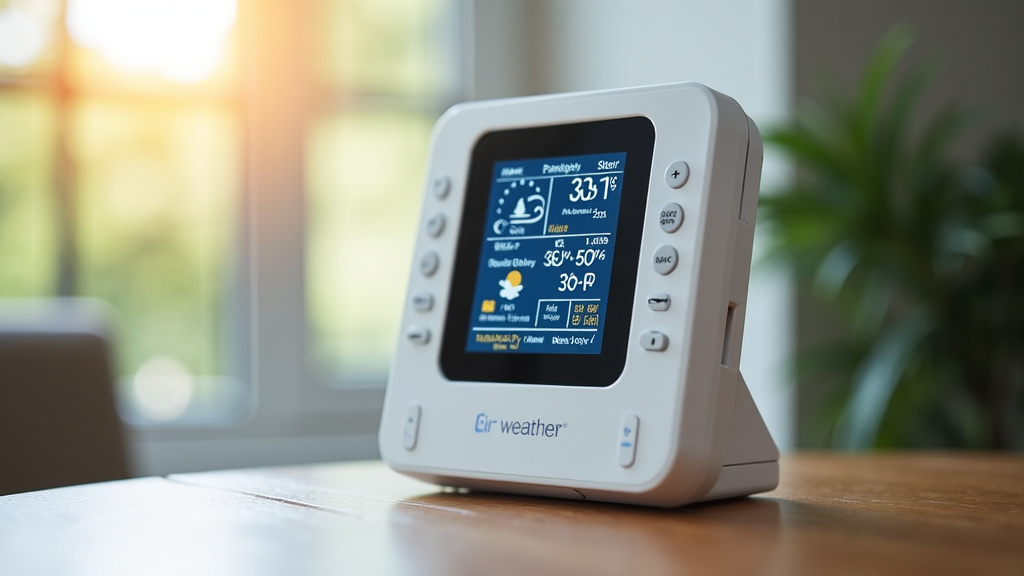
The screen on your console is its most visible feature. Common display technologies include LCD (Liquid Crystal Display) or sometimes LED (Light Emitting Diode). Many consoles have backlighting. This allows you to read the display even in low light conditions. Some higher-end models might feature larger, more vibrant color screens. The design aims to make the key information visible at a glance.
User Interface and Controls
Consoles have buttons or touch-sensitive areas. These allow you to navigate through different readings. You can often cycle through historical data. You might also be able to adjust settings like units of measurement (e.g., Fahrenheit vs. Celsius). The interface is generally kept simple for ease of use. You are in control of what you see and how it’s presented.
Key Components of a Typical Console
To understand how it all works, it helps to know the basic parts that make up a console.
- Display Screen: Shows all the weather data.
- Receiver: Catches the wireless signals from sensors.
- Processor: Interprets and converts the raw data.
- Power Source: Usually AC adapter with battery backup.
- Buttons/Controls: For navigation and settings.
- Memory (Optional): Stores historical data.
- Wi-Fi Module (Optional): Connects to the internet.
This combination of hardware and software allows your console to be a reliable source of local weather information. It’s a sophisticated device designed for everyday use. You are getting a lot of technology in one neat package.
Conclusion
You now understand that your weather station console is more than just a display; it’s the central hub translating your outdoor sensors’ data into actionable weather information. From simple temperature readings to advanced wind and rain metrics, this device gives you a clear picture of your local climate. Consider your console your personal weather command center, helping you make informed decisions daily. Your next step is to familiarize yourself with your console’s specific features and how to best utilize the data it provides for your everyday planning.
Frequently Asked Questions
How often does my weather station console update the weather data?
Most weather station consoles update data from outdoor sensors at regular intervals, typically every 16 to 32 seconds. This frequency helps conserve battery power in the sensors while still providing you with current weather conditions. Always check your specific model’s manual for exact update times.
Can I place my weather station console anywhere in my house?
While you can place your console in many locations, it’s best to position it near your main Wi-Fi router if it has internet capabilities. For optimal wireless reception from outdoor sensors, avoid placing it too far from them or near large metal objects that could cause interference.
What does “barometric pressure” mean on my console?
Barometric pressure is the weight of the atmosphere pushing down on the Earth’s surface. Changes in this pressure can help predict short-term weather shifts. A falling pressure often suggests incoming storms, while rising pressure usually indicates clearing weather.
Do I need an internet connection for my weather station console to work?
No, an internet connection is not required for basic operation. The console will still receive data from your outdoor sensors and display core weather readings. Internet connectivity is an optional feature that enables online data sharing and remote app access.
How do I know if my console is receiving signals from my outdoor sensors?
Your console typically has an indicator, often a small icon, that shows the strength of the wireless connection to each sensor. If the signal is weak or lost, you might see this icon disappear or change. Refer to your console’s manual for specific indicators.