8 Best Remote Fridge Temperature Monitors (November 2026)
The best remote fridge temperature monitors include the Ideal Sciences Temp Stick Remote WiFi Temperature for simple WiFi monitoring, the MOCREO WiFi Freezer Thermometer Alarm with Digital for a visible hub display, and the MOCREO WiFi Remote Thermometer Freezer Alarm for longer sensor reach.
On this page (11 sections)
- Which remote fridge temperature monitors suit different needs?
- How were the best remote fridge temperature monitors compared?
- How should you choose a remote fridge temperature monitor?
- How do you set up a fridge temperature monitor?
- Where should you place the sensor?
- How do you care for a remote fridge temperature monitor?
- What mistakes can make fridge alerts less useful?
- Is WiFi or cellular better for remote fridge monitoring?
- Can you check a fridge without opening its door?
- How can you reduce false temperature alerts?
- Which remote fridge temperature monitor should you choose?
The best remote fridge temperature monitor for most homes is the MOCREO H5Lite kit, which includes an LCD hub, two sensors, and app, email, and local alarms. Temp Stick fits a simpler WiFi setup, while cellular monitors suit places without WiFi.
A remote sensor lets you check refrigerator temperatures without repeatedly opening the door. Your choice depends on whether you want phone alerts, a local display, outage history, or a connection that works away from home WiFi.
For a simpler local setup, see our best fridge and freezer thermometer guide. For a phone-connected option focused on the refrigerator, compare the picks in our best wireless thermometer for refrigerator roundup.
Our picks at a glance
-
1
 Best for simple WiFi monitoring
Ideal Sciences Temp Stick Remote WiFi Temperature
9.5/10 our score
See it on Amazon -
2
 Best for a visible hub display
MOCREO WiFi Freezer Thermometer Alarm with Digital
9.4/10 our score
See it on Amazon -
3
 Best for longer sensor reach
MOCREO WiFi Remote Thermometer Freezer Alarm
9.3/10 our score
See it on Amazon
- 4
 Check it
NECTO Cellular Temperature Monitor
Best for locations without WiFi - 5
 Check it
LSNDRG Freezer Thermometer with Alarm
Best for local two-zone checks - 6
 Check it
MOCREO WiFi Refrigerator Thermometer with Freezer Alarm
Best for crowded wall outlets - 7
 Check it
Frigga 4G Cellular Temperature & Humidity Monitor
Best for flexible connections - 8
 Check it
MOCREO WiFi Refrigerator Thermometer with Freezer Alarm
Best for outage history review
Which remote fridge temperature monitors suit different needs?
The MOCREO H5Lite kit fits most homes because it combines two sensors, a hub display, and several alert channels. Other picks serve specific needs, including cellular access, local-only monitoring, or temperature history during an outage.
Ideal Sciences Temp Stick Remote WiFi Temperature: Best for simple WiFi monitoring
- Temperature and humidity monitoring
- 2.4 GHz WiFi
- Text and email alerts
- 2 AA batteries
Temp Stick monitors temperature and humidity over WiFi and can send text or email alerts when readings reach your thresholds. It suits a fridge within range of compatible home WiFi.
Pros
- Text and email alerts
- Stores readings while temporarily offline
- No subscription required
Cons
- Does not support 5 GHz WiFi
- Not for public or guest WiFi networks
Temp Stick is a compact remote sensor for a refrigerator within range of your home WiFi. It monitors temperature and humidity and can send text or email alerts when readings cross thresholds you set.
If the connection drops temporarily, the sensor keeps recording and can upload up to one month of stored data after it reconnects. It runs on two AA batteries, and there’s no subscription.
Choose it when you want one sensor and direct alerts without a separate hub display. Skip it if your network only offers 5 GHz WiFi or if you need to connect through public or guest WiFi.
For a separate freezer or another cold-storage location, compare the options in our best wireless freezer thermometer guide.
MOCREO WiFi Freezer Thermometer Alarm with Digital: Best for a visible hub display
- H5Lite hub with LCD
- Two temperature sensors
- App, email and 80 dB hub alerts
- 2-year data export
The H5Lite hub displays sensor readings, trends, and alerts, while two sensors can cover separate cold-storage locations. App, email, and local hub alarms offer several ways to notice a temperature change.
Pros
- Hub LCD shows readings without opening the fridge door
- Two sensors included
- CSV export for up to 2 years
Cons
- WiFi supports 2.4 GHz only
- Wireless signal can be affected by enclosed metal
The H5Lite kit suits a kitchen where you want to check readings at a glance. Its LCD hub displays sensor temperatures, trends, and alerts, so you can check the screen without opening the refrigerator door.
Two sensors let you monitor separate locations, such as a fridge and freezer. App notifications, email, and an 80 dB hub alarm give you several alert routes, and data can be viewed and exported as CSV for up to 2 years.
A 0.9 mm flat probe cable is designed to pass through a door seal. The hub uses 2.4 GHz WiFi, so check your network before setup; enclosed metal can also affect its wireless signal.
Choose this kit for a visible hub and two monitored locations. Skip it if you need cellular service or a sensor system designed for a long open-air range.
For another fridge-focused option, see our best WiFi temperature sensor for freezer roundup.
MOCREO WiFi Remote Thermometer Freezer Alarm: Best for longer sensor reach
- H5Pro hub
- Two IP66 splash-proof sensors
- App, email and 95 dB hub alerts
- 2-year data export
The H5Pro hub communicates with compatible sensors over an open-air range of up to 1640 ft. Two splash-proof sensors and several alert routes suit cold storage spread across more than one area.
Pros
- Hub supports Ethernet or 2.4 GHz WiFi
- Two sensors included
- CSV export for 2 years
Cons
- Open-air range may not reflect a home with walls
- Avoid fully enclosed metal spaces
This MOCREO set pairs two splash-proof sensors with the H5Pro hub. The hub connects through Ethernet or 2.4 GHz WiFi and communicates with compatible sensors over an open-air range of up to 1640 ft.
Its display shows readings and history. App notifications, email, and a 95 dB hub beep provide three alert routes, and the system supports CSV export for 2 years.
The range is an open-air figure, so walls and metal surfaces can reduce the practical reach. Keep the sensors where they can communicate with the hub, and avoid fully enclosed metal spaces.
Choose this set when sensors need to cover a wider property or more than one storage area. Skip it if your only need is one fridge beside a router and a simple display.
For monitoring an RV refrigerator or pet area, see our best RV pet temperature monitor guide.
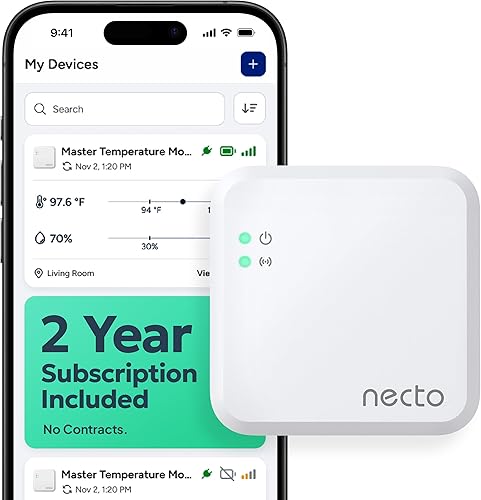
NECTO Cellular Temperature Monitor: Best for locations without WiFi
- 4G LTE connection
- 2 years of cellular service included
- Temperature, humidity and power monitoring
- Rechargeable battery
NECTO uses cellular service instead of WiFi and can alert you to temperature, humidity, or power changes. Its rechargeable battery can keep monitoring during a power loss.
Pros
- Does not require WiFi
- Power outage alerts
- Up to 5 alert contacts
Cons
- Service renewal is needed after 2 years
- Online portal readings update every 10 minutes
NECTO uses 4G LTE cellular service, which suits a refrigerator in a place without WiFi. Two years of service are included, and its rechargeable battery can last up to 3 days.
It tracks temperature, humidity, and power status. You can set high and low thresholds, add up to 5 alert contacts, and access past readings through the app or web portal.
After the included service period, renewal is needed to keep cellular monitoring. Readings are stored for 1 year, and portal readings update every 10 minutes.
Choose NECTO if the site lacks WiFi and power outage alerts matter. Skip it if you want to avoid cellular service renewal.
It may not suit you if you need faster updates in the portal. For a logger-focused comparison, see our best wireless temperature data logger guide.
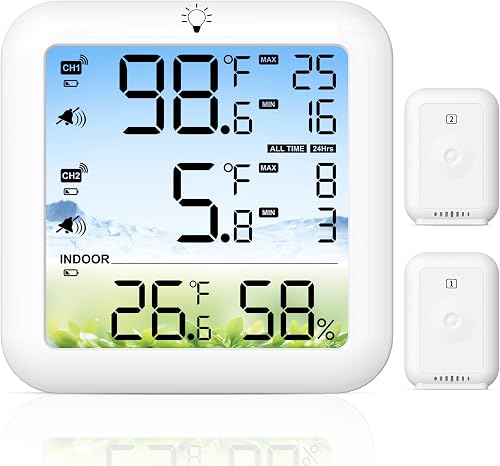
LSNDRG Freezer Thermometer with Alarm: Best for local two-zone checks
- Two probes
- Visual and audible alerts
- 330 ft stated range
- Backlit display
This local wireless thermometer uses two probes to monitor two locations, such as a refrigerator and freezer. Its display shows 24-hour maximum and minimum readings without an app.
Pros
- No WiFi or app needed
- Two probes included
- Visual and audible alerts
Cons
- No remote app alerts
- No cloud data history stated
The LSNDRG thermometer is the local-monitoring choice in this group. Its two probes can track two locations, and the backlit display shows 24-hour maximum and minimum readings.
It works without WiFi or an app and sends visual and audible alerts when temperatures pass preset limits. The stated transmission range is 330 ft.
Choose it if you want a nearby display and don’t need alerts while away. Skip it if you need phone notifications or a saved online temperature history.
The stated range is a maximum, so position the display where it can receive both probe signals.
For other remote choices, compare the options in our best remote room temperature monitor guide.
MOCREO WiFi Refrigerator Thermometer with Freezer Alarm: Best for crowded wall outlets
- Two sensors
- H3 hub with pass-through outlet
- App, email and 80 dB hub alerts
- 2-year data storage
The H3 hub has a pass-through outlet, leaving room to plug another appliance into the wall outlet. Its two sensors and remote alerts suit a kitchen where outlet access matters.
Pros
- Pass-through outlet hub
- Two sensors included
- Temperature history can be exported
Cons
- WiFi supports 2.4 GHz only
- Power outage alerts may take up to 25 minutes
MOCREO’s H3 hub includes a pass-through outlet, so another appliance can still use the same wall outlet. Two sensors can monitor fridge and freezer temperatures, with app, email, and hub buzzer alerts.
The 0.9 mm flat probe cable is designed to pass through a refrigerator or freezer door seal. Temperature history can be viewed and exported for up to 2 years, and one hub can manage up to 30 sensors.
Power outage notifications may take up to 25 minutes, and the hub needs WiFi. That delay matters if you need to know about a loss of power as soon as possible.
Choose the H3 kit when outlet space is tight and you want two sensors with remote alerts. Skip it if cellular access or immediate outage notification is essential.
Frigga 4G Cellular Temperature & Humidity Monitor: Best for flexible connections
- 4G cellular with 2 years included
- Optional 2.4 or 5 GHz WiFi
- Temperature and humidity alerts
- Rechargeable battery
Frigga can use cellular service or connect to 2.4 or 5 GHz WiFi. Its screen, app alerts, and rechargeable battery give you connection options for different locations.
Pros
- Cellular connection included for 2 years
- Optional dual-band WiFi
- Temperature and humidity monitoring
Cons
- Service renewal is needed after 2 years
- App readings update every 10 or 30 minutes
Frigga offers cellular monitoring with optional WiFi, so you can choose the connection that works at the location. It includes 2 years of cellular service and can also connect to 2.4 or 5 GHz WiFi.
The screen refreshes every 5 seconds in constant-on mode. Normal readings reach the app every 10 or 30 minutes, while app, email, and voice alarms can signal temperature, humidity, power failure, or disconnection changes.
Its rechargeable battery can last up to 7 days, and records can be stored for up to 2 years and downloaded as CSV files. Check cellular coverage before relying on remote alerts.
Choose Frigga if connection flexibility and a built-in screen suit your location. Skip it if you need more frequent app updates or don’t want to plan for service renewal after the included 2 years.
MOCREO WiFi Refrigerator Thermometer with Freezer Alarm: Best for outage history review
- MS3 sensor and H6Lite hub
- App, email and 90 dB hub alerts
- 168-hour local data recall
- 2-year data export
This MOCREO setup stores up to 168 hours of temperature history locally during a WiFi or power outage. After power returns, you can review the temperature curve alongside remote alerts.
Pros
- Local temperature recall during outages
- App, email and hub alerts
- Hub can manage up to 30 sensors
Cons
- WiFi connection required for remote monitoring
- Power outage alerts may take up to 25 minutes
This MOCREO kit stores temperature history locally for up to 168 hours during a WiFi or power outage. Once power returns, you can review the temperature curve and see how readings changed while the system was offline.
App and email notifications work alongside a 90 dB hub alarm. The flat probe cable is designed for fridge or freezer door seals, and temperature history can be exported for up to 2 years.
Power outage alerts may take up to 25 minutes. The system relies on WiFi for remote monitoring, so stored history is useful for reconstructing an outage after the connection returns, rather than a substitute for cellular alerts.
Choose this model when outage history is a priority. Skip it if you mainly want a screen or a pass-through outlet hub, where the H5Lite or H3 fits better.
How were the best remote fridge temperature monitors compared?
The useful differences are connection type, alert routes, sensor arrangement, and what happens when power or internet fails. A good choice fits the fridge’s location and the way you’ll notice an alert.
WiFi systems can send information to an app or email when the home network is working. Cellular monitors can work without WiFi, while local-only thermometers keep the setup simple when you only need to check readings nearby.
A display is useful when someone at home needs to check temperatures quickly. Data history matters more when you may be away during an outage and want to review the temperature trend later.
How should you choose a remote fridge temperature monitor?
Start with where the refrigerator sits and what connection reaches it. A home kitchen usually has WiFi nearby, but a cabin, RV, or outbuilding may need cellular coverage or a local-only monitor.
Then decide how many places need monitoring. One sensor can cover a single fridge; two probes or sensors can track a fridge and freezer, or two separate refrigerators.
Before buying, confirm that the sensor arrangement suits the placement you have in mind.
Choose alert routes you will notice. Phone notifications and email help when you are away, while a hub alarm can alert someone nearby.
A screen lets you check current readings without opening the fridge.
Finally, decide whether you need stored history. A chart or export can help you understand temperature changes after a connection returns, but it does not guarantee that you’ll receive an alert at the moment a problem starts.
How do you set up a fridge temperature monitor?
Set up the monitor beside the refrigerator first, then confirm that the sensor, hub, and alert path work before leaving it unattended. Follow the instructions for the specific model, since WiFi, cellular, and local systems pair differently.
For a WiFi system, check the supported band and connect the hub or sensor to the correct network. Some models in this roundup support 2.4 GHz only.
Frigga also supports optional 5 GHz WiFi. Test an alert in the app and confirm that emails or texts reach the right account or phone.
Place the sensor or probe where it measures the cold-storage area you care about. If a cable passes through the door seal, check that the door closes fully and the cable is not pinched.
If the kit has two sensors, label them by location in the app or on a small note beside the hub. That simple step can prevent confusion when a reading changes.
Where should you place the sensor?
Place the sensing tip where it represents the stored food area, while keeping it clear of shelves, packages, and the door mechanism. Follow the model’s directions for whether the sensor should hang, sit, or attach with its included clip.
A wireless sensor needs a path to its hub. Avoid placing it inside a fully enclosed metal container, which can interfere with signal transmission; if a refrigerator blocks the signal, try the sensor’s recommended position or use a probe cable designed to pass through the seal.
Do not let a cable prevent the door from closing. A poor seal can cause temperature swings and frost, which can create misleading alerts and affect the refrigerator itself.
How do you care for a remote fridge temperature monitor?
Keep the sensor and hub dry and clean according to their care instructions. For example, the MOCREO H5Lite components are wipe-clean and should not be soaked.
Check batteries or charging status on a regular schedule, even when a model sends low-battery alerts. Replace batteries with the type specified for that device, and confirm that the monitor reconnects and reports a current reading afterward.
Review the alert thresholds after moving a sensor or changing what you store. A threshold that is too narrow can create repeated alerts during normal door openings or defrost cycles, while one that is too broad may fail to draw attention to a meaningful change.
What mistakes can make fridge alerts less useful?
A common mistake is buying a WiFi monitor before checking the network band and signal at the refrigerator. If the hub cannot connect reliably, remote alerts and history may not work as expected.
Another is treating an open-air range as the range you will get through a house. Walls, appliances, and metal surfaces can reduce signal reach, so position the hub where it can communicate with its sensors.
Avoid setting alerts so tightly that routine door openings trigger repeated notifications. Use a delay setting when available, and allow the sensor to settle after installation before deciding that its thresholds need changing.
Do not assume every remote monitor keeps sending alerts through an outage. Check whether the system uses cellular service and backup power, stores readings locally, or depends on the home router and electricity.
Is WiFi or cellular better for remote fridge monitoring?
WiFi is a practical choice for a fridge near a stable home network. It supports app access without cellular service, but remote access can stop if the router or household power goes down.
Cellular suits a vacation home, cabin, RV, or other location without WiFi, provided there is cellular coverage. Check the included service period and renewal terms before you plan to keep monitoring over the long term.
A local wireless thermometer is better when you want a nearby screen and alarm but don’t need updates while away. It avoids app and network setup, but it cannot provide remote phone alerts.
Can you check a fridge without opening its door?
Yes. A remote sensor can send a reading to an outside hub or phone, so you can check the temperature without opening the refrigerator.
A hub screen is convenient at home, while an app helps when you are away. Some kits use a flat probe cable through the door seal; make sure the door still closes fully after installation.
How can you reduce false temperature alerts?
Set thresholds for the temperatures you want to monitor and use an alert delay if the system offers one. A short delay can filter out brief changes from door openings or normal defrost cycles.
Secure the sensor or probe and avoid moving it repeatedly. If alerts continue, check placement, the door seal, and the threshold before muting notifications.
Which remote fridge temperature monitor should you choose?
Choose the MOCREO H5Lite kit for two sensors, a visible hub, and app, email, and local alerts. Pick Temp Stick for one straightforward WiFi sensor, NECTO for cellular monitoring without WiFi, or the LSNDRG model if a local display and two probes meet your needs.
For a wider sensor reach, consider MOCREO’s H5Pro kit; for a pass-through outlet, choose its H3 kit. If reviewing temperature history after an outage matters most, the MOCREO H6Lite model is the clearest fit.
Our top 3 picks at a glance
-
1
Best for simple WiFi monitoring
Ideal Sciences Temp Stick Remote WiFi Temperature
9.5/10 our score
See it on Amazon -
2
Best for a visible hub display
MOCREO WiFi Freezer Thermometer Alarm with Digital
9.4/10 our score
See it on Amazon -
3
Best for longer sensor reach
MOCREO WiFi Remote Thermometer Freezer Alarm
9.3/10 our score
See it on Amazon
Frequently asked questions
How does a remote fridge temperature monitor work?
A remote fridge temperature monitor tracks conditions with a sensor or probe, then sends readings or alerts through WiFi or cellular service. Some kits also include a display or audible alarm outside the refrigerator.
Check the connection type and alert methods before buying.
A WiFi monitor needs a compatible network, while a cellular model needs service and coverage.
Can a wireless sensor go inside a refrigerator?
Yes, if the sensor is designed for the refrigerator's temperature range and its signal can reach its hub. Some kits use a thin probe cable through the door seal, while others place a wireless sensor inside.
Follow the placement directions, keep the door closing fully, and avoid putting a wireless sensor inside an enclosed metal container.
Will a remote monitor alert me during a power outage?
It depends on the monitor's connection and power source. A cellular monitor with a backup battery may keep sending alerts during some outages, while a WiFi hub can lose remote access if household power or internet fails.
Local data recall can preserve a temperature record for review after power returns, but it does not guarantee an immediate remote alert.
Should I choose WiFi or cellular for fridge monitoring?
Choose WiFi when the fridge is near a stable home network and you want app access without cellular service. Cellular suits a location without WiFi, but check coverage, how long service is included, and renewal terms.
A local wireless thermometer is a simpler choice when you only need a nearby display and audible alarm.


