7 Best WiFi Temperature Sensors for Freezers (November 2026)
The best WiFi freezer temperature sensors include the MOCREO WiFi Thermometer Freezer Alarm for two freezer locations, the Ideal Sciences Temp Stick Remote WiFi Temperature for direct WiFi monitoring, and the MOCREO WiFi Freezer Thermometer Alarm with Digital for a visible hub display.
On this page (5 sections)
The best WiFi temperature sensor for a freezer depends on how you want alerts delivered and whether your freezer is within reliable WiFi range. Temp Stick connects directly to WiFi, MOCREO adds a hub alarm and paired sensors, and YoLink uses LoRa with a hub for locations beyond typical WiFi coverage.
A remote monitor can alert you to a temperature change while you're away. For a wider look at options without a phone connection, see our best fridge and freezer thermometer picks.
Our picks at a glance
-
1
 Best for two freezer locations
MOCREO WiFi Thermometer Freezer Alarm
9.5/10 our score
See it on Amazon -
2
 Best for direct WiFi monitoring
Ideal Sciences Temp Stick Remote WiFi Temperature
9.5/10 our score
See it on Amazon -
3
 Best for a visible hub display
MOCREO WiFi Freezer Thermometer Alarm with Digital
9.4/10 our score
See it on Amazon
- 4
 Check it
MOCREO WiFi Remote Thermometer Freezer Alarm
Best for long-range sensor coverage - 5
 Check it
YoLink Freezer Temperature Sensor Kit
Best for several storage locations - 6
 Check it
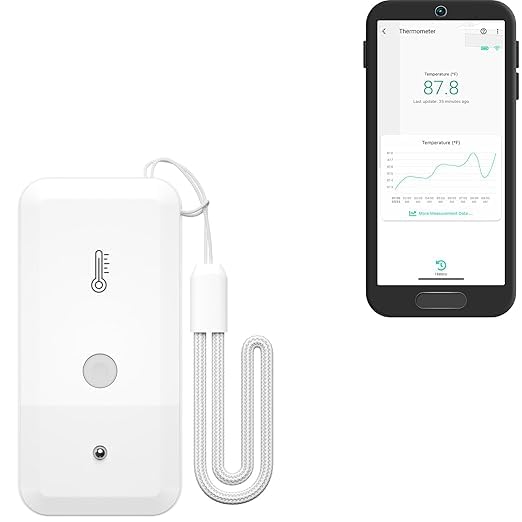
YoLink Freezer Temperature Sensor
Best for adding one freezer sensor - 7
 Check it
GoveeLife WiFi Refrigerator Thermometer Sensor with Alarm
Best for quick temperature response
How to choose the best WiFi temperature sensor for a freezer
The best WiFi freezer thermometer should match your network, freezer layout, and preferred alert method. We compared the connection types, sensor counts, temperature ranges, alerts, and data features for this roundup.
Confirm the sensor's signal path before placing it inside a chest freezer or a metal-sided upright model. A sensor can record a reading inside the freezer while its wireless signal struggles to reach the hub or router.
| Product | Best for | Sensors | Temperature range | Alerts | Our score |
|---|---|---|---|---|---|
| MOCREO WiFi Thermometer Freezer Alarm | two freezer locations | 2 wireless thermometers | -40°F to 158°F | App, email and 90 dB hub alarm | 9.5 |
| Ideal Sciences Temp Stick Remote WiFi Temperature | direct WiFi monitoring | Text, email and app | 9.5 | ||
| MOCREO WiFi Freezer Thermometer Alarm with Digital | a visible hub display | 2 wireless thermometers | -40°F to 158°F | 9.4 | |
| MOCREO WiFi Remote Thermometer Freezer Alarm | long-range sensor coverage | 2 wireless LS1 thermometers | -4°F to 131°F | 9.3 | |
| YoLink Freezer Temperature Sensor Kit | several storage locations | 3 sensors plus hub | -4°F to 122°F | 9.1 | |
| YoLink Freezer Temperature Sensor | adding one freezer sensor | -4°F to 122°F | 9.0 | ||
| GoveeLife WiFi Refrigerator Thermometer Sensor with Alarm | quick temperature response | 2 sensors plus gateway | -40°F to 158°F | 8.7 |
Which WiFi temperature sensor for a freezer has the right connection?
Choose a direct WiFi sensor if you want fewer components, or a hub system if its added sensors, display, or wireless range fit your setup. The WiFi systems here use 2.4 GHz networks where specified.
Temp Stick connects directly to a 2.4 GHz network. MOCREO and GoveeLife kits use a hub or gateway, while YoLink sensors communicate with their hub over LoRa rather than using household WiFi for sensor traffic.
A freezer in a garage or basement may be far from the router. LoRa can extend sensor coverage, but the hub still needs an internet connection for remote app updates.
Which alerts matter when checking a freezer remotely?
App and email alerts are useful for routine monitoring, while a local hub alarm can be heard at home. Text alerts add another option when you may not see app notifications promptly.
Temp Stick includes unlimited text alerts. YoLink's SMS allowance is limited, and its kit notes 15 free SMS per month for a hub and one sensor.
MOCREO and GoveeLife include audible alarms. Check whether the sound comes from a hub or the sensor itself, and whether muting or silencing it requires app access or pressing a button.
Should you choose a display, data history, or extra sensors?
A local display helps you check readings without opening an app, while stored data can help you see temperature changes over time. Extra sensors are useful when one hub needs to cover more than one freezer or cold-storage area.
The MOCREO H5Lite shows readings on its LCD hub, and both MOCREO systems here support data export. Temp Stick records data while temporarily offline and can upload stored readings after reconnection.
If app access is your main priority, compare these options with our guide to the best freezer thermometer with an app. For a sensor that can attach to a metal surface, see magnetic freezer thermometer options.
The best WiFi freezer temperature sensors for different setups
The 7 picks cover direct WiFi, hub-based monitoring, and LoRa sensor coverage. Each one serves a different freezer setup, so check the connection requirements before choosing.
MOCREO WiFi Thermometer Freezer Alarm: Best for two freezer locations
- 2 wireless sensors
- App, email and hub alerts
- 2.4 GHz WiFi
- CSV data export
This MOCREO set pairs two wireless sensors with a WiFi hub, making it useful for monitoring a freezer and another cold-storage spot. It records data online and supports CSV export.
Pros
- Two sensors in the set
- Hub can sound a local alarm
- Includes hub offline and low battery alerts
Cons
- Requires 2.4 GHz WiFi
- Uses a hub
The MOCREO H6Lite set is a strong choice for monitoring two spots, such as a kitchen freezer and a garage refrigerator. It comes with two wireless thermometers, a hub, and app, email, and audible hub alerts.
Its sensors measure from -40°F to 158°F, with a flat cable that can pass through a refrigerator or freezer door seal. The hub supports up to 30 compatible MOCREO BLE sensors within an open-area range of up to 230 ft.
You can view online graphs and export up to 2 years of data as CSV files. The hub's beep can be muted in the app, and the system includes hub offline and low battery alerts.
Choose this set when two sensors and a local alarm are more useful than a built-in display. It uses 2.4 GHz WiFi, so place the hub where it can reach both the router and sensors.
Ideal Sciences Temp Stick Remote WiFi Temperature: Best for direct WiFi monitoring
- 2.4 GHz WiFi
- Text and email alerts
- 2 AA batteries
- Data logging
Temp Stick connects directly to a 2.4 GHz WiFi network and sends temperature and humidity alerts. It suits a freezer owner who wants remote monitoring without a separate hub.
Pros
- Unlimited text alerts
- Stores data while temporarily offline
- No gateway required
Cons
- Does not support 5 GHz WiFi
- Not for public or guest WiFi
Temp Stick is a strong match if you want a sensor that joins your WiFi network directly. It monitors temperature and humidity, then sends text, email, and app alerts when readings cross thresholds you set.
Its data recording continues while the connection is temporarily offline, with up to a month of stored data uploaded after reconnection. Automated daily, weekly, and monthly email reports can also help you review freezer conditions over time.
It runs on 2 AA batteries and does not need a gateway. The main limitation is network compatibility: it works on 2.4 GHz WiFi and does not support 5 GHz or public and guest networks.
Choose Temp Stick if you want direct WiFi, multiple alert thresholds, and no hub to place nearby. If your freezer is beyond WiFi reach, a hub system with a separate sensor link may fit better.
MOCREO WiFi Freezer Thermometer Alarm with Digital: Best for a visible hub display
- LCD hub display
- 2 wireless sensors
- App, email and hub alerts
- CSV data export
The H5Lite hub displays sensor readings and trend charts locally, alongside app and email alerts. Pick it if you want a quick temperature check at the hub as well as remote access.
Pros
- Hub shows sensor readings
- Two sensors included
- Supports CSV data export
Cons
- Requires 2.4 GHz WiFi
- External probe for using the hub as a sensor is not included
This MOCREO kit adds an LCD screen to the hub, showing the clock, sensor readings, trends, alerts, calendar, and weather. That can save a phone check when you walk by the freezer.
The two sensors have the same stated -40°F to 158°F measurement range as the other MOCREO kit here. App push notifications, email, and an 80 dB hub alarm provide three alert routes, with data charts and CSV export for review.
The hub can also function as a temperature sensor when paired with a separate probe, which is not included. Its 2.4 GHz WiFi connection and support for up to 30 compatible BLE sensors make it a flexible option for a larger setup.
Choose it if you want temperature readings visible at the hub as well as on your phone. If you don't need the LCD, the H6Lite set offers remote alerts and two sensors in a simpler hub format.
MOCREO WiFi Remote Thermometer Freezer Alarm: Best for long-range sensor coverage
- H5Pro hub
- Up to 1,640 ft open-air sensor range
- IP66 splash-proof sensors
- App and email alerts
The H5Pro hub connects with the two LS1 sensors over a long-range wireless protocol and supports Ethernet or 2.4 GHz WiFi. The splash-proof sensors suit damp locations, though enclosed metal freezers can affect signal.
Pros
- Long open-air sensor range
- IP66 splash-proof sensors
- Hub has an LCD display
Cons
- Not intended for fully enclosed metal containers
- Hub connection requires Ethernet or 2.4 GHz WiFi
The MOCREO H5Pro set is designed for longer sensor reach than the BLE hub kits. Its open-air sensor range is up to 1,640 ft, and the H5Pro connects through Ethernet or 2.4 GHz WiFi.
The two LS1 sensors are rated IP66 for splash resistance and measure from -4°F to 131°F. The hub screen displays readings and trends, while app push, email, and a 95 dB hub beep provide alerts.
MOCREO cautions that fully enclosed metal containers can interfere with the wireless signal. That matters for commercial walk-in units or thick freezer doors, so keep the sensor placement and signal path in mind.
Choose this set for a distant freezer or a damp area where splash resistance helps. For a small home freezer close to the router, a shorter-range kit may be easier to place.
YoLink Freezer Temperature Sensor Kit: Best for several storage locations
- 3 sensors and hub
- LoRa wireless protocol
- Up to 2,034 ft open-air range
- App, text and email alerts
This kit includes three sensors and a hub, so you can monitor several freezers or other locations in one system. YoLink uses LoRa instead of WiFi for the sensor connection.
Pros
- Three sensors included
- Long open-air sensor range
- Supports app, text and email alerts
Cons
- SMS messages are limited
- Sensor readings require the YoLink hub
The YoLink kit includes three sensors and a hub, so it suits a home with multiple freezers or other temperature-sensitive spaces. The sensors use LoRa, which keeps them from adding traffic to your WiFi network.
YoLink states an open-air sensor range of up to 2,034 ft. Alerts can arrive by app, text, or email, and the sensors run on 2 AA batteries with up to 5 years of battery life depending on use and conditions.
The temperature range is -4°F to 122°F. The SMS allowance is limited, so app or email alerts may be the better everyday choice if you monitor several sensors.
Choose this kit when you need three locations covered or the freezer sits beyond ordinary WiFi reach. The hub still needs internet access for remote updates through the app.
YoLink Freezer Temperature Sensor: Best for adding one freezer sensor
- LoRa wireless protocol
- Up to 2,034 ft open-air range
- 2 AA batteries
- Hub required
This single sensor can expand a compatible YoLink setup to another freezer or cold-storage spot. It requires a YoLink hub for app use and full functionality.
Pros
- Long open-air sensor range
- Up to 5 years of battery life, depending on use and conditions
- Supports app alerts
Cons
- Hub required
- SMS messages are limited
This single YoLink sensor is a way to add one more freezer to a compatible YoLink setup. It uses LoRa and requires a YoLink hub for app access and full functionality.
Like the three-pack sensor, it measures from -4°F to 122°F and supports app alerts, as well as text and email notifications with limits on SMS. It runs on 2 AA batteries, with up to 5 years of life depending on usage and conditions.
The stated open-air range is up to 2,034 ft. That range may be useful for a freezer in a remote room, but the hub and sensor need a workable radio path.
Choose this sensor if you already have a compatible hub and need coverage for one additional location. If you're starting from scratch or need multiple sensors, the YoLink kit bundles a hub with three.
GoveeLife WiFi Refrigerator Thermometer Sensor with Alarm: Best for quick temperature response
- 2 sensors and WiFi gateway
- 2-second response time
- App, email and buzzer alerts
- 2.4 GHz WiFi
GoveeLife pairs two sensors with a WiFi gateway and can send app and email alerts, with an audible buzzer at the sensor. It is a practical fit if quick updates and monitoring more than one location matter.
Pros
- 2-second response time
- Two sensors included
- Gateway supports up to 10 sensors
Cons
- Gateway uses 2.4 GHz WiFi
- Buzzer is muted by default
GoveeLife pairs two sensors with a WiFi gateway and supports app, email, and buzzer alerts. Its 2-second response time is the quickest stated among these picks.
The temperature range is -40°F to 158°F, with ±0.9°F precision. A gateway supports up to 10 sensors within an open-area range of up to 230 ft, which can help if you want to add more monitored spots later.
The buzzer is muted by default, and silencing it requires pressing the sensor's side button. Keep the gateway within reach of the router and sensors, since obstacles can reduce wireless range.
Choose GoveeLife if quick readings, two sensors, and a local buzzer suit your routine. If you want data export or an LCD hub, compare the MOCREO options above.
How should you place a WiFi freezer thermometer?
Place the sensing probe or sensor where it can read the freezer air without being crushed by food or blocking the door seal. Keep the hub or gateway outside the freezer unless its instructions say otherwise.
For probe models, route the cable so the door closes fully. MOCREO and GoveeLife describe slim cables that pass through door seals, but check the fit on your own freezer.
A sensor's radio signal may weaken inside a metal cabinet. If readings stop updating, try moving the sensor closer to the door or repositioning the hub outside the freezer.
If you need an option for a refrigerator as well, see our guide to the best wireless thermometer for a refrigerator. A broader explanation of sensor basics is in what a temperature and humidity sensor measures.
What should you check before relying on freezer alerts?
Set a high-temperature threshold that gives you time to respond, then confirm that app notifications are enabled on your phone. A local hub alarm can help when someone is home, while remote alerts depend on the hub's power and internet path.
Check the alert setup using the system's available controls and follow its instructions. Review low-battery settings, hub offline notices, and whether the sensor keeps data during a connection interruption.
Allow for normal compressor and auto-defrost cycles when reviewing a temperature graph. MOCREO notes that minor fluctuations during these cycles are normal, so set a threshold that accounts for routine variation.
A freezer monitor tracks conditions at its sensor, but it does not replace a response plan. Make sure the people who can reach the freezer know how to act on an alert, and check the sensor periodically to confirm it is reporting.
For a different monitoring need, our high-temperature data logger guide covers a tool for recording warmer conditions. For a replacement weather station sensor question, see the La Crosse TX141TH-BV4 compatibility guide.
Which freezer temperature sensor should you choose?
Choose the MOCREO WiFi Thermometer Freezer Alarm for two sensors, app and email alerts, and a hub alarm. Choose Temp Stick for direct WiFi connection and unlimited text alerts, or MOCREO H5Lite when you want a visible display at the hub.
Pick YoLink when you need LoRa coverage across several locations or already use its hub. GoveeLife suits a two-sensor setup where a fast response time and buzzer matter.
For any system, confirm 2.4 GHz support where required, map the hub-to-router and sensor-to-hub paths, and choose alert thresholds you can act on. That is the practical way to choose the best WiFi temperature sensor for a freezer.
Our top 3 picks at a glance
-
1
Best for two freezer locations
MOCREO WiFi Thermometer Freezer Alarm
9.5/10 our score
See it on Amazon -
2
Best for direct WiFi monitoring
Ideal Sciences Temp Stick Remote WiFi Temperature
9.5/10 our score
See it on Amazon -
3
Best for a visible hub display
MOCREO WiFi Freezer Thermometer Alarm with Digital
9.4/10 our score
See it on Amazon
Frequently asked questions
Do WiFi freezer thermometers need a hub?
Some connect directly to your home WiFi, while others use a hub to connect the sensors to the internet. Temp Stick connects to 2.4 GHz WiFi without a gateway.
MOCREO and GoveeLife options here include a gateway or hub, while YoLink sensors require a compatible YoLink hub for app use.
Will a WiFi temperature sensor work inside a freezer?
A sensor or probe can monitor freezer temperature, but the wireless signal may weaken inside an enclosed metal cabinet. MOCREO cautions against placing its long-range sensors inside fully enclosed metal containers.
Check where the sensor and hub can sit, and confirm that the probe cable can pass through the door seal without stopping it from closing.
Can a freezer thermometer alert me during a power outage?
It can alert you if the system detects a temperature rise or a hub connection loss, but the alert path depends on the system and your internet connection. MOCREO lists hub offline alerts, and Temp Stick can notify you if its internet connection is lost.
Review each system's alert settings and keep the hub powered and connected.
What should I compare in a WiFi freezer thermometer?
Compare the connection type, alert methods, number of sensors, probe or sensor placement, and whether the system keeps data. For a distant freezer, check the hub's wireless range and remember that walls or metal can reduce it.
Also confirm whether your home network supports the required WiFi band.