9 Best Solar Powered WiFi Weather Stations (November 2026)
The best solar powered WiFi weather stations include the Ambient Weather WS-4000 Solar Powered UltraSonic Wi-Fi for low upkeep, the Ambient Weather WS-2902 Wi-Fi Smart Weather Station for backyard coverage, and the AcuRite Iris for local forecasts.
On this page (8 sections)
- Which solar powered WiFi weather stations stand out?
- What should you check before choosing one?
- Best solar powered WiFi weather stations compared
- How do solar power and WiFi work together?
- How do you set up a solar WiFi weather station?
- What care and placement habits help readings stay useful?
- What mistakes cause trouble with solar WiFi stations?
- Which station should you choose?
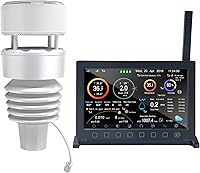
The best solar powered WiFi weather station for a home setup should match how you plan to power the outdoor sensor and view its readings. The Ambient Weather WS-4000 is the strongest all-around fit here, with a solar powered array, included color console and remote access through the Ambient Weather Network.
Solar power and WiFi solve separate problems. A solar panel can reduce the need to wire power to an outdoor sensor, while WiFi can share readings through a network, app or online service; the console or hub may still need its own power source.
Our picks at a glance
-
1
 Best for low upkeep
Ambient Weather WS-4000 Solar Powered UltraSonic Wi-Fi
9.7/10 our score
See it on Amazon -
2
 Best for backyard coverage
Ambient Weather WS-2902 Wi-Fi Smart Weather Station
9.6/10 our score
See it on Amazon -
3

- 4
 Check it
VEVOR 7-in-1 Wi-Fi Weather Station with APP
Best for Smart Life users - 5
 Check it
Sainlogic 5G&2.4G WiFi Weather Station
Best for data exports - 6
 Check it
Sainlogic 12-in-1 Wireless Weather Station with Rain
Best for solar rain tracking - 7
 Check it
Sainlogic 5GHz/2.4GHz Dual-Band WiFi Weather Station
Best for phone alerts - 8
 Check it
Ambient Weather WS-2000 Smart Weather Station
Best for console readers - 9
 Check it
ECOWITT Wittboy Weather Station GW2001
Best for app only
Which solar powered WiFi weather stations stand out?
The Ambient WS-4000 is the best fit for a compact array with no-moving-parts wind and rain sensors, a color console and remote monitoring. That mix suits buyers who want solar powered outdoor sensing without giving up a screen to read at a glance in the house.
Other picks suit specific priorities, including more display space, a particular app, saved data or a setup that skips the indoor screen. Those differences matter because a station that looks complete on paper may still leave you checking a phone, a hub or a separate indoor unit for everyday readings.
We compared the stated sensor power, internet connection, included display or hub and the measurements each station can track. The scores reflect how closely each option fits a shopper seeking solar assisted outdoor monitoring with WiFi access.
That approach also separates confirmed features from partial matches. A model can offer solar energy without stated WiFi, or WiFi without confirmed solar sensor power.
For a small yard, a compact all-in-one array can be easier to place and keep clear. For a larger property, range, mounting options and the position of the display or hub may matter more than a long list of readings.
Setup needs differ across the picks, so check adapters, backup batteries and app requirements before you choose. A solar panel on the outdoor sensor does not mean every other part runs without its own power source.
The right pick is the one whose power path, viewing method and measurements line up with your routine.
| Product | Best for | Sensor power | WiFi | Display | Our score |
|---|---|---|---|---|---|
| Ambient Weather WS-4000 Solar Powered UltraSonic Wi-Fi | low upkeep | Solar powered | Yes | Color console included | 9.7 |
| Ambient Weather WS-2902 Wi-Fi Smart Weather Station | backyard coverage | Solar panel with optional battery backup | Yes | LCD color display | 9.6 |
| AcuRite Iris | local forecasts | Battery requirements are stated | Not stated | Color LCD | 9.0 |
| VEVOR 7-in-1 Wi-Fi Weather Station with APP | Smart Life users | Solar panel with battery backup | 2.4GHz only | 7.5 in display | 8.9 |
| Sainlogic 5G&2.4G WiFi Weather Station | data exports | Not stated | 5GHz and 2.4GHz | Display console included | 8.9 |
| Sainlogic 12-in-1 Wireless Weather Station with Rain | solar rain tracking | Solar energy with battery backup | Not stated | 6.5 in screen | 8.8 |
| Sainlogic 5GHz/2.4GHz Dual-Band WiFi Weather Station | phone alerts | Battery powered | 5GHz and 2.4GHz | LCD | 8.7 |
| Ambient Weather WS-2000 Smart Weather Station | console readers | Solar panel with optional battery backup | Yes | TFT color display | 8.6 |
| ECOWITT Wittboy Weather Station GW2001 | app only | Solar powered or battery powered | Yes, through the hub | No display | 8.5 |
What should you check before choosing one?
Start with the complete power path: outdoor sensor, display console or hub, and WiFi connection. Then decide which readings and viewing options you will actually use, since a station with many measurements may still miss a must-have such as a screen or remote access.
Is the outdoor sensor solar powered?
Check the sensor's power source separately from the display or hub. The WS-4000 and WS-2000 are described as solar powered, while the WS-2902 array uses a solar panel to charge a super capacitor and can use optional battery backup.
Solar assistance does not always mean battery-free operation. Before mounting the array somewhere difficult to reach, check whether your chosen setup needs backup batteries and whether they are included.
Does WiFi mean the outdoor sensor connects directly to the internet?
No. Many systems send readings from the outdoor sensor to a console or hub first, then that indoor device shares them over WiFi.
This distinction matters when you plan where to put the display and whether it needs a constant power connection.
The ECOWITT Wittboy uses a WiFi hub and has no display. VEVOR provides Smart Life app access on 2.4GHz WiFi, and its adapter must remain plugged in for WiFi syncing.
Do you want a display at home?
A console lets you check readings in a room without opening an app. The WS-4000, WS-2902 and WS-2000 include color displays, while the ECOWITT package relies on its hub and app or a supported online service.
If you want to understand the role of that screen in a station setup, see what a weather station console does. With an app-only approach, consider who in your household needs access and whether they are comfortable checking the phone or online dashboard.
Which weather readings will help you?
Choose readings based on your routine. Rainfall can help you track local precipitation, while wind, temperature and humidity offer a broader view of yard conditions; UV or solar radiation readings may matter if you want those additional measurements.
For garden placement ideas, browse the guide to the best weather stations for gardens. If rain measurement is the main reason for buying, compare the options with solar powered weather stations that include a rain gauge.
Which WiFi band and app does your setup need?
Check your router and preferred app before buying. VEVOR specifies 2.4GHz only, while the two Sainlogic WiFi models in this list support both 2.4GHz and 5GHz; Ambient Weather and ECOWITT describe their own network or service connections.
A compatible band is only one part of setup. Confirm the app or service you want to use, and check whether the console or hub must stay plugged in to keep remote access working.
Best solar powered WiFi weather stations compared
These 9 picks do not all offer the same combination of features. Some clearly pair solar power with internet access, while others are useful alternatives with solar readings but no stated WiFi, or WiFi access without stated solar power.
Ambient Weather WS-4000 Solar Powered UltraSonic Wi-Fi: Best for low upkeep
- Solar powered
- Ultrasonic wind and haptic rain gauges
- No moving parts
- Color console included
- Ambient Weather Network remote monitoring
A compact all-in-one sensor array pairs with a color console and Ambient Weather Network access. Its ultrasonic wind and haptic rain gauges have no moving parts.
Pros
- Solar powered
- Wind and rain sensors have no moving parts
- Remote monitoring and alerts through AWN
Cons
- No specific WiFi band is stated
- No moving parts does not mean the station needs no setup
The WS-4000 is for buyers who want a compact solar powered outdoor array, a local color console and remote access. Its ultrasonic wind gauge and haptic rain gauge have no moving parts, which avoids the spinning cups and tipping bucket mechanisms used in many traditional arrays.
That design can suit homes where upkeep matters, because there are fewer moving pieces to wear or jam over time. It still needs a sensible outdoor position, clear air flow and an unobstructed spot for rain sensing.
The package also includes a WH32B sensor for indoor temperature, humidity and barometric pressure. Those indoor readings help you compare living space conditions with what the outdoor array is reporting.
Ambient Weather Network access supports remote monitoring, data analysis and alerts. That can be useful when you want to check readings away from the console or keep a record of changing conditions.
Choose it when a simple sensor layout and remote access matter more than choosing a particular WiFi band. Skip it if you need a stated router band before you buy, since that detail is not specified here.
Ambient Weather WS-2902 Wi-Fi Smart Weather Station: Best for backyard coverage
- Solar powered sensor array
- LCD color display
- Measures wind, temperature, humidity, rainfall, UV and solar radiation
- Ambient Weather Network access
This station combines a solar powered outdoor array with a color console and WiFi access to the Ambient Weather Network. Its sensor readings cover wind, temperature, humidity, rainfall, UV and solar radiation.
Pros
- Color console included
- Broad set of outdoor measurements
- Remote access and alerts
Cons
- Console needs an AC adapter
- Sensor backup batteries are optional and not included
The WS-2902 suits a household that wants both a color console and a broad range of backyard readings. Its array measures wind speed and direction, temperature, humidity, rainfall, UV intensity and solar radiation.
That wider set can help gardeners and homeowners judge conditions beyond temperature alone. Wind and rain readings speak to local exposure, while UV and solar radiation readings add context for sunny spells.
The solar panel charges a super capacitor, with optional backup batteries for the sensor array. That arrangement means solar power supports the outdoor unit, but it is not the same as a battery free system.
The console uses an AC adapter, so the solar power applies to the outdoor array rather than every part of the system. Plan for a suitable indoor outlet where you want the display to sit.
Choose it if you want the console in a central room and remote access when away. Skip it if you want a fully solar powered setup, or if you need backup batteries included with the sensor.
It fits best when a display centered routine and broad outdoor coverage are the priority. Mounting position still matters, since the array needs open exposure and a reliable wireless path to the console.
AcuRite Iris: Best for local forecasts
- Indoor and outdoor readings
- Color LCD display
- Wind, temperature, humidity, pressure and rainfall
- 12-hour personalized forecast
AcuRite Iris provides local indoor and outdoor readings on a color screen, plus a forecast based on elevation and barometric pressure. WiFi access is not stated, so it is not a match if remote internet viewing is essential.
Pros
- Color display with adjustable dimmer
- Many weather readings and historical data
- Forecast based on local pressure and elevation
Cons
- WiFi access is not stated
- Not described as solar powered
AcuRite Iris fits buyers who want local indoor and outdoor readings, a color display and a personalized forecast. It reports temperature, humidity, wind, barometric pressure and rainfall; its forecast uses elevation and barometric pressure to estimate conditions over 12 hours.
The forecast feature is a practical plus for daily planning at home. It gives a local indication of what may follow, although it should be read as an estimate rather than a guarantee.
A large color LCD display with an adjustable dimmer can suit living rooms and bedrooms. You can adjust brightness for daytime glare or a darker room at night.
This is a local-reading alternative, not a confirmed solar powered WiFi pick. WiFi access is not stated, and the station is not described as solar powered.
Choose Iris if you mainly want readings on a screen at home and value its forecast features. Skip it if remote internet viewing or solar sensor power is essential.
For more on operation choices, read how weather stations get power.
Setup is aimed at an indoor display paired with an outdoor sensor. Check battery needs and sensor placement before mounting, since local readings depend on a clear and representative outdoor spot.
VEVOR 7-in-1 Wi-Fi Weather Station with APP: Best for Smart Life users
- Solar powered outdoor sensor
- Smart Life app
- 2.4GHz WiFi only
- 7.5 in display
- Battery backup for nighttime or cloudy weather
VEVOR pairs a solar powered outdoor sensor with a display and Smart Life app access. Its WiFi supports 2.4GHz only, and the adapter must remain plugged in for WiFi syncing.
Pros
- Solar panel with battery backup
- App can store and share weather data
- Large display with four brightness levels
Cons
- Does not support 5GHz WiFi
- Adapter must stay plugged in for WiFi syncing
VEVOR combines a solar powered outdoor sensor with a 7.5 in display and Smart Life app access. It tracks temperature, humidity, rainfall, wind speed and direction, sunlight and dew point, among other information shown on the display.
The large display can make readings easier to scan from across a room. Four brightness levels also help you set it for bright daytime use or a dimmer evening setting.
The solar panel powers the sensor in sunny conditions, while batteries take over at night or in cloudy weather. That backup arrangement is useful, but it means batteries remain part of routine care.
WiFi is limited to 2.4GHz, and the adapter must remain plugged in for WiFi syncing. Keep that in mind when you choose a spot for the display near a router and a power outlet.
Choose it if you already use a 2.4GHz network and want a large indoor display as well as app access. Skip it if you need 5GHz-only WiFi or cannot keep the adapter connected.
It suits buyers who value app storage and sharing along with a physical screen. Avoid interference sources and metal fencing near the sensor, since those can affect the wireless link.
Sainlogic 5G&2.4G WiFi Weather Station: Best for data exports
- 5GHz and 2.4GHz WiFi
- Up to two years of local data storage
- Excel export
- Indoor and outdoor readings
- 443 ft stated open-area wireless range
Sainlogic supports both 5GHz and 2.4GHz WiFi, with remote viewing and up to two years of local weather history for export. Solar power is not stated, so confirm the sensor power arrangement if that feature is a must-have.
Pros
- Dual-band WiFi
- Local data storage and Excel export
- Measures wind, rainfall, temperature, humidity and pressure
Cons
- Solar power is not stated
- The stated 443 ft range is for open areas
This Sainlogic station suits people who value dual-band WiFi and keeping a long record of local conditions. It supports remote monitoring and cloud storage, plus up to two years of local weather history that can be exported to Excel.
That history can help you spot seasonal patterns in temperature, humidity and rainfall. Exporting readings may also suit garden planning, home maintenance records or travel comparisons.
Its measurements include indoor and outdoor temperature and humidity, barometric pressure, wind speed and direction, and rainfall. Moon phase and forecast information are also part of the wider display.
Dual-band WiFi gives more flexibility with home router setups than a single band. It can help when a router offers both bands.
Solar power is not stated, so this model does not meet a confirmed solar requirement without further power details. Check the sensor power arrangement if solar operation is a must-have for your yard.
Choose it if history and exporting readings are higher priorities than solar power. Skip it if a solar powered sensor is a firm requirement.
The stated 443 ft wireless range applies in open areas, and walls or other obstacles can affect placement.
Sainlogic 12-in-1 Wireless Weather Station with Rain: Best for solar rain tracking
- Solar energy with battery backup
- Rainfall readings
- Wind speed and direction
- Large display
- Wireless sensor connection
This Sainlogic station pairs solar energy with battery backup and tracks rainfall alongside wind, temperature, humidity and pressure. WiFi is not stated, so it fits buyers who prioritize solar powered local readings over internet access.
Pros
- Solar energy with battery backup
- Rainfall and wind readings
- Large screen with adjustable backlight
Cons
- WiFi is not stated
- Battery backup is not included
The Sainlogic 12-in-1 is a solar energy option for buyers who want local rainfall, wind and other readings on a large screen. It monitors rainfall, wind speed and direction, temperature, humidity and barometric pressure, among other measurements.
The 6.5 in screen with extra big bold fonts can be easier to read in a kitchen, bedroom or garden room. A three level adjustable backlight also helps in bright daylight or low light.
Solar energy and battery backup are described, but WiFi is not. The display uses battery power, so check that requirement when you plan where it will sit indoors.
Treat this as a local weather station rather than a confirmed internet-connected choice. You will check readings on the console instead of through an app or online dashboard.
That can suit a smaller property or a household that mainly wants a quick look at conditions. It may be less useful if you often need readings while away from home.
Choose it if solar assistance and a display matter more than app access. Skip it if you need to check readings remotely; the backup batteries also are not included.
Mount the outdoor sensor where it has open exposure for wind and rain. Wireless transmission avoids cabling, but the sensor still needs a stable path to the display.
Sainlogic 5GHz/2.4GHz Dual-Band WiFi Weather Station: Best for phone alerts
- 5GHz and 2.4GHz WiFi
- Inercom app access
- Up to two years of local data storage
- Indoor and outdoor weather readings
- Smart alerts
This dual-band Sainlogic station connects to the Inercom app for remote monitoring and alerts, and stores up to two years of data locally. It is battery powered, so it does not meet a solar power requirement.
Pros
- Supports both common WiFi bands
- App alerts and historical data
- Tracks rainfall, wind, temperature and humidity
Cons
- Battery powered rather than solar powered
- App connection requires setup
This Sainlogic model suits buyers who want dual-band WiFi, Inercom app access, alerts and stored weather history. It can save up to two years of local data for review and supports remote monitoring.
The station tracks indoor and outdoor temperature and humidity, wind direction and speed, rainfall, barometric pressure and forecast information. Date and moon phase readings round out the display for everyday reference.
Smart alerts can help you act on changing conditions without checking the console each time. Customizable alerts are useful for frost, heat or humidity changes in a garden or greenhouse setting.
It is battery powered, so it does not meet a solar power requirement. That distinction matters if you specifically want a solar panel on the outdoor sensor.
Dual-band WiFi can make setup easier with many home routers. Still confirm the app steps and keep the display or hub in a spot with a reliable signal.
Choose it if app alerts and both common WiFi bands matter more than solar operation. Skip it if you want the outdoor sensor powered by a solar panel.
For other home options, see best battery operated weather stations. The two year local storage gives you a useful record for seasonal review.
Ambient Weather WS-2000 Smart Weather Station: Best for console readers
- Solar powered sensor array
- TFT color display
- Wind, rainfall, temperature, humidity, UV and solar radiation
- WiFi data publishing
The WS-2000 combines a solar powered sensor array with a color console and WiFi data publishing. It displays readings such as wind, rainfall, temperature, humidity, UV and solar radiation.
Pros
- Solar powered array
- Color display with multiple screens
- Calibration and imperial or metric units
Cons
- Indoor sensor is optional and sold separately
- Console uses an included 5V DC adapter
The WS-2000 pairs a solar powered sensor array with a TFT color console and WiFi data publishing. The array tracks wind, temperature, humidity, rainfall, UV and solar radiation, and the console shows readings across multiple screens.
A color TFT display can be easier to read than a plain numeric panel. Multiple screens let you move between current conditions, calculated values and other details without relying only on an app.
The sensor array uses a solar panel with optional battery backup. That helps the outdoor unit keep sending readings, but backup batteries are not included for the array.
The console uses an included 5V DC adapter, and the indoor sensor for additional indoor measurements is sold separately. Plan for an indoor outlet and decide whether separate indoor readings are worth the extra purchase.
Calibration options and imperial or metric units can suit different households. Those settings also help you align readings with the units you use most often.
Choose it if you want a display-centered setup and a wide set of outdoor measurements. Skip it if indoor readings are a must-have out of the box or if you want the console to run on solar power.
Mount the array in an open spot with a clear wireless path to the console. The display is the main viewing point, so its indoor position should be convenient for daily checks.
ECOWITT Wittboy Weather Station GW2001: Best for app only
- Solar powered WS90 outdoor sensor with battery backup
- GW2000 WiFi hub
- App data access
- Supports several weather services
- Expandable with compatible ECOWITT sensors
The Wittboy pairs a solar powered outdoor sensor with a WiFi hub and app access, without an included display. It can send readings to supported weather services and pair with compatible ECOWITT sensors.
Pros
- Solar powered sensor with battery backup
- App and internet service access
- Can pair with compatible ECOWITT sensors
Cons
- No display included
- The maker notes rain readings can vary with drop size and wind
The ECOWITT Wittboy is for buyers who prefer a solar powered sensor, app access and a separate WiFi hub instead of a console. The WS90 sensor measures temperature, humidity, wind, light, UV and rainfall, and the GW2000 hub handles WiFi connectivity.
There is no display, so plan to view measurements in the app or through a supported online weather service. That trade-off can work well if you are comfortable checking a phone or computer.
The sensor has a built-in solar panel with backup batteries, while the hub uses a USB cable. Solar power helps the outdoor unit, but the indoor hub still needs its own power connection.
The hub can pair with compatible ECOWITT sensors, which may suit buyers who want to expand over time. Soil, pool, leak or air quality sensors are among the compatible types described for the system.
Choose it if you value a hub-based setup or may want compatible ECOWITT sensors later. Skip it if you want a display in the house or need rain readings to be as consistent as possible under every condition; ECOWITT notes that drop size and wind can affect results.
For a wind-focused option, see our guide to the best Kestrel weather meters. Setup needs care with mounting, WiFi configuration and sensor balance.
How do solar power and WiFi work together?
A solar panel can power an outdoor sensor, while a console or hub uses WiFi to share readings. The outdoor sensor, indoor device and internet connection each have distinct power and placement needs, so check all three before choosing a mounting spot.
The WS-4000, WS-2902 and WS-2000 describe solar power and internet connectivity through Ambient Weather services. ECOWITT combines its solar powered sensor with a WiFi hub, while VEVOR uses solar assistance and a Smart Life app but requires its adapter to remain plugged in for WiFi syncing.
Some models are only partial matches for the search phrase. The Sainlogic 12-in-1 describes solar energy without stated WiFi, while the dual-band Sainlogic options describe WiFi but do not confirm solar sensor power.
How do you set up a solar WiFi weather station?
Set up the network and indoor unit before mounting the outdoor sensor permanently. That order gives you a chance to confirm that the display or hub receives readings and that WiFi or app access works from the place where you'll use it.
Start by checking what the package includes and what else the setup needs, such as a console adapter or backup batteries. Put the display or hub near the power source and router connection it needs, then follow the station's instructions to connect it to the sensor and any app or online service.
Next, choose an outdoor position with room for the sensor array and access to sunlight where its solar panel can receive it. Use the included mounting method for the specific model; do not assume every station uses the same pole size or mounting hardware.
Check live readings at the console or in the app before settling on the final position. If the connection is weak, move the indoor device or outdoor array to reduce walls and other obstructions between them, then confirm the sensor continues to receive suitable light.
What care and placement habits help readings stay useful?
Good placement and occasional checks help you keep readings useful over time. Mount the array where its sensors can respond to local outdoor conditions, and keep the solar panel clear enough to receive light.
Avoid placing a weather sensor right beside a heat source, an exhaust outlet or a sheltered corner if you want readings that reflect the yard. Wind and rain measurements can be affected by nearby structures, so think about exposure and safe access before mounting the array.
Check the station after severe weather and at the start of a new season. Look for a shifted mount, debris around rain-sensing parts or a panel covered by leaves, then compare readings with the surrounding conditions to spot a possible placement issue.
Keep a note of the sensor location and any changes you make. That helps explain shifts in rainfall or wind readings after you move a station or alter nearby landscaping.
What mistakes cause trouble with solar WiFi stations?
The most common buying mistake is treating solar power and WiFi as one feature. Confirm sensor power, console or hub power, WiFi band and app support separately; a solar array may still depend on a powered indoor unit for internet access.
Another mistake is assuming a stated wireless range will carry through a house or across every property. Range figures often describe open space, and walls, metal and other obstacles can reduce signal reach.
Do not pick a station just because it has the most measurements. If you only need rainfall and temperature, extra data screens may add setup work without helping your routine; if you need remote access, a station with no stated WiFi may not fit at all.
Finally, don't mount the sensor before checking the full setup. A good position must balance sunlight, a useful view of outdoor conditions and a reliable connection to the console or hub.
Which station should you choose?
Choose the Ambient Weather WS-4000 for solar power, a color console, remote access and wind and rain sensors with no moving parts. Pick the WS-2902 if you want a color display and a broad set of outdoor measurements.
Choose VEVOR if you want a solar sensor and Smart Life app access on 2.4GHz WiFi. Choose ECOWITT for a solar sensor with hub-based app access and no screen, or Sainlogic dual-band if app access and saved data matter more than solar power.
AcuRite Iris and the Sainlogic 12-in-1 are local-reading alternatives rather than confirmed WiFi matches. For more solar options beyond internet access, compare our best solar powered weather stations; if you need local readings without WiFi, consider Iris.
Our top 3 picks at a glance
-
1
Best for low upkeep
Ambient Weather WS-4000 Solar Powered UltraSonic Wi-Fi
9.7/10 our score
See it on Amazon -
2
Best for backyard coverage
Ambient Weather WS-2902 Wi-Fi Smart Weather Station
9.6/10 our score
See it on Amazon -
3
Frequently asked questions
What does solar powered mean on a WiFi weather station?
It means the outdoor sensor uses a solar panel as a power source, often with batteries or another backup for low light. WiFi describes how weather data can reach an app, service or network.
Check both details separately, because a solar sensor does not guarantee that the console or hub is solar powered.
Also check whether a console needs an adapter for internet access.
Does solar powered mean a weather station works without batteries?
No. Some solar sensor arrays use backup batteries, while others describe solar power without specifying the backup arrangement.
Check the power needs for the sensor, console and WiFi hub separately.
For example, the Ambient WS-2902 has optional sensor battery backup, while the ECOWITT sensor can use solar or battery power.
Can a weather station use WiFi if its outdoor sensor connects wirelessly to a console?
Yes. The outdoor sensor can send readings wirelessly to a console or hub, which then uses WiFi to share data online.
Those are separate links in the system.
Check which WiFi bands the console supports and whether it needs to stay plugged in for syncing, as the VEVOR does.
Which solar powered WiFi station has no moving parts?
The Ambient Weather WS-4000 has ultrasonic wind and haptic rain gauges with no moving parts. It also includes a color console and supports remote monitoring through the Ambient Weather Network.
If you want a solar sensor and app access without a screen, the ECOWITT Wittboy uses a WiFi hub and has no display.
Do solar powered WiFi weather stations predict the weather?
Some display a forecast based on readings or calculated conditions, but a home station measures weather at your location and doesn't guarantee what will happen next. The AcuRite Iris, for example, uses elevation and barometric pressure for a personalized 12-hour forecast.
See our guide to whether a home weather station can predict weather for what a local forecast can tell you.