9 Best Wi-Fi Temperature Sensors (November 2026)
The best Wi-Fi temperature sensors include the Ideal Sciences Temp Stick Remote WiFi Temperature for flexible remote monitoring, the MOCREO WiFi Thermometer Freezer Alarm for two refrigerator or freezer spots, and the YoLink Indoor Temperature and Humidity Sensor Kit for indoor long-range coverage.
On this page (9 sections)
- How we chose the best Wi-Fi temperature sensors
- Which Wi-Fi temperature sensor fits your setup?
- How do you choose the best Wi-Fi temperature sensor?
- Does a Wi-Fi temperature sensor need a hub?
- How should you set up and place a Wi-Fi temperature sensor?
- What alerts and data history should you choose?
- How do you care for a wireless temperature sensor?
- What common Wi-Fi temperature sensor mistakes should you avoid?
- Which best Wi-Fi temperature sensor should you pick?
The Ideal Sciences Temp Stick Remote WiFi Temperature is the best Wi-Fi temperature sensor for direct remote monitoring, with text and email alerts, logged readings, and no subscription. Choose MOCREO for a freezer setup with two probes, or YoLink when reaching distant indoor spaces matters more than connecting the sensor directly to Wi-Fi.
A smart temperature sensor can help you spot a problem while you’re away from home. The right choice depends on where you’ll place it, how it connects, and which alerts you want to receive.
For humidity readings as well as temperature, compare these picks with our best WiFi temperature and humidity sensor options. If remote access is your main goal, our best remote temperature sensor guide covers other connection types, including cellular systems.
Our picks at a glance
-
1
 Best for flexible remote monitoring
Ideal Sciences Temp Stick Remote WiFi Temperature
9.5/10 our score
See it on Amazon -
2
 Best for two refrigerator or freezer spots
MOCREO WiFi Thermometer Freezer Alarm
9.5/10 our score
See it on Amazon -
3
 Best for indoor long-range coverage
YoLink Indoor Temperature and Humidity Sensor Kit
9.4/10 our score
See it on Amazon
- 4
 Check it
MOCREO WiFi Remote Thermometer Freezer Alarm
Best for damp or outdoor sensor locations - 5
 Check it
Govee Smart Bluetooth Thermometer Hygrometer H5074
Best for checking nearby rooms - 6
 Check it
YoLink Freezer Temperature Sensor Kit
Best for several hard-to-reach spots - 7
 Check it
Tapo Smart Temperature and Humidity Monitor
Best for a clear local display - 8
 Check it
GoveeLife 2.0 WiFi Hygrometer Thermometer with Gateway
Best for monitoring three indoor rooms - 9
 Check it
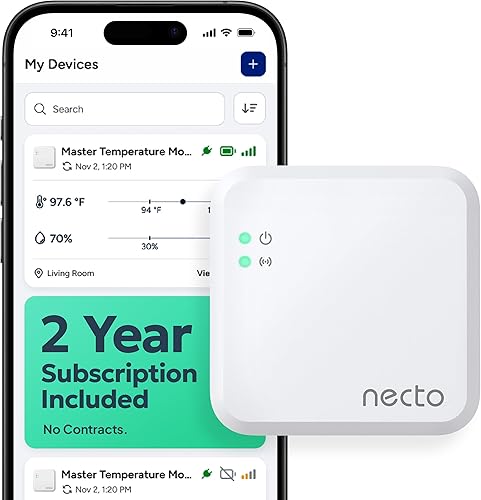
NECTO Cellular Temperature Monitor
Best when Wi-Fi is unavailable
How we chose the best Wi-Fi temperature sensors
The best Wi-Fi temperature sensors pair remote readings with alerts that fit the place you need to monitor. We compared the stated connection requirements, number of sensors, temperature and humidity features, alert methods, and data history.
A sensor that uses a hub can still provide remote access, but the hub must be part of the setup. Direct Wi-Fi, hub-based systems, Bluetooth, and cellular devices work in different ways, so this guide identifies the connection type for each pick.
The scores reflect how well each option’s features fit remote monitoring, including alert choices, connection needs, and useful extras. A strong match has a practical connection path and an alert method suited to its job, whether that job is checking a freezer or tracking several indoor spaces.
| Product | Best for | Connection | Power | Alerts | Our score |
|---|---|---|---|---|---|
| Ideal Sciences Temp Stick Remote WiFi Temperature | flexible remote monitoring | 2.4 GHz Wi-Fi | 2 AA batteries | Text and email | 9.5 |
| MOCREO WiFi Thermometer Freezer Alarm | two refrigerator or freezer spots | 3 replaceable AAA batteries | 9.5 | ||
| YoLink Indoor Temperature and Humidity Sensor Kit | indoor long-range coverage | 9.4 | |||
| MOCREO WiFi Remote Thermometer Freezer Alarm | damp or outdoor sensor locations | 9.3 | |||
| Govee Smart Bluetooth Thermometer Hygrometer H5074 | checking nearby rooms | Bluetooth, not Wi-Fi | 9.2 | ||
| YoLink Freezer Temperature Sensor Kit | several hard-to-reach spots | 2 AA batteries per sensor | 9.1 | ||
| Tapo Smart Temperature and Humidity Monitor | a clear local display | 2 AAA batteries | 9.0 | ||
| GoveeLife 2.0 WiFi Hygrometer Thermometer with Gateway | monitoring three indoor rooms | 8.9 | |||
| NECTO Cellular Temperature Monitor | when Wi-Fi is unavailable | 4G LTE cellular | 8.8 |
Which Wi-Fi temperature sensor fits your setup?
The right pick depends on whether you need one sensor, several locations, a freezer probe, a local display, or monitoring without home Wi-Fi. These nine options appear in product-score order, and each suits a different setup.
Ideal Sciences Temp Stick Remote WiFi Temperature: Best for flexible remote monitoring
- Temperature and humidity monitoring
- Text and email alerts
- No subscription
- Data logging
A direct Wi-Fi sensor for checking temperature and humidity remotely, with multiple alert thresholds and stored readings that can upload after a connection returns.
Pros
- Text and email alerts
- No subscription
- Stores readings while offline
Cons
- Does not support 5 GHz Wi-Fi
- Not for public or guest Wi-Fi
Temp Stick suits buyers who want one sensor to connect directly to a private home network and send alerts to a phone or inbox. It monitors temperature and humidity, with multiple alert thresholds for setting different limits.
Ideal Sciences says the sensor monitors conditions every second and supports unlimited text and email alerts. It records readings while temporarily offline and can upload up to a month of stored data after reconnecting.
The sensor runs on two AA batteries and supports 2.4 GHz Wi-Fi only. It isn’t intended for public or guest Wi-Fi networks, such as those at hotels, campgrounds, or coffee shops, so check the network where you plan to use it.
Choose Temp Stick if you want remote access without a separate gateway or subscription. Skip it if you need a display on the sensor or only have 5 GHz Wi-Fi available.
For a sensor that also measures humidity, our guide to what a temperature and humidity sensor does explains which readings matter and where to place one.
Buy it for a home, RV, or other location with a private 2.4 GHz network where text alerts and stored readings are useful.
MOCREO WiFi Thermometer Freezer Alarm: Best for two refrigerator or freezer spots
- Wi-Fi hub with two temperature sensors
- App, email, and hub alerts
- CSV data export
- 2.4 GHz Wi-Fi
This hub-based kit monitors two locations and can send app or email alerts when conditions shift. Probe cables and included clips suit refrigerator and freezer placement.
Pros
- Two sensors in the kit
- App, email, and audible alerts
- Exports up to 2 years of data
Cons
- Uses a hub
- Wi-Fi connection is 2.4 GHz only
MOCREO’s kit is designed to monitor two temperature-sensitive locations, such as a refrigerator and a freezer. It includes a Wi-Fi hub, two wireless thermometers, and probe cables that can pass through refrigerator door seals.
The system offers app notifications, email alerts, and an audible hub alarm. It can also warn about a hub going offline or a low battery, so you can be alerted to a monitoring problem as well as a temperature change.
Its stated temperature range is -40°F to 158°F, with an accuracy of ±0.9°F. You can view graphs online and export up to 2 years of data in CSV format.
This setup needs a 2.4 GHz Wi-Fi connection for its hub. Choose it if you need separate readings in cold storage and want both remote notices and a sound at home.
Skip it if you only need a single room reading or don’t want an additional hub. For refrigerator-focused options and placement advice, see our wireless thermometers for refrigerators guide.
Buy it for two indoor cold-storage spots where probe cables and a hub alarm are useful.
YoLink Indoor Temperature and Humidity Sensor Kit: Best for indoor long-range coverage
- Two indoor temperature and humidity sensors
- Hub included
- LoRa communication
- Push, email, or SMS alerts
A hub and two sensors monitor indoor spaces where Wi-Fi coverage may be weak. The sensors use LoRa to reach the hub, which connects through Ethernet or 2.4 GHz Wi-Fi.
Pros
- Hub and two sensors included
- Long-range LoRa communication
- SMS alerts included with limits
Cons
- Not for outdoor use
- Uses a hub
The YoLink starter kit includes a hub and two indoor temperature and humidity sensors. The sensors use LoRa to reach the hub, which connects through Ethernet or 2.4 GHz Wi-Fi.
That connection path can help when a sensor needs to sit in a basement, barn, or other area with weak Wi-Fi coverage. YoLink states a LoRa range of up to 2,034 ft in open air, but the kit is not for outdoor use.
You can receive push notifications, email, or SMS alerts. The hub and two-sensor kit includes 20 free SMS messages per month, and the system also works with Alexa for temperature queries and with IFTTT applets.
Choose this kit when indoor sensor-to-hub reach is a priority. Skip it if you need direct Wi-Fi at each sensor or an outdoor-rated sensor.
For outdoor placement, compare the outdoor Wi-Fi temperature sensors guide and confirm the intended use for each option.
Buy it for indoor monitoring in several rooms or hard-to-reach spaces where a hub-based system fits.
MOCREO WiFi Remote Thermometer Freezer Alarm: Best for damp or outdoor sensor locations
- Two splash-proof wireless sensors
- Long-range hub
- LCD monitor
- App, email, and hub alerts
The H5Pro hub connects with two IP66 splash-proof sensors for monitoring places such as garages, greenhouses, and refrigerators. The LCD hub shows readings and supports alarms.
Pros
- Two splash-proof sensors included
- Hub has an LCD display
- Exports up to 2 years of data
Cons
- Uses a hub
- Avoid enclosed metal containers that can block the signal
This MOCREO kit pairs a Wi-Fi hub with two IP66 splash-proof wireless sensors. They suit damp locations such as refrigerators and can also be used in outdoor areas, garages, greenhouses, and well houses.
The H5Pro hub has an LCD display for readings, alarms, and historical data. It connects through Ethernet or 2.4 GHz Wi-Fi, and the system can send app notifications, email alerts, or a hub beep.
The temperature range is -4°F to 131°F, with stated accuracy of ±0.9°F. MOCREO says the sensors can run for up to 2 years on three replaceable AAA batteries when used above 32°F.
The system supports data export for up to 2 years. Avoid placing a sensor inside a fully enclosed metal container, which can interfere with the signal.
Choose it if you want splash-proof sensors, a local display, and hub-based remote alerts. Skip it if the sensor must sit inside a fully enclosed metal space.
For other outdoor temperature options, see our outdoor thermometers guide.
Buy it for a hub-based setup that needs splash-proof sensors and a local display.
Govee Smart Bluetooth Thermometer Hygrometer H5074: Best for checking nearby rooms
- Bluetooth app monitoring
- Temperature and humidity readings
- Preset range alerts
- Data export
This compact Bluetooth sensor sends readings to the app within its stated range and can notify you when preset temperature or humidity limits are crossed.
Pros
- Compact sensor with hanging loop
- App alerts for set ranges
- CSV data export
Cons
- Not a Wi-Fi sensor
- Range is stated for an area without obstacles
The Govee H5074 is a Bluetooth thermometer and hygrometer, not a Wi-Fi sensor. It can still send readings to its app within Bluetooth range, which is stated as up to 262 ft when there are no obstacles.
Use the Govee Home app to set temperature and humidity ranges and receive notifications when readings fall outside them. The sensor stores 20 days of readings onboard, and the app can export data to CSV.
Its small size and hanging loop make it easy to move between nearby rooms or place in a compact space. Govee gives temperature accuracy of ±0.54°F and humidity accuracy of ±3% RH.
Choose it if nearby app checks and alerts are enough. Skip it if you need to monitor a remote location through Wi-Fi while you’re away from home.
Buy it for a nearby room where Bluetooth range is enough.
YoLink Freezer Temperature Sensor Kit: Best for several hard-to-reach spots
- Three sensors and hub
- LoRa communication
- Custom temperature alerts
- Up to 5 years of battery life
Three sensors share one YoLink hub and use LoRa rather than connecting directly to Wi-Fi. The kit fits multiple locations where long-range communication is useful.
Pros
- Three sensors and hub included
- Long-range LoRa communication
- Text, email, and push alerts
Cons
- Not a direct Wi-Fi sensor
- SMS messages have usage limits
This YoLink kit comes with a hub and three freezer temperature sensors. Like the indoor YoLink kit, the sensors use LoRa to communicate with the hub rather than connecting directly to Wi-Fi.
That can suit a home, greenhouse, barn, or other location where Wi-Fi may not reach the sensor. YoLink states up to 2,034 ft of open-air range and up to 5 years of battery life, depending on use and conditions.
The sensors run on two AA batteries each and support custom temperature alerts by text, email, or push notification. YoLink says SMS use is limited; one hub and one sensor include 15 free messages per month, so confirm the terms for your kit before relying on texts.
The stated temperature range is -4°F to 122°F. Choose this kit when you want to cover several spots through one hub, but skip it if you need each sensor to connect directly to Wi-Fi.
If you need a wired probe arrangement, compare the Wi-Fi temperature sensors with probes guide.
Buy it for several locations where long-range communication to a hub is useful.
Tapo Smart Temperature and Humidity Monitor: Best for a clear local display
- 2.7-inch E-ink display
- Temperature and humidity readings
- Hub required
- Free data export
The T315 displays temperature, humidity, comfort level, battery status, and signal strength. It needs a Tapo hub, which connects to a secured 2.4 GHz Wi-Fi network.
Pros
- Readable E-ink display
- App alerts for chosen ranges
- Stores and exports data
Cons
- Tapo H100 hub sold separately
- Sensor communicates with the hub, not Wi-Fi directly
Tapo’s T315 pairs a temperature and humidity sensor with a 2.7-inch E-ink display. The screen shows readings along with comfort level, battery status, and signal strength.
This sensor requires a Tapo H100 hub, sold separately. The hub connects to a secured 2.4 GHz Wi-Fi network, while the T315 communicates with the hub over a low-power wireless protocol.
The T315 refreshes data every 2 seconds and supports app notifications for custom temperature or humidity ranges. It records data and supports free export.
Two AAA batteries power the sensor, with battery life stated as up to 2 years under normal use. Choose it if you want a local screen as well as app access and already have, or plan to get, the required hub.
Skip it if a separate hub would be an unwanted addition. Before setup, check that the hub and sensor support the same regional frequency band.
Buy it for a clear local display in a Tapo hub setup.
GoveeLife 2.0 WiFi Hygrometer Thermometer with Gateway: Best for monitoring three indoor rooms
- Three temperature and humidity sensors
- Wi-Fi gateway included
- App and email alerts
- Data export
Three compact sensors connect through the included gateway for remote app readings, alerts, and data export. The gateway can pair with up to 10 sensors.
Pros
- Three sensors and gateway included
- App and email alerts
- Exports up to 2 years of data
Cons
- Requires the gateway
- Only supports 2.4 GHz Wi-Fi
GoveeLife’s kit includes three temperature and humidity sensors and a Wi-Fi gateway. The gateway connects to 2.4 GHz Wi-Fi and can pair with up to 10 sensors, leaving room to add more locations later.
Use the app to view readings, set temperature and humidity limits, and receive app or email alerts. The kit supports trend charts for the past 20 days and export of up to 2 years of data.
GoveeLife gives temperature accuracy of ±0.54°F and humidity accuracy of ±3% RH. The sensors are intended for indoor use, and their stated battery life is up to 2 years.
Choose this kit if you want three indoor locations monitored through one gateway. Skip it if you only want one sensor or don’t have a compatible gateway connection.
Buy it for three indoor rooms that need remote temperature and humidity readings.
NECTO Cellular Temperature Monitor: Best when Wi-Fi is unavailable
- Cellular connection
- Temperature, humidity, and power outage monitoring
- Two years of cellular service included
- Rechargeable backup battery
NECTO uses cellular service rather than Wi-Fi to send remote readings and alerts. It monitors temperature, humidity, and power loss, with a rechargeable battery for outages.
Pros
- No Wi-Fi required
- Power outage alerts
- Two years of cellular service included
Cons
- Renewal is needed after the included service period
- Designed to stay plugged in for continuous monitoring
NECTO is a cellular temperature monitor, not a Wi-Fi sensor. Its built-in multi-network SIM connects over 4G LTE, which can be useful for monitoring a place without Wi-Fi access.
The device tracks temperature, humidity, and power outages, and it can send alerts to as many as five contacts. Two years of cellular service are included; after that, NECTO says service can be renewed through the app for 6 dollars.99 per month.
It has a rechargeable internal battery that can last up to 3 days. The unit is designed to stay plugged in for continuous monitoring, with the battery providing backup during an outage.
Choose cellular when Wi-Fi isn’t available and power-loss alerts matter. Skip it if you don’t want a service renewal or need a battery-only monitor.
For water-related basement risks, our Wi-Fi sump pump alarms guide covers a different type of connected alert.
Buy it for a monitored space without Wi-Fi where cellular service is suitable.
How do you choose the best Wi-Fi temperature sensor?
Start with the location and connection, then match the sensor’s range, alert method, and power needs to that space. A direct Wi-Fi sensor needs a suitable network where it will be used, while a hub-based system needs the hub placed where it can reach both the network and the sensors.
For a refrigerator or freezer, check the stated temperature range and how the sensor sits in the space. A probe cable can pass through a door seal more neatly than a bulky sensor body, but you still need a wireless signal path that works from the sensor to its hub or network.
For a basement, greenhouse, or outbuilding, look at the distance and obstacles between the sensor and its connection point. LoRa can reach beyond Wi-Fi coverage, but open-air range claims don’t predict performance through walls, appliances, or metal surfaces.
Then decide how quickly you need to know about a problem. Texts, emails, app notifications, audible alarms, and power or connection warnings are not available on every device, so choose the combination you’re most likely to notice.
Does a Wi-Fi temperature sensor need a hub?
A Wi-Fi temperature sensor may connect directly to your router, or it may communicate with a hub that connects to the internet. The product’s connection path affects placement, compatibility, and what happens if the hub loses power or its network connection.
Direct Wi-Fi keeps the setup to the sensor and the network, as with Temp Stick. Check the frequency requirements first: several options here only support 2.4 GHz, and Temp Stick does not support public or guest Wi-Fi networks.
A hub-based kit adds a second device that must be plugged in, connected, and placed within range of its sensors. This can help when sensors use a longer-range radio link, but a hub that is too far from the router or sensors can interrupt remote access.
Bluetooth is meant for nearby communication with a phone or gateway. Cellular uses a mobile network instead of Wi-Fi, which can help in a location without a router but may require service after an included period ends.
How should you set up and place a Wi-Fi temperature sensor?
Set up the network or hub before relying on alerts, then place the sensor where it measures the condition you care about. The phone app can show readings, but an incorrect location or an untested alert can still leave you with a gap in monitoring.
Start by confirming the Wi-Fi frequency, password, and security requirements. If your network uses separate 2.4 GHz and 5 GHz names, connect the compatible hub or sensor to the 2.4 GHz network where required.
For a hub-based kit, choose a location with a reliable network connection and a clear path toward the sensors. Keep the sensor away from enclosed metal spaces unless the system is designed for that placement, since metal can weaken wireless signals.
Place a temperature sensor away from direct sunlight, heating vents, cold-air outlets, and exterior walls unless those conditions are the specific thing you want to measure. For a freezer probe, route the cable through the seal as directed and check that the door still closes fully.
After pairing, set both high and low limits if temperature changes in either direction matter. Trigger a safe alert or temporarily set a threshold near the current reading to confirm that the app, email, text, or hub alarm reaches you.
What alerts and data history should you choose?
Choose alerts based on how urgent a temperature change is and how you prefer to be notified. A freezer may call for an audible alarm plus a phone notification, while a room monitor may only need an app alert and an occasional review of its history.
Set limits with the space in mind rather than using the same thresholds for every sensor. A nursery, greenhouse, refrigerator, or garage has a different purpose, and a limit that is too narrow can create frequent alerts that are easy to ignore.
Check for connection-loss, low-battery, hub-offline, and power-outage warnings if a missed reading would matter. Temperature alerts only help when the sensor remains powered and connected enough to send them.
Data history is useful for spotting recurring changes or reviewing a period when you were away. If you need records outside the app, check whether the system offers CSV export and how much history it keeps.
How do you care for a wireless temperature sensor?
Keep the sensor dry unless its intended use allows exposure to moisture, and follow its care instructions when cleaning. A splash-proof rating does not mean a sensor should be soaked or placed where water can collect.
Check battery status and replace batteries when the device warns you or readings stop updating. For equipment in a hard-to-reach place, add a reminder to inspect it before the expected battery life ends rather than assuming the estimate will match every use.
Keep the hub, sensor, and app software up to date where updates are available. After moving a sensor, replacing batteries, or changing your router, confirm that it reconnects and that alerts still arrive.
For a critical location, keep a simple backup plan, such as a separate thermometer or a second alert path. A connected sensor can report conditions only while its sensor, power, and communication route are working.
What common Wi-Fi temperature sensor mistakes should you avoid?
The most common mistake is buying for the word “Wi-Fi” without checking how the sensor actually connects. Some picks need a hub, some use Bluetooth, and the cellular option uses mobile service rather than Wi-Fi.
Another mistake is assuming a long-range number applies inside a home. Open-air distance claims can shrink when a signal passes through walls, floors, appliances, or metal enclosures, so test the chosen location before relying on it.
Don’t overlook a hub’s placement or a required network band. A 5 GHz-only setup won’t suit a device that requires 2.4 GHz, and a hub without a stable network connection cannot provide remote access.
Finally, don’t set alerts and then forget them. Confirm that notifications reach the right phone or inbox, keep contact details current, and review thresholds when the monitored space or its purpose changes.
Which best Wi-Fi temperature sensor should you pick?
Choose the Temp Stick for direct Wi-Fi monitoring with text and email alerts, data logging, and no subscription. Pick MOCREO’s two-sensor freezer kit for probe-based cold storage, or YoLink when long-range sensor communication is more important than direct Wi-Fi.
For a local display, choose the Tapo T315 if you’re ready to add its required hub. If Wi-Fi is unavailable, consider NECTO’s cellular setup and account for service after its included 2-year period.
Our top 3 picks at a glance
-
1
Best for flexible remote monitoring
Ideal Sciences Temp Stick Remote WiFi Temperature
9.5/10 our score
See it on Amazon -
2
Best for two refrigerator or freezer spots
MOCREO WiFi Thermometer Freezer Alarm
9.5/10 our score
See it on Amazon -
3
Best for indoor long-range coverage
YoLink Indoor Temperature and Humidity Sensor Kit
9.4/10 our score
See it on Amazon
Frequently asked questions
Do Wi-Fi temperature sensors need a hub?
Some connect directly to a 2.4 GHz Wi-Fi network, while others send readings to a hub that connects to Wi-Fi. Check which setup a sensor uses before buying, and include the hub in your plan if it is required.
For example, Temp Stick connects to Wi-Fi, while the YoLink kits and GoveeLife gateway kit use a hub.
Can a Wi-Fi temperature sensor monitor a freezer?
Yes, if the sensor is intended for the temperature range and placement you need. MOCREO's two-sensor Wi-Fi kit includes probe cables for refrigerator or freezer monitoring and specifies a range from -40°F to 158°F.
Check the sensor's connection path too, since a freezer or metal enclosure can affect wireless signals.
Are Bluetooth temperature sensors the same as Wi-Fi sensors?
No. Bluetooth sensors communicate with a nearby phone or compatible gateway, while Wi-Fi sensors or their hubs connect to a Wi-Fi network for remote access.
The Govee H5074 uses Bluetooth and is explicitly not a Wi-Fi version, so it is better suited to nearby checks than remote monitoring away from home.
What should I check before setting temperature alerts?
Choose high and low limits that match what you are monitoring, then confirm how the sensor sends alerts and whether it can alert when its connection or power is lost.
A text alert may suit urgent changes, while app notifications and email can provide extra ways to see a warning.