9 Best Replacement Sensors for Weather Stations (October 2026)
The best replacement weather station sensors include the AcuRite Wireless Indoor Outdoor Temperature and Humidity for AcuRite label matches, the La Crosse Technology TX141TH-BV4 Wireless Weather-resistant Temperature/Humidity Sensor for La Crosse owners, and the Ambient Weather WH31E Thermo-Hygrometer Sensor for Ambient channel expansion.
On this page (11 sections)
- Which replacement sensor for a weather station fits your setup?
- How do you choose the best replacement sensor for a weather station?
- Which AcuRite replacement sensor suits a matching label?
- Which La Crosse temperature and humidity sensor fits?
- When should you replace a complete outdoor sensor array?
- When does an outdoor sensor need a shield instead?
- Which extra sensors work with Ambient, BALDR and Newentor stations?
- When is a complete weather station a better buy?
- How do you set up a replacement weather station sensor?
- What mistakes can make a replacement sensor seem incompatible?
- Which replacement sensor should you choose?
The best replacement sensor for a weather station is the model confirmed for your exact console and sensor type. Before comparing features, check the labels on both the indoor console and the outdoor unit.
Similar shapes, brand names and wireless labels do not prove that two parts will pair.
A temperature and humidity transmitter cannot replace an integrated array that also measures wind and rainfall. If you are identifying parts, start with what sensors come with a home weather station and what a weather station console does.
Our picks at a glance
-
1
 Best for AcuRite label matches
AcuRite Wireless Indoor Outdoor Temperature and Humidity
9.6/10 our score
See it on Amazon -
2
 Best for La Crosse owners
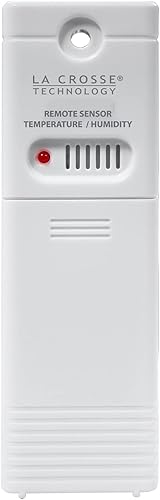
La Crosse Technology TX141TH-BV4 Wireless Weather-resistant Temperature/Humidity Sensor
9.4/10 our score
See it on Amazon -
3
 Best for Ambient channel expansion
Ambient Weather WH31E Thermo-Hygrometer Sensor
9.2/10 our score
See it on Amazon
- 4
 Check it
La Crosse Technology 925-1418 Sensor Protection Shield
Best for exposed La Crosse sensors - 5
 Check it
Ambient Weather WS-2902-ARRAY Replacement Sensor Array
Best for Ambient array repairs - 6
 Check it
BALDR Wireless Weather Station Remote Sensor
Best for non-WiFi BALDR - 7
 Check it
AcuRite Iris Weather Station with Rain Gauge
Best for full AcuRite systems - 8
 Check it
Newentor Wireless Temperature and Humidity Remote Sensor
Best for Newentor consoles - 9
 Check it
La Crosse Technology 328-1415 Wireless Professional Color
Best for full La Crosse systems
Which replacement sensor for a weather station fits your setup?
The right replacement depends on the model number, the readings you need and whether the failed part is a separate transmitter or one piece of an outdoor array. Match compatibility first, then choose based on placement and channel needs.
| Product | Best for | Sensor type | Compatible models | Power | Our score |
|---|---|---|---|---|---|
| AcuRite Wireless Indoor Outdoor Temperature and Humidity | AcuRite label matches | Temperature and humidity | 00592TX, 00592TXR, 06002M, 06002RM, 11126-592TXR | 2 AA alkaline or lithium batteries | 9.6 |
| La Crosse Technology TX141TH-BV4 Wireless Weather-resistant Temperature/Humidity Sensor | La Crosse owners | Temperature and humidity | 2 AA batteries | 9.4 | |
| Ambient Weather WH31E Thermo-Hygrometer Sensor | Ambient channel expansion | Temperature and humidity | 9.2 | ||
| La Crosse Technology 925-1418 Sensor Protection Shield | exposed La Crosse sensors | 9.0 | |||
| Ambient Weather WS-2902-ARRAY Replacement Sensor Array | Ambient array repairs | Selected WS-1900, WS-1965, WS-2000 and WS-2902 models | 8.7 | ||
| BALDR Wireless Weather Station Remote Sensor | non-WiFi BALDR | Temperature and humidity | 8.5 | ||
| AcuRite Iris Weather Station with Rain Gauge | full AcuRite systems | 8.3 | |||
| Newentor Wireless Temperature and Humidity Remote Sensor | Newentor consoles | Temperature and humidity | Newentor B0836CM7KY, B085R9KBN1 and B089JY7XBB | 2 AA batteries | 8.2 |
| La Crosse Technology 328-1415 Wireless Professional Color | full La Crosse systems | 8.1 |
Our score weighs specs, features and buyer feedback against what you are shopping for. A high score cannot make an incompatible sensor pair with your console, so confirm the model before buying.
How do you choose the best replacement sensor for a weather station?
Choose a replacement sensor by identifying the part that stopped working and checking its model number against the console's supported sensor list. The brand and appearance are clues, but the exact model family is the key detail.
Start with the rear label on the old sensor. Then check the console model on its back or in its manual, and compare both numbers with the replacement's compatibility information.
If either number is missing or unclear, contact the station maker to confirm the combination before buying.
Also check the function of the failed part. A thermo-hygrometer measures temperature and humidity, while an integrated array may also handle wind, rain, UV or solar readings.
A shield protects an outdoor transmitter from exposure, but it does not send data.
Best replacement sensor for weather station buyers: what to compare
Compare model compatibility, sensor type, channel, power and mounting. These details help separate a direct replacement from an accessory or a full station.
- Model match: Search for the complete console and sensor numbers, including letters and suffixes. Similar model names can still refer to different generations.
- Measurement role: Check whether you need temperature and humidity only or an array that restores wind, rainfall and other outdoor readings.
- Channel support: If you want to monitor another room or location, confirm that both the console and transmitter support an open channel.
- Wireless system: Frequency alone does not guarantee compatible data formats.
- Power: Note the required battery type and whether batteries are included. Most of the separate sensors in this guide use two AA batteries.
- Placement: Decide where the unit can be mounted and whether it needs shade or a protective shield.
Which AcuRite replacement sensor suits a matching label?
The AcuRite 06002M / 592TXR is the clearest choice when the old sensor's label matches one of its supported model numbers. If you're replacing the whole system, compare the best AcuRite weather stations.
It measures temperature and humidity for compatible AcuRite stations.
AcuRite Wireless Indoor Outdoor Temperature and Humidity: Best for AcuRite label matches
- For specified AcuRite model numbers
- Temperature and humidity readings
- A-B-C switch
- 2 AA batteries
A direct option when the model number on your old AcuRite sensor matches one of the supported numbers. Check the back label before choosing it.
Pros
- Specific model numbers are given
- A-B-C switch
- Can pair with compatible stations or AcuRite Access
Cons
- Compatibility must be checked before ordering
- Batteries are not included
This sensor suits you if the rear label on your old unit reads 00592TX, 00592TXR, 06002M, 06002RM or 11126-592TXR. It has an A-B-C switch, so compare the switch and model label as part of identification.
It can pair with compatible AcuRite digital weather stations or AcuRite Access, sold separately, for remote viewing on a phone, computer or tablet.
Power it with two AA alkaline or lithium batteries, which are not included. The integrated mounting hole lets you hang the sensor on a nail.
This is a suitable option when the label matches. If you cannot confirm the model number, contact AcuRite support to check compatibility.
Which La Crosse temperature and humidity sensor fits?
The TX141TH-BV4 suits owners of supported La Crosse stations that use the TX141TH family. For other model matches, see La Crosse replacement sensor options.
Its compatibility information names specific consoles and backwards compatibility with TX141TH-B, v2 and v3 sensors.
La Crosse Technology TX141TH-BV4 Wireless Weather-resistant Temperature/Humidity Sensor: Best for La Crosse owners
- Temperature and humidity
- Supports listed La Crosse models
- Backwards compatibility with TX141TH-B versions
- 2 AA batteries
A replacement candidate for supported La Crosse stations that use the TX141TH family. Compare your console model and the sensor version before buying.
Pros
- Compatibility list includes multiple station models
- Backwards compatibility with TX141TH-B, v2 and v3
- Weather-resistant case
Cons
- Works only with compatible models
- Batteries are not included
The sensor measures temperature and humidity and has a weather-resistant case. Its compatibility list includes models such as C85845, L78571, S75617, S77925, S84107 and S85814, along with several 308-series stations.
La Crosse gives an open-air transmission range of up to 330 ft, without walls or floors in the way. For outdoor mounting, its guidance is a north-facing wall or shaded location, about 6 to 18 in below eaves or under a deck rail.
It takes two AA batteries, sold separately. Choose it when your console model and sensor family match.
When should you replace a complete outdoor sensor array?
Replace the full array when the station combines several outdoor readings in one unit and that assembly has failed. The Ecowitt Wittboy Pro review covers a complete station with an integrated outdoor sensor.
A separate thermometer cannot restore wind, rain or UV data from an integrated array.
Ambient Weather WS-2902-ARRAY Replacement Sensor Array: Best for Ambient array repairs
- Measures wind, temperature, humidity, rainfall, UV and solar radiation
- 915 MHz RF
- For specified Ambient models
- Array only
This is a full outdoor array for compatible Ambient stations, not a single thermometer. Confirm the exact console version before replacing an array.
Pros
- Combines several outdoor measurements
- Compatible station families are named
- Array connects to a console or hub
Cons
- Not for stations outside its compatibility list
- Mounting pole is not included
The Ambient Weather WS-2902-ARRAY is an outdoor Osprey array with a rain cup for compatible Ambient stations. It measures wind speed and direction, rainfall, outdoor temperature and humidity, UV intensity and solar radiation.
The array communicates with its console or hub by 915 MHz RF. Compatible models include selected WS-1900, WS-1965, WS-2000 and WS-2902 versions, along with ObserverIP, ObserverIP2.0 and WeatherHub.
It mounts to a pole between 1.25 and 2 in in diameter. The pole is not included, so check your existing mount before choosing this replacement.
Pick the array when the model family and console version match and you need the combined measurements. Skip it if you only need a separate temperature transmitter or your station is outside the compatibility list.
If the station itself needs replacing, compare the best wireless weather stations or browse the best La Crosse weather stations before deciding on a full system.
When does an outdoor sensor need a shield instead?
A shield is useful when a compatible outdoor transmitter still works but needs protection from rain or snow. It cannot replace a failed sensor, restore a wireless link or add measurements.
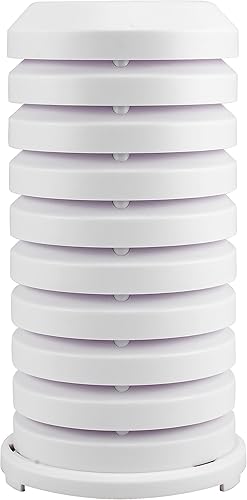
La Crosse Technology 925-1418 Sensor Protection Shield: Best for exposed La Crosse sensors
- Tiered plates for ventilation
- Wall mount or flat surface placement
- Turn-lock base
- For many listed La Crosse sensor families
This is a protective accessory rather than a replacement transmitter. It can help shelter a compatible outdoor sensor from rain and snow.
Pros
- Designed to cover compatible sensors
- Mounting hardware included
- Ventilated tiered-plate design
Cons
- Does not replace a failed sensor
- Compatibility varies by sensor model
The La Crosse 925-1418 is a protective cover with a ventilated tiered-plate design. It can mount on a wall or sit on a flat surface, and its turn-lock base secures the cover over a compatible sensor.
La Crosse names several sensor families, including TX141, TX141-A and TX141-B, along with other TX-series models. Check your transmitter's model number because the shield does not fit every sensor.
Choose it when your transmitter works and its model is supported. If readings are missing or the sensor itself has failed, investigate the transmitter and console connection first.
Which extra sensors work with Ambient, BALDR and Newentor stations?
Choose an extra transmitter only when its console family matches the station you own. The Ambient, BALDR and Newentor options here serve different systems and do not replace one another.
Ambient Weather WH31E Thermo-Hygrometer Sensor: Best for Ambient channel expansion
- Indoor or outdoor temperature and humidity
- Up to 8 channels
- 915 MHz
- 2 AA batteries
The WH31E works with specified Ambient Weather stations and supports channel selection through dip switches. Outdoor placement needs protection.
Pros
- Channel configuration
- Compatible station models are specified
- Indoor or outdoor use
Cons
- Not intended for stand-alone use
- Outdoor use calls for a protected location
The Ambient Weather WH31E is a separate temperature and humidity sensor for compatible Ambient stations. It supports up to eight channels through dip switches and uses 915 MHz wireless communication.
Compatible models include WS-1551-IP, WS-1938, WS-1965, WS-2000, WS-2902, WS-3000 variants, WS-5000 variants, ObserverIP, ObserverIP2.0 and WeatherHub. Its wireless range is up to 300 ft line of sight, with 100 ft in most conditions.
For outdoor use, Ambient recommends a protected place such as under an eave or inside a radiation shield. The sensor takes two AA batteries, which are not included.
This is a useful choice for a compatible Ambient console when you need another temperature and humidity channel. Choose an array instead if you need wind or rain readings.
BALDR Wireless Weather Station Remote Sensor: Best for non-WiFi BALDR
- For BALDR non-WiFi models
- Temperature and humidity
- Supports up to 3 channels
- 2 AA batteries
This remote sensor is aimed at compatible BALDR non-WiFi stations and can support readings from multiple locations. Confirm your station model first.
Pros
- Supports up to 3 channels
- Shelf or wall placement
- Battery powered
Cons
- Not for BALDR WiFi models
- Batteries are not included
The BALDR remote sensor is intended for compatible non-WiFi BALDR stations. It measures temperature and humidity, supports up to three channels and can sit on a shelf or hang on a wall.
It uses two AA batteries, sold separately. BALDR recommends sheltering the sensor for longer-lasting performance.
Choose it when your BALDR console is a compatible non-WiFi model and you want another location reading. It is not intended for BALDR WiFi models or stations from another brand.
Newentor Wireless Temperature and Humidity Remote Sensor: Best for Newentor consoles
- For Newentor Q3, Q5, Q6 and Q10 stations
- 3 channels
- Up to 200 ft in open air
- 2 AA batteries
This sensor fits a narrow set of Newentor station models and offers three channels. Check the model number of your console before choosing it.
Pros
- Compatible station ASINs are specified
- Three channels
- Sensor has its own display
Cons
- Compatibility is limited to specified Newentor models
- Batteries are not included
Newentor's remote sensor is designed for its Q3, Q5, Q6 and Q10 station families. See Newentor sensor compatibility before choosing a replacement.
Compatible station numbers include B0836CM7KY, B085R9KBN1 and B089JY7XBB.
The sensor displays temperature and humidity on its own screen and supports three channels. Its range is up to 200 ft in open air, and it uses two AA batteries, which are not included.
Choose it for a matching Newentor console when you want another room or location on a supported channel. It does not measure wind or rainfall.
When is a complete weather station a better buy?
A complete weather station is the better fit when the console and several sensors have failed, or when you want a new display and sensor set together. For another complete system, see the WeatherFlow Tempest review.
A replacement system may not pair with older sensors, so plan for the console to change too.
AcuRite Iris Weather Station with Rain Gauge: Best for full AcuRite systems
- Station with outdoor sensor and display
- Measures wind, rainfall, temperature and humidity
- Built-in barometer
- 01535M model
When a single replacement sensor is not the right fix, this complete AcuRite station includes an outdoor sensor and display. It is a different model, so it will not repair an unrelated console.
Pros
- Includes sensor and display
- Combines several weather measurements
- Customizable alerts
Cons
- Replaces a full setup rather than one sensor
- Not a universal replacement for other station brands
The AcuRite Iris 01535M includes a display and outdoor sensor array with a rain gauge, wind measurements, temperature, humidity and a built-in barometer. It is a complete setup, not a single transmitter for an existing console.
The display provides more than 25 data points, including rainfall history and wind direction. Custom alarms cover temperature, humidity, wind speed and rainfall, while a storm alarm activates when barometric pressure drops.
Choose it if you want these readings together and are ready to replace the display as well. It is not a single sensor for a different AcuRite console.
La Crosse Technology 328-1415 Wireless Professional Color: Best for full La Crosse systems
- Complete station with display and outdoor sensors
- TX145WSDR Cyclone sensor
- TX141TH-BV4 temperature and humidity sensor
- 433 MHz
This package includes a console and sensors, so consider it when you want a complete La Crosse system. It is not a standalone replacement sensor.
Pros
- Includes a display and outdoor sensors
- Tracks wind and rainfall as well as temperature and humidity
- TX141TH-BV4 sensor is identified
Cons
- A full station rather than a single sensor
- Not a universal fit for existing consoles
The La Crosse 328-1415 is a complete system with a color display, a TX145WSDR Cyclone sensor and a TX141TH-BV4 temperature and humidity sensor. It measures wind, rainfall, indoor and outdoor temperature, humidity and barometric pressure.
The station uses 433 MHz wireless communication, and the TX141TH-BV4 sensor takes two AA batteries. Choose this package if you want a new La Crosse console and its sensors together.
For more replacement-part options, see weather station replacement parts. The brand-specific guides for Chaney parts, LOGIA parts and a BALDR replacement sensor can help you narrow down other systems.
How do you set up a replacement weather station sensor?
Set up a replacement by matching its channel to the console, installing the required batteries and following the station's pairing steps. Keep the sensor close to the console during initial connection, then move it to its final location and confirm that readings continue to arrive.
Use the model-specific manual for pairing. Some transmitters have channel or dip switches, and the console may need to search for the sensor after you install batteries.
Avoid changing multiple settings at once, so you can identify whether the channel, battery or placement caused a connection issue.
Once the console receives data, mount the sensor as its manufacturer recommends. La Crosse advises shade and a north-facing wall for the TX141TH-BV4, while Ambient recommends a protected outdoor location for the WH31E.
Direct sun can heat a sensor and make its air-temperature reading less useful.
If the console still shows no reading, confirm battery orientation and charge, check that both devices use the same channel, and repeat the pairing steps. Then verify that the sensor is within range and that walls or metal objects are not blocking the signal.
What mistakes can make a replacement sensor seem incompatible?
The most common buying mistake is matching a sensor by brand or appearance instead of model number. Another is buying a temperature transmitter when the failed component is an array responsible for wind, rainfall or other readings.
Avoid these checks:
- Do not assume the same frequency guarantees a match. The console and sensor also need compatible communication and data formats.
- Do not overlook suffixes or revisions. Letters and version numbers can distinguish supported sensor families.
- Do not confuse a shield with a transmitter. A shield protects a sensor but cannot measure or transmit conditions.
- Do not ignore channel settings. A sensor on a different channel may not appear where you expect.
- Do not place a temperature sensor in direct sun. Follow its placement guidance and provide shade where recommended.
- Do not assume a complete station will reuse old parts. Check compatibility for every sensor and console you plan to keep.
Keep the sensor in its recommended location, check batteries when readings stop updating, and inspect its mounting after strong weather.
If readings look unusual, compare the sensor's placement and exposure before assuming it needs replacement.
Which replacement sensor should you choose?
Choose the AcuRite 06002M / 592TXR for a confirmed matching AcuRite label, the TX141TH-BV4 for a supported La Crosse station, or the WH31E for a compatible Ambient console that needs another temperature and humidity channel.
Pick the WS-2902-ARRAY when a compatible Ambient system needs its combined outdoor array. Choose the 925-1418 shield only when a supported transmitter works and needs shelter.
For BALDR or Newentor, match the exact console family before ordering, and consider a complete station when you want to replace the display and sensor setup together.
The best replacement sensor for weather station use is the one that restores the readings you need and is confirmed for your console. Check the model labels and compatibility guidance, then use how to check weather station accuracy to understand what to compare after setup.
Our top 3 picks at a glance
-
1
Best for AcuRite label matches
AcuRite Wireless Indoor Outdoor Temperature and Humidity
9.6/10 our score
See it on Amazon -
2
Best for La Crosse owners
La Crosse Technology TX141TH-BV4 Wireless Weather-resistant Temperature/Humidity Sensor
9.4/10 our score
See it on Amazon -
3
Best for Ambient channel expansion
Ambient Weather WH31E Thermo-Hygrometer Sensor
9.2/10 our score
See it on Amazon
Frequently asked questions
How do I find a compatible replacement sensor for a weather station?
Read the model number on the console and the sensor you are replacing, then compare both with the replacement's compatibility list. Also check the sensor type and wireless system.
A similar shape or matching brand name alone does not confirm that the parts will pair.
Can I use a different brand's weather station sensor?
Only if the console maker confirms that exact sensor and console combination. Wireless sensors can use different frequencies and data formats, so a sensor from another brand may not connect even if it measures the same conditions.
Match the model numbers before buying.
Should I replace one sensor or the whole outdoor array?
Replace one sensor when the failed part is a separate temperature or humidity transmitter and the console supports that model. Choose a complete array only when the station uses an integrated outdoor unit and the replacement is confirmed for your console.
Check which measurements your station combines before ordering.
Can a sensor shield replace an outdoor weather sensor?
No. A sensor shield covers and protects a compatible transmitter, but it does not measure weather or send readings to a console.
Use a shield when the sensor works and needs shelter.
Replace the sensor itself when it no longer sends data, after checking the station's troubleshooting steps.
Where should I mount an outdoor replacement sensor?
Follow the sensor maker's placement guidance and keep the transmitter shaded and protected from direct weather exposure where required. La Crosse recommends a north-facing wall or shaded location for its TX141TH-BV4, while Ambient says the WH31E needs protection outdoors.
Keep it away from direct sunlight that can skew temperature readings.