Ambient WS-2902D Replacement Console Guide
Before replacing an Ambient Weather WS-2902D console, confirm the replacement is compatible with your exact console model and outdoor array. A similar model name alone does not confirm that the display will receive your array’s sensor data.
On this page (5 sections)
Before replacing an Ambient Weather WS-2902D wireless console, confirm that the replacement supports your exact console model and outdoor array. A similar model name does not guarantee compatibility, so check both model numbers before buying a display.
Find the model number on your console, then compare it with the model information for your outdoor array. Ask Ambient Weather to confirm the combination if the replacement instructions do not name your exact setup.
A console displays readings received from outdoor sensors. If you’re new to this part of a station, see what a weather station console does.
How do you confirm WS-2902D console compatibility?
Match the replacement console to both your WS-2902D setup and its outdoor array. Check the full model names and any letters or suffixes, and get confirmation for the exact combination before ordering.
Write down the model number from the console and the model number for the array or sensor assembly. Check the manual or original packaging if a label is hard to find, and take a clear photo of each label to share with Ambient Weather support.
Then confirm these points:
- The replacement console supports your specific outdoor array.
- The model number matches the one you were told to buy, including any suffix.
- The setup instructions cover how to pair that console with your array.
- You know whether the replacement is a console only or includes other parts.
Ambient Weather sells stations and replacement parts with different model names. Do not use appearance alone to decide that one console will work with another station.
You can also compare the questions covered in our Ambient Weather WS-2000 and WS-5000 console guide, while keeping in mind that compatibility must be confirmed for your WS-2902D setup.
What should you check before replacing only the display?
Replace only the display when your outdoor array is still working and a compatible console is available. If the array is damaged or the new console requires a different sensor setup, ask Ambient Weather whether you need additional parts.
Before shopping, note which part has failed and what still works. A blank screen, missing readings and a sensor that no longer transmits can point to different issues, so describe the symptoms rather than assuming the console is the cause.
If the console powers on but does not show outdoor data, check the manual’s power and pairing steps. If it still fails, contact Ambient Weather with both model numbers and a short description of what you see.
For a broader parts checklist, read how to choose Ambient Weather WS-2902 replacement parts. If you’re comparing options across the brand, our guide to the best Ambient Weather station replacement parts can help you identify which component you need.
How do you install and pair a replacement console?
Follow the instructions for your exact replacement console and outdoor array. Install batteries or connect power as directed, then use the documented pairing sequence for those models.
Keep the old console until the replacement is receiving readings. Before removing it, record any settings you want to restore and note whether it has been displaying outdoor data reliably.
Do not assume the new console will copy settings or connect automatically.
During setup, check the basics in order:
- Confirm that the console model and array are compatible.
- Use the power source and battery types named in the replacement instructions.
- Follow the pairing sequence and timing in the manual.
- Place the console as directed and allow the connection process to finish.
- Check that outdoor readings appear before adjusting or moving equipment.
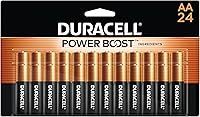
If you need spare batteries, choose the type your console or array instructions call for. Duracell Coppertop AA Batteries are single-use AA alkaline batteries, while Amazon Basics AAA Long-Lasting Alkaline Batteries are single-use AAA alkaline batteries.
Don’t substitute one size for another.
When should you replace the outdoor array too?
Replace the array only when it is faulty, damaged or incompatible with the console you’re buying. A replacement display cannot restore readings from an array that no longer sends them.
First check that the array has the correct power, is installed as directed and is paired with the console. If the console and array are confirmed compatible but readings remain absent, ask Ambient Weather for troubleshooting steps for those exact models.
If you do need to remount compatible outdoor equipment, the Ambient Weather EZ2-35W2MC Weather Station Pole Mounting includes six mast sections that assemble to a height of up to 66 inches, plus clamps and lag screws for mounting to a vertical surface. The anemometer pictured is not included.
Choose the mounting location by following your station’s instructions. Check clearance from nearby obstructions and keep the array away from surfaces or objects that could affect its readings, as directed by the manufacturer.
What if the WS-2902D replacement console still will not connect?
Recheck the model match and setup sequence before buying another part. A connection problem can come from an incompatible console, an incomplete pairing process or a power issue.
Write down the exact console and array model numbers, the steps you followed and which readings appear. Contact Ambient Weather with those details if the console still cannot receive data after you’ve followed the instructions.
Use this decision rule: keep the array if it works and the new console is confirmed compatible; replace the array only when it is faulty or required for the new setup. For another brand’s display questions, compare our Davis Vantage Vue console guide and Davis Vantage Pro2 console guide.
If you’re comparing indoor options instead, see best Newentor weather stations and best indoor weather stations for home.
Frequently asked questions
Will any Ambient Weather console work with a WS-2902D array?
No. A console needs to support the exact outdoor array and sensor setup you own.
Check the console model number and confirm compatibility with Ambient Weather before ordering.
A similar name or appearance does not prove that the console can receive your array’s readings.
How do I find my WS-2902D console model?
Look for the model number printed on the back or underside of the console, and check the original packaging or manual if you still have them. Keep the exact spelling, including letters and suffixes, when asking Ambient Weather about a replacement.
Do I need to replace the outdoor array too?
Not necessarily. If the array still works, first confirm that a replacement console supports it.
Replace the array only if it is damaged, unreliable, or Ambient Weather confirms that your chosen replacement requires a different sensor setup.
What should I check if a replacement console will not receive readings?
Confirm the console and array are compatible, then follow the pairing and startup sequence in the instructions for those exact models. Check power, battery placement and distance or obstructions as directed by the manual.
Contact Ambient Weather if the console still cannot receive readings.