WeatherFlow Tempest Weather Station Review: Worth It? (November 2026)
The WeatherFlow Tempest suits households that want app based local weather monitoring without a dedicated display. Its outdoor sensor tracks a broad range of conditions and sends wireless updates, while Ambient Weather alternatives include color consoles.
On this page (9 sections)
- What does the WeatherFlow Tempest include?
- How useful is Tempest for household monitoring?
- Does Tempest need a display?
- How does Tempest compare with Ambient Weather?
- Who should consider the Tempest?
- What should you check before installation?
- How should you think about accuracy?
- What if readings stop or a sensor fails?
- Which station should you choose?
The WeatherFlow Tempest is a connected personal weather station for households that want local readings without a separate console. Its solar powered outdoor sensor tracks wind, rain, temperature, humidity, pressure, UV and lightning, then sends wireless updates for app based monitoring.
For how to interpret pressure readings, see station pressure vs barometric pressure.
That setup works well if your phone is where you already check weather. If you want a screen on a counter or desk, an Ambient Weather station with a bundled display may be a better fit.
What does the WeatherFlow Tempest include?
The Tempest combines many outdoor weather measurements in one solar powered sensor. It has no dedicated display, so you'll view the information through a connected device.
WeatherFlow Tempest Weather Station with Built-in Wind: Best for app based monitoring

- Solar powered outdoor sensor
- Wireless updates every 3 seconds
- Temperature, humidity, pressure, wind, rain, UV and lightning data
- Alexa and smart home integrations
A connected weather station for households that want many outdoor readings in one solar powered unit and are comfortable viewing them through an app.
Pros
- Tracks wind, rainfall, lightning, UV and other conditions
- Updates every 3 seconds
- No moving parts
- Works with Alexa, Rachio and IFTTT
Cons
- No dedicated display
- Smartphone or another connected device is needed to view readings
WeatherFlow says the outdoor sensor sends updates every 3 seconds and transmits wirelessly up to 1,000+ feet. Signal performance can vary with placement and obstructions, so plan the sensor location with the receiving connection in mind.
The sensor uses non-mechanical technology and has no moving parts. WeatherFlow describes it as engineered for years of near-zero maintenance.
How useful is Tempest for household monitoring?
Tempest is useful when you want backyard conditions and connected reporting in one system. Its readings cover more than basic temperature and rainfall, including wind direction, dew point, UV, solar radiation and lightning strikes.
That range can help you decide whether to water, bring outdoor items inside or adjust plans around local wind and rain. Since the sensor measures conditions at your property, readings can differ from a weather app that reports a nearby airport or regional forecast.
The station also connects with Amazon Alexa, Rachio, IFTTT and popular smart home platforms. Weather based routines may help coordinate irrigation or other home actions, but confirm the integration supports the trigger or device you plan to use.
A home station reports what is happening near its sensor and may provide forecast features. It does not guarantee what the weather will do next, so use official alerts for severe conditions and see whether a home weather station can predict weather for the limits of local forecasting.
Does Tempest need a display?
No, Tempest does not include a dedicated display. Choose it if app based access suits your household, or compare console based stations if you want a screen indoors.
A phone can make remote checks convenient, especially when you're away from home. A dedicated console may be easier for quick checks by family members who don't want to open an app.
If you'd like to add a screen to a Tempest setup, first decide which readings you want visible and how you expect the display to connect. This guide explains how to choose a display for a Tempest weather station.
A console is the indoor screen or hub used by some weather station systems. Learn what a weather station console does before choosing a setup with one.
How does Tempest compare with Ambient Weather?
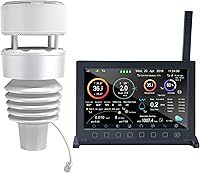
Tempest emphasizes one sensor and connected reporting, while the Ambient Weather WS-2902 and WS-2000 pair an outdoor sensor array with an indoor color display. The right choice depends on whether you value app access or a screen included with the station.
| Station | Display | Monitoring approach | A useful fit |
|---|---|---|---|
| Ambient Weather WS-2902 | LCD color display | Console and Wi-Fi remote monitoring | A screen included with remote access |
| Ambient Weather WS-2000 | High-definition TFT color display | Console with Wi-Fi publishing option | A full color console and adjustable units |
| WeatherFlow Tempest | No dedicated display | App based and connected reporting | One outdoor sensor and a broad set of readings |
The WS-2902 measures wind, temperature, humidity, rainfall, UV and solar radiation, with Wi-Fi remote monitoring and alerts. The WS-2000 measures similar outdoor conditions and supports imperial or metric units and calibration.
For a closer feature by feature decision, read Tempest weather station vs Ambient Weather. The two Ambient models are alternatives when a physical console matters to you.
Who should consider the Tempest?
Tempest fits a household that wants many local readings and expects to use an app. It can also suit smart home users who want weather data available to supported integrations.
Consider another setup if your main requirement is a dedicated display that works as a central household screen. The Ambient WS-2902 comes with an LCD color display, while the WS-2000 includes a high-definition TFT color console.
The Tempest's no moving parts design may appeal if you prefer a sensor without mechanical components. Choose a suitable outdoor location and consider the wireless communication path.
What should you check before installation?
Choose an open outdoor location with practical access and a reliable wireless path. Nearby buildings, trees and surfaces can affect how representative a sensor's readings are.
Wind readings can be affected by roofs, walls and trees, while a shaded or sheltered spot may not reflect the conditions you want to monitor. Consider what the data is meant to represent before fixing the sensor in place.
The station is solar powered, so choose a location with access to daylight. Keep it accessible enough for periodic inspection.
Follow a Tempest weather station installation guide for placement and mounting considerations. Good positioning supports more useful observations, but it cannot make a backyard sensor represent every part of a large property.
How should you think about accuracy?
Tempest can provide useful measurements near its sensor, but no backyard station captures every weather condition across a neighborhood. Nearby structures, trees, exposure and installation height shape what the sensors observe.
Compare its readings with a trusted local reference over time if you need to understand patterns. A single difference from a phone forecast does not by itself show which source is wrong, since forecasts may cover a broader area.
For a more detailed look at measurement limits and placement effects, see how accurate a Tempest weather station is. Use official weather alerts for warnings that affect safety.
What if readings stop or a sensor fails?
Start with power, wireless connection and sensor conditions if updates disappear or look unusual. Check that the sensor is in its intended position, has an unobstructed view of the sky where appropriate, and can communicate with the system.
Weather can affect solar charging or wireless reception, and physical buildup may interfere with sensors. Review the app for connection status and follow WeatherFlow's current support steps before resetting or replacing equipment.
Use the Tempest weather station troubleshooting guide for general connection and reporting issues. If one measurement appears missing or stuck, follow the more focused guide to Tempest weather station sensor failure.
If the station cannot be restored, check the steps for Tempest weather station replacement. Confirm compatibility and account or setup requirements before moving to a replacement unit.
Which station should you choose?
Choose the WeatherFlow Tempest if app based reporting, a wide range of readings and a single solar powered sensor match your routine. Pick the Ambient WS-2902 for a bundled color display and remote monitoring, or the WS-2000 if its high definition console and unit options suit your household better.
Frequently asked questions
Does the WeatherFlow Tempest include a display?
No, the Tempest has no dedicated display. It sends readings wirelessly for app based monitoring, so plan to check conditions on a connected device.
If you want a screen in the box, compare it with a station such as the Ambient Weather WS-2902 or WS-2000.
What does the Tempest weather station measure?
Tempest monitors temperature, humidity, barometric pressure, wind speed and direction, dew point, solar radiation, UV index, lightning strikes and rainfall. These readings describe conditions around the sensor and don't replace official alerts.
Is the Tempest weather station difficult to maintain?
WeatherFlow describes Tempest as a solar powered sensor with no moving parts and near-zero maintenance. Choose a suitable mounting spot and check the sensor periodically for dirt, damage or blocked exposure.
Can Tempest connect to smart home devices?
Tempest integrates with Amazon Alexa, Rachio, IFTTT and popular smart home platforms. Weather data can be used for automations, but check that the specific service and routine you want are supported.