Davis Vantage Pro2 Console Compatibility Guide
A Davis Vantage Pro2 console must match your station’s sensor system and connection needs. Check the exact console model, wired or wireless setup, display features and WeatherLink options before replacing or adding one.
On this page (8 sections)
- How do you check Davis Vantage Pro2 console compatibility?
- Which Davis Vantage Pro2 console should you choose?
- Does a WeatherLink console include online access?
- How should you set up and place the console?
- How do you care for the full station setup?
- What mistakes can lead to the wrong console?
- How do you replace a Vantage Pro2 console without losing the setup?
- How do you decide whether to buy a Vantage Pro2 console?
A Davis Vantage Pro2 console should be chosen to match your station’s sensor system, wired or wireless setup, and connection needs. Before you buy a replacement, identify the console and sensor models and decide whether local readings or online access matter most.
A console is the indoor unit that receives or displays weather readings. It does not replace the outdoor sensors that collect the data, and it should not be judged on its own as if it were a complete station.
The best starting point is a short check of what you already own. Look for the model labels on the console and the sensor suite, and note whether the system was installed as a wired or wireless configuration.
That record will save time if you later compare options or need help from a supplier. It also prevents a common mistake, which is choosing a unit that looks right but belongs to a different station family or setup type.
Think about how you will use the station each day. Some owners mainly glance at the indoor display in the morning, while others want readings available online for checking from elsewhere.
If you need a quick explanation of its role, see what a weather station console does.
The sections that follow break down compatibility, WeatherLink, placement, replacement, and the final buy decision. Each check builds on the model details you gather at the start.
How do you check Davis Vantage Pro2 console compatibility?
Check the exact console and station models together before buying. The Vantage Pro2 name alone doesn't confirm that a console will work with your sensor suite or accessories.
Start with the label on the console and the station documentation. Write down the model, whether the configuration is wired or wireless, and any WeatherLink component already in use.
Then verify these points against Davis compatibility information for your equipment:
- The console supports your Vantage Pro2 station and its wired or wireless configuration.
- It can receive the sensors in your current setup.
- Any expansion sensors or accessories you plan to keep are supported.
- The WeatherLink connection you want works with that console generation.
- Power and placement requirements fit your intended indoor location.
Consoles that look similar may belong to different Davis station families. Compare model numbers rather than choosing by appearance or the Vantage name alone.
If you're comparing the other Davis station family, read our Davis Vantage Vue console compatibility guide. Vue and Pro2 compatibility should be considered separately.
Which Davis Vantage Pro2 console should you choose?
Choose a console by matching your station first, then by deciding which readings and connections you need. The right fit is the compatible console that shows the information you check and supports your planned setup.
For a replacement, begin with the model already in your system. Confirm the wired or wireless type and look for any sensor or WeatherLink accessories that need to remain in service.
This narrows the choice before you compare screen layout or controls.
For a new setup, make a list of the measurements you expect to see and the sensors that provide them. Check the console documentation to confirm it supports those readings.
Don't infer support for a measurement just because another part of the station can collect it.
A console is a sensible choice when you want a dedicated indoor display and your equipment matches its supported system. It's a poor fit if you expect the console alone to add sensors, provide a network connection, or resolve a fault elsewhere in the setup.
Who is a Vantage Pro2 console a good fit for?
A Vantage Pro2 console suits someone who already has a compatible Pro2 sensor system and wants a local place to view readings. It can also suit an owner replacing a console when the exact model and connection type are known.
It may not suit someone who hasn't identified the station model, expects a Vue console to be interchangeable, or wants online access without checking WeatherLink separately. If the goal is only to fix missing sensor data, diagnose the sensor and connection path before buying a console.
What should you compare in a Davis Vantage Pro2 console?
Compare station compatibility, display needs and connection support in that order. A feature only helps when your station can provide its data and the console can show it.
Use this checklist:
- Your station's exact model and wired or wireless type.
- The readings and sensor data you want to see.
- Any WeatherLink connection you plan to use.
- The console's placement, power and viewing angle.
- Whether you're replacing a failed unit or building a new setup.
If you're setting up a console for the first time, follow the Davis WeatherLink console setup guide. For a broader comparison of station configurations, see best Davis Vantage Pro2 weather stations.
Does a WeatherLink console include online access?
A console and a WeatherLink connection are different parts of the setup. Identify the hardware you already have before buying a connection accessory or replacing the console.
A console can show readings locally even when no network connection is present. WeatherLink is the separate path that can carry data beyond the display, so the two should be checked as separate components.
Write down the model of each component: the console, sensor suite and WeatherLink device or service. Compare those details with Davis instructions for the connection method you want.
This simple inventory also clarifies what is actually at fault when something stops working. If the screen is blank, power and the console itself move to the front of the list.
If readings appear on the console but not online, the fault is more likely to sit in the WeatherLink device, its connection, or the network path after the console. Replacing a working display would not fix that later step.
Your home network can also play a part in the online side of the system. Check that the connection method you plan to use is supported in your location and that you can place the equipment where it can connect reliably.
Do not assume that every console generation supports the same WeatherLink method. The safe approach is to confirm support for your exact console model before you buy any accessory.
Our guide to choosing a Davis WeatherLink connection for Vantage Pro2 explains how to think through that choice. If the display itself behaves unexpectedly, use the Davis WeatherLink console reset guide after identifying your model and reviewing its reset instructions.
Keeping the console and the connection separate makes the whole setup easier to test. You can confirm local readings first, then work along the chain toward online access one step at a time.
How should you set up and place the console?
Set up the console indoors where you can read the screen, reach the controls and provide the required power. Keep the console's location separate from the location chosen for outdoor sensors.
The console needs to be practical in daily use, not just close to the sensor suite. A shelf, desk, or wall position where you naturally pass by often works better than a spot chosen only for cable length.
Before powering it on, confirm the model and follow its instructions for wiring or pairing. Keep a record of sensor settings and WeatherLink components so you can restore the system if you need to move or replace equipment later.
That record should include the wired or wireless type and any accessories currently in use. It will also help if you move house, rearrange a room, or pass the station to someone else.
Choose a viewing spot with enough room to operate the controls. Avoid placing the display where glare makes readings hard to see or where cables could be pulled loose.
Glare varies through the day, so a position that looks fine in the morning may be hard to read later. Try the spot at different times if you can before you fix cables or mount anything in place.
Check the manual for power needs instead of guessing from another Davis model. The correct supply and connection method matter more than a close visual match with a different unit.
If your console uses replaceable batteries, match the size and polarity printed in its compartment or manual. AA and AAA cells are different sizes and cannot substitute for each other.
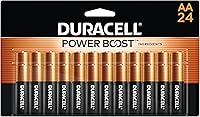
For AA powered equipment, the Duracell Coppertop AA Batteries pack offers 24 alkaline cells with a stated 12 year storage guarantee, which suits a household that keeps spares for remotes, detectors, toys, and consoles. They are single use cells, so they are stored until needed rather than recharged.
For AAA powered equipment, the Amazon Basics AAA Long-Lasting Alkaline Batteries pack offers 36 alkaline cells at 1.5 volts with a stated 10 year shelf life, which suits smaller devices that use AAA cells. Using the right size matters, because a cell that fits loosely or not at all will not give the device the contact it needs.
Keep spare cells in their original or a closed pack, in a dry place, and check the printed expiry or storage date before use. Replace a whole set in a multi cell device when the manual advises it, rather than mixing old and new cells.
How do you care for the full station setup?
Keep the indoor console accessible and check the whole connection path when readings disappear. A clean display location and a clear record of model numbers make routine troubleshooting and future replacements easier.
For a console that stops responding, check its power source and connections before changing settings. If it still displays readings but no online data appears, focus on WeatherLink and network connections.
If readings from one sensor are missing, investigate that sensor and its pairing rather than assuming the console has failed.
Outdoor mounting is a separate task from console placement. Choose a mount suited to the sensor and installation surface, and follow the sensor maker's placement instructions.
Wind and temperature sensors need appropriate exposure, so avoid treating a nearby wall or roof as a neutral location.
For a vertical surface, the Ambient Weather EZ2-35W2MC kit includes six mast sections that assemble to 66 inches, two clamps and four lag screws. The anemometer shown with the kit is not included, so this mount only makes sense when its mounting approach suits your sensor and site.
What mistakes can lead to the wrong console?
The most common buying mistake is choosing by the Vantage Pro2 name alone. Confirm the exact model, sensor family and wired or wireless configuration before deciding that a console will fit.
A second mistake is treating WeatherLink as part of the console. Decide whether you need online access, identify the connection hardware or service involved, and verify that it works with your console model.
It's also easy to replace a display when the actual fault is power, a cable, a sensor or a network connection. Note what still works before buying parts.
If the console shows readings locally, that is a useful clue that the problem may be farther along the connection path.
Finally, don't assume that an indoor console and outdoor sensors share placement needs. The console should be readable and accessible, while outdoor sensors need a location suited to the measurements they collect.
For symptoms that continue after checking power and connections, use the Vantage Pro2 troubleshooting guide. If you're replacing batteries as part of diagnosis, see the Vantage Pro2 battery replacement guide.
How do you replace a Vantage Pro2 console without losing the setup?
Record your existing configuration before disconnecting anything. The model number, wired or wireless type and accessory list help you choose a compatible replacement and reconnect the station.
Write down the console model and any WeatherLink components. A photo of the cable connections and settings can also help you restore the same arrangement.
Take the photo before you unplug anything, and make sure labels, cable ends, and socket positions are visible. A second photo of the screen settings may help if the console stores options you will need to reenter.
Before removing the old console, check its manual for shutdown or replacement steps. Follow the installation instructions for wiring or pairing sensors, then confirm that expected readings appear.
Do not rush the first power on. Give the new console time to find the sensor suite, and check each reading against what you would expect for the time of day and the weather outside.
If the new console doesn't receive readings, review its connection to the sensor suite and verify that you selected the right wired or wireless configuration. A mismatch here is more likely than a failed sensor when everything worked before the swap.
If local readings work but online data does not, revisit WeatherLink rather than replacing more station hardware. Note what works and what does not, because that split points to the later part of the chain.
Keep the old console until you have confirmed the replacement for a few days. That pause lets you compare settings, check the display in normal light, and return to the old unit if a compatibility detail was missed.
Care for the new console by keeping the display clean and the area around it dry and uncluttered. Store the model record, manuals, and any spare batteries together so the next change is simpler.
How do you decide whether to buy a Vantage Pro2 console?
Buy a Davis Vantage Pro2 console when you have confirmed it matches your station and gives you the display and connection options you need. If you can't identify the station or console model, pause to check those labels and manuals first.
Use this decision rule:
- Keep your current sensor suite: match the console to its exact model and connection type.
- Want online access: confirm WeatherLink support as a separate step.
- Replacing a console: record the old model and accessories, then verify the replacement against them.
- Unsure what failed: check power, sensors and connections before buying parts.
- Need only a local display: prioritize compatibility and screen usability over online features you won't use.
If the model and setup match, a Vantage Pro2 console can serve as the indoor display for your station. It will suit an owner who wants a clear local view and already knows the sensor system will feed it.
If the model does not match, or the fault lies in a sensor, cable, or WeatherLink path, buying a console will not solve the problem. In that case, the money and time are better spent on the part that has actually failed.
For a different Davis family, compare the Vantage Vue console guide before deciding.
Frequently asked questions
Can a Vantage Pro2 console work with a Vantage Vue station?
Don't assume a Vantage Pro2 console and a Vantage Vue station are interchangeable. Confirm the exact console and sensor models in Davis compatibility information before buying or pairing them.
Vue and Pro2 are separate station families, so check both model names and whether the setup is wired or wireless.
Does a Vantage Pro2 console need WeatherLink?
No. WeatherLink is a separate connection option, not the console itself.
You can use the console to view station readings, then choose a compatible WeatherLink method if you also want online access.
Check your console model and the connection options it supports before adding an accessory.
What should I check before replacing a Vantage Pro2 console?
Write down the console model and confirm whether your station is wired or wireless. Then check sensor compatibility, power needs and any WeatherLink accessories you plan to keep.
If the console is failing, inspect power and connections first.
Replacing the display won't fix a sensor or cable issue.
Can I mount a Vantage Pro2 console outdoors?
Treat the console as an indoor display unless Davis instructions for your exact model say otherwise. Put it where you can read and operate it, with power and any needed network connection available.
Outdoor sensor placement is a separate decision.
Console compatibility doesn't determine where sensors should go.