How to Set Up and Program a Midland Weather Radio
To program a Midland NOAA weather radio, connect its power, select your local NOAA channel, and set S.A.M.E. alerts for your county. Button sequences differ by model, so keep the exact model's manual beside you.
On this page (6 sections)
To program a Midland NOAA weather radio, connect its power, select a local NOAA Weather Radio channel, and set S.A.M.E. alerts for your county. The exact buttons vary by model, so follow the manual for your radio rather than assuming every Midland uses the same menu.
Start with the model name on the radio or its packaging. Then find that model's instructions before changing settings, especially if you want alerts for more than one county.
What should you do before programming a Midland weather radio?
Identify the model and locate the NOAA station for your area before setting alerts. A radio can only alert you reliably if it receives a usable broadcast and is configured for the places you care about.
Place it near a window or another spot where reception is clear, then connect the included power adapter if your model uses one. Extend the antenna and keep the radio away from objects that block or interfere with the signal.
For a broader explanation of radio types and features, see our NOAA weather band radio guide. It can help you understand the difference between a weather receiver and an alert radio with county targeting.
How do you find your local NOAA channel?
Use NOAA's station information to identify the broadcast serving your location. The channel number and reception can vary by area, so don't rely on a station someone in another county uses.
NOAA Weather Radio broadcasts on seven VHF frequencies. Once you find your local station, tune the radio as its manual directs and listen for a clear, continuous broadcast.
If you're new to the setup process, our guide to how to program a NOAA weather radio explains the general steps across radio brands. Midland menus may differ, so use that guide for the sequence and your Midland manual for the button presses.
How do you set a county with S.A.M.E.?
S.A.M.E. stands for Specific Area Message Encoding, and it lets compatible radios target alerts to selected counties. Choose the county you want covered, then enter its code using the instructions for your exact Midland model.
On some Midland radios, you can choose an automatic or default county selection; others let you enter one or more counties manually. The WR120 supports alerts for up to 25 counties when set to Custom mode.
Use NOAA's county code information or your model's manual to confirm the code before entering it. Our guide to Midland weather radio programming codes covers what those codes mean and how to handle county selection.
The WR120 scans 7 weather-band channels and locks onto the strongest weather channel. It has a clock with an alarm and a trilingual display in English, Spanish, and French.
Should you program one county or several?
Select one county for a focused alert setup, or add counties where you regularly need warnings. Nearby counties can matter if you commute across county lines or want alerts for another household location.
More counties may bring alerts that don't apply to your immediate location. Keep the selection limited to places you have a reason to monitor, and review it when you move or change your routine.
For WR120-specific button instructions, read how to program a Midland WR120 weather radio. If you're comparing its versions, Midland WR120 vs WR120B explains the model difference.
How do you check reception and alert settings?
Listen for a clear NOAA broadcast and confirm the radio is set to receive alerts for the intended counties. A quiet radio does not automatically mean it's broken; there may be no active alert.
Keep the antenna extended and try a different location if the audio is weak or interrupted. Once reception is clear, check the radio's display or menu to verify the channel and county settings.
Don't trigger a real emergency alert as a test. Use only a test procedure or alert test authorized by the manufacturer or local emergency management, and follow the manual.
If the broadcast is missing or silent, read why NOAA Weather Radio may be off the air. You can also check local emergency management updates while service is unavailable.
How should you use a Midland weather radio day to day?
Leave the radio powered and tuned to the local weather broadcast so it can receive alerts when you need them. Check its settings after a move, a power interruption, or a change in the counties you want to monitor.
Keep the manual nearby and note the selected channel and county codes. If the radio has a clock or alarm feature, set those separately from the weather-alert options.
A weather radio alarm setting controls how the radio signals an alert, while a weather station alarm is a different feature. Our primer on what a weather station alarm setting is explains that distinction.
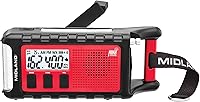
The ER310 has a built-in flashlight and supports USB connectivity. It includes 6 AA batteries.
The RunningSnail radio has a 2000mAh rechargeable battery and supports hand-crank, solar, and USB charging. Its features include phone charging and a 1W LED flashlight.
What if the radio is not receiving alerts?
Check power, antenna position, channel selection, alert settings, and the local broadcast before changing anything else. A reception problem and a county-code problem need different fixes.
Confirm that the radio is plugged in or has working batteries, then extend the antenna. Recheck the NOAA channel for your area and make sure the desired county is still selected.
If the radio receives the broadcast but doesn't sound for an alert, review its alert mode and S.A.M.E. settings. Use the model manual to restore or change settings, since reset steps can vary.
For a separate review of Midland's tabletop model, see Midland WR400 weather radio reviews. Compare the features you need with your current radio before replacing it.
Which setup is right for you?
Use a single county for a simple home setup, and add counties only for places you need to monitor. Choose a model-specific guide for the button sequence, then verify reception before relying on alerts.
A Midland WR120 suits a stationary setup with S.A.M.E. county selection. The ER310 or RunningSnail radio may suit readers who also want emergency-radio features such as a flashlight or alternate power options.
For the PRO version, see the Midland ER310PRO radio review.
Keep a second way to receive urgent local information during a broadcast outage. A NOAA radio can be part of an alert plan, but it shouldn't be your only source for emergency updates.
Frequently asked questions
How do I program a Midland NOAA weather radio?
Connect the radio to power, find the NOAA station for your area, and set the county or counties for S.A.M.E. alerts. The button sequence depends on the model, so use its manual for menu steps.
After setup, check reception and confirm that the alert settings match the places you want covered.
What does S.A.M.E. mean on a Midland weather radio?
S.A.M.E. means Specific Area Message Encoding. It lets a compatible radio target alerts to selected counties instead of sounding for every warning carried by a broadcast.
Set the county or counties that matter to you, and check the radio's manual for how to enter or change them.
Should I select one county or multiple counties?
Choose your home county if you want alerts focused on where you live. Add nearby counties if you travel, work across county lines, or want to monitor places where family members live.
More selected counties can mean more alerts, so include only areas you need to hear about.
Why is my Midland weather radio not receiving alerts?
Check that the radio has power, the antenna is extended, the selected NOAA channel has a usable signal, and the alert mode and county settings are correct. A quiet radio may simply have no active alert.
If broadcasts are unavailable, check for a service outage and use another trusted source for urgent updates.